Here’s a quick overview before we get into the details:
Google Search Console
When it comes to refreshing content, Google Search Console is really the only tool you need – as long as you have the time to then put in the work to make the updates needed.
The best part? Google Search Console is a completely free tool.
To use Google Search Console for content refreshing, the first step is to use the ‘pages’ view in the ‘search results’ report to regularly audit existing content on your website and identify individual pages where the SEO performance is starting to plateau or decline – when the impressions and clicks for a page are levelling off or reducing.
In the same view you’ll be able to analyse all of the queries that search users are using when they come across that piece of content – those with the most impressions are keywords that you should check that the content is optimised for to make the most of the traffic.
Using the ‘average position’ also enables you to identify content that is having some success for certain keywords, and could potentially reach page 1 for those keywords if further optimisations were made.
Where Google Search Console can’t help is with actually making the updates to your content.
It’s over to you for optimising for high potential keywords, refreshing any out-of-date information or statistics, and adding additional information to increase the quality of the content – or you could use one of the SEO tools reviewed later in this article which do support with content optimisation.
Animalz Revive
Content agency Animalz have released a content refresh tool named Revive – it’s free, so a great place to start, but it does have limited functionality.
You connect a Google Analytics account, and Revive analyses the data to find content that is declining in SEO performance, ranked by potential for increased performance. The results can then be exported to CSV to inform content plans.
So, if you simply want to identify which content to prioritise for refreshes, Animalz Revive might be perfect for you – and it’s completely free, so I’m highlighting it up front.
However, if you’re looking for a tool to support the actual content refreshing work, you’ll need one of the other tools outlined in this article, so keep reading!
MarketMuse
MarketMuse is an SEO tool which can be used for many purposes, including content refreshes.
Monitor content performance and highlight content that’s damaging performance and needs to be refreshed or improved
Determine how best to refresh each piece of content that has been flagged, including insights on which areas to expand, remove, or add in
Compare your content on a topic to that of competitors to identify key gaps in competitor content that you could fill to ensure your content is the best on the market.
Here’s the key differences in terms of using the tool for content refreshing:
Optimise: $99 per month. Includes site inventory (i.e. monitoring your site performance), with 100 tracked topics and 1 user included.
Research $249 per month. Includes site inventory with 500 tracked topics and 3 users included.
Strategy $499 per month. Includes site inventory with 10,000 tracked topics and 5 users included.
MarketMuse does have a free trial available, but it does not include the ability to add a site inventory, which means the free trial cannot be used for content optimisation purposes.
SEOwind’s content update feature enables users to:
Analyse SEO content to understand which content is ranking well and which is underperforming and, therefore, may be an opportunity for a content refresh
Automatically suggest improvements to underperforming content – including areas where content is out-of-date, trusted statistics and sources, new opportunities for internal links, and more.
Automatically suggest new content ideas based on SERP analysis, identifying content and keyword gaps that could improve topical authority.
SEOwind pricing
SEOwind offers a free trial which gives users 3 days of access to the platform for free, including the option to write or update 2 articles – so this is a great way to test out the content update functionality to see if it fits your content refresh needs.
Beyond this, SEOwind has three pricing tiers. The key differences for the content update functionality are:
Basic $49 per month. Write or update 96 articles for 1 domain.
Pro $119 per month. Write or update 240 articles across 2 domains.
Agency $299 per month. Write or update 1200 articles across 12 domains.
Clearscope is an SEO tool which, like many others, includes functionality for updating and optimising existing content – perfect for content refreshing.
Grade content: Understand how well optimised existing content is for SEO and keyword opportunities.
Monitor content decay: Track the performance of existing content and identify when performance is declining and so a content refresh is needed.
Identify content gap opportunities: Get recommendations for keywords in ‘striking distance’ i.e. easy content gap wins that could improve SEO performance quickly.
Receive weekly suggestions to improve poor-scoring content through fresh insights and better quality writing
Automatically optimise poor-scoring content using the tool’s suggestions
Identify content gaps to provide direction for future content that will boost SEO performance.
SurferSEO pricing
Like most of the other content refresh tools reviewed here, SurferSEO has three pricing tiers.
In terms of the content audit features, the key differences are:
Essential $99 per month. Track 200 articles per month, make automatic optimisations to 30 articles per month, generate 5 AI articles per month. 5 teammates allowed.
Scale $219 per month. Track 1,000 articles per month, make automatic optimisations to 100 articles per month, generate 20 AI articles per month. 10 teammates allowed. Access support from SurferSEO’s team.
Enterprise: available on request – custom pricing, custom features.
Whilst the tools listed in this article can support with identifying underperforming content and making AI suggestions for improvements, they can’t offer in-depth content refreshing support to drastically improve the quality of content – additional research, subject matter expert input, data analysis, and so on.
It’s likely a better use of budget to work with a trusted content refresh expert, someone who has real-world experience of SEO refreshes to boost performance.
If you’re someone who has tried and failed to get new habits to stick, then Atomic Habits by James Clear is the book for you.
It’s contains a simple framework for how to actually implement habits and reach goals, with lots of insightful tips and tricks along the way.
In this article we’ll take a closer look at that framework. Bear in mind this is just a summary – if something resonates I’d highly recommend diving into the whole book.
“Every action you take is a vote for the type of person you wish to become. No single instance will transform your beliefs, but as the votes build up, so does the evidence of your new identity.”
James Clear, Atomic Habits
The core message of Atomic Habits by James Clear
Often when it comes to planning our new habits, goals, or resolutions, we focus on big changes. We want to run a marathon, become fluent in French, journal every day — and then we wonder why we fail each time.
The reality is that we don’t change overnight, and that making new habits (and breaking old habits) takes time. It’s a long game and it takes patience.
In Atomic Habits, James Clear talks of the ‘compounding effect’ and the idea that getting 1% better every day leads to large changes over time, even if you don’t notice that change day-to-day.
“This is a gradual evolution. We do not change by snapping our fingers and deciding to be someone entirely new. We change bit by bit, day by day, habit by habit. We are continually undergoing microevolutions of the self. ”
James Clear, Atomic Habits
James also sets out his key idea that the best way to change habits is to focus on who you want to become, not what you want to achieve.
He suggests asking yourself the question ‘Who is the type of person that could get the outcome I want?’ So that might be shaped as, for instance, ‘Who is the type of person who could learn a new language?’ And then shape your habits and actions around this question, letting your identity drive your actions rather than the results or outcomes.
“I have a friend who lost over 100 pounds by asking herself ‘What would a healthy person do?’ All day long she would use this question as a guide. Would a healthy person walk or take a cab? Would a healthy person order a burrito or a salad?”
James Clear, Atomic Habits
The final chapter of this first part starts to outline the process of building habits, which the rest of the book will then delve into. He defines a habit as ‘a behaviour which is done so many times it becomes automatic’.
The four steps to ensure that you keep repeating the behaviour to make the habit stick, are:
Make it obvious
Make it attractive
Make it easy
Make it satisfying
Step 1: Make it obvious
The first step in making a new habit, according to James Clear, is to observe your existing habit.
Write down your current daily routine, listing our all the actions that you repeat on the regular, including the time and location they take place in. Then label each of these habits as good, bad, or neutral. This will help to identify habits you want to break, as well as gaps in your routine where new habits could slot in.
These existing habits also serve to prove the point that if you repeat something enough times, your brain picks up on it and predicts the outcome without any conscious thought i.e. the action becomes automatic. For most of us it just doesn’t feel right to get into bed without brushing our teeth, for instance.
Creating a ‘cue’ for a new habit makes it easier for your brain to build these unconscious actions, and time and location are the two most common cues.
So, when you’re planning a new habit you should either fix a time and location to it:
‘I will [new behaviour] at [time] in [location]’.
Or you should try habit stacking, pairing a new habit with an existing habit which is already automatic:
‘After [current habit] I will [new habit]’.
💡Habit stacking is the Atomic Habits takeaway that has stuck (pun intended) with me the most
Habit stacking is a technique I’ve found particularly helpful since reading James Clear’s Atomic Habits.
One of the easiest wins in content marketing is repurposing i.e. reusing elements of a piece of content by transforming it into a new format or by taking one aspect and turning that into a new story.
But it’s hard to find the time to repurpose existing content amidst the need to create new content.
I find that habit stacking helps – I started implementing the rule that everytime I publish a new piece of content, the next action I take is to repurpose that content, turning it into short-form LinkedIn posts, for instance.
Over time, that process has become habitual to me, and now content repurposing is an automatic habit that I don’t even have to think about.
This section also covers the importance of environment in making habits stick. It’s partly about making that new cue stand out, such as placing your bottle of vitamins on the kitchen counter each night so that you see them in the morning and are reminded to take them.
But it also comes back to location, and the idea that it’s harder to build a new habit in an environment you know well, because you’re surrounded by old cues. If you try to build a new writing habit sat at the desk in your bedroom, you might find yourself opening up the video game you usually play there. So try to build a new in a new environment — going to a local coffee shop to write, for instance.
And what about breaking habits?
Essentially, it’s the reverse: make it invisible. It’s easier to avoid temptation than to resist it, so you could try putting your video game controller away, out of sight, in a cupboard.
Step 2: Make it attractive
The more attractive something seems to us, the more likely we are to want to repeat that behaviour regularly.
So, if you can make a new habit seem attractive, you’re more likely to keep doing it.
Temptation bundling is one technique to make this easier, meaning that you associate your desired behaviour with something that you want to do:
‘After [habit I need] I will do [habit I want]’.
For instance, before you check Instagram, you have to do 10 minutes of Spanish practice.
Part of making it attractive is realising that as humans we are social beings, and we tend to imitate the actions of those around us which are seen as positive. This could be people close to us, family and friends, the wider crowd or society we identify with, or people with status and prestige.
So, you could join a community or group where your desired behaviour is common, to give yourself further incentive to do that action. We thrive on approval, praise, and respect, and we want to fit in with our tribe — so exploit these things to help you build your new habit. If you want to develop a creative writing habit, join a local writing group. If you want to become fitter, start with a gym class or running group.
Step 3: Make it easy
“How can we design a world where it’s easy to do what’s right? Redesign your life so the actions that matter the most are also the actions that are easiest to do.”
James Clear, Atomic Habits
We humans are simple creatures, and we tend to follow the ‘law of least effort’, taking the option which is easiest or requires the least work.
So, to make a behaviour stick, you want to make it as easy as possible to complete. You can do this by reducing the friction with behaviours you want to adopt.
If you want to increase your fitness levels, lay out your workout clothes the night before you plan to go to the gym.
The reverse is true with behaviours you don’t want to keep: increase the friction and make them difficult. Hide the chocolate at the back of your kitchen cupboard if you don’t want to eat it, for instance.
In this section James Clear also sets out the two minute rule: when you start a new habit it should take less than 2 minutes to complete.
Planning habits is easy, but ultimately you need to take action to build habits. So start breaking down your goals and habits into small steps you could take towards the habit, starting with the two minute starting action. If you want to run a marathon, start running for 2 minutes each day. Then, repeat that single 2 minute action for long enough to become automatic. Once it feels automatic, like part of your day-to-day routine, add to it to build up the habit. That might be increasing the amount of time you do the behaviour for, or the frequency you do it.
You can also make it easier by automating your future behaviour to fit in with the type of person you want to be. If you want to travel more but don’t have the money, set up a direct debit every month after your pay comes in, transferring a small amount into a savings pot. If you want to build a yoga habit, pay for a month’s worth of weekly evening classes upfront and put them in your diary.
Step 4: Make it satisfying
The previous sections have been about ensuring that a behaviour happens in the first instance (make it obvious, attractive, easy).
Making it satisfying is about making sure that we repeat that behaviour again the next time and the time after that — making it a habit rather than a one-off.
If a behaviour feels satisfying, we’re more likely to repeat that action. Our brains have evolved to prioritise immediate reward over delayed reward. So, for instance, we are more likely to prioritise the quick reward of the pleasurable taste gained from eating a chocolate bar, rather than the long-term reward of feeling healthier if we stop eating chocolate bars so often.
So, you want to feel some kind of immediate success when you complete your desired behaviour, even if it’s in a really small way, to increase the likelihood of you doing it again.
The feeling of making progress is something that tends to motivate most of us. It’s simple to put this into place by starting to track your habit. There are apps to do this for most common habits, such as tracking how much water you’re drinking in a day. Or, you could go traditional and just start marking an ‘x’ on your calendar each time the action is completed.
You can reverse this idea by making it unsatisfying if you don’t complete an action — having the blank day in your calendar without an x marked. Getting an accountability partner is one way to do this, as you know someone else is keeping an eye on your habit, who will frown upon you if you don’t complete your new habit.
The cardinal rule of building a habit successfully is never miss twice.
It’s okay to miss your habit once, but if you do make it your first priority to ensure you don’t miss it a second time.
Extra tips from James Clear on how to build habits successfully
The role of genetics in habit building
Genes have an influence on our habits.
If you want to be truly successful at something, then you should pick a habit which fits with your natural abilities, and avoid those which don’t. If you do this, genes have the power to accelerate your process and give you an advantage. But, don’t rely on genes entirely.
“Genes do not eliminate the need for hard work. They clarify it. They tell us what to work on.”
James Clear, Atomic Habits
Even if you have a natural propensity for something, you still need to work at it to become the best at it.
Habits + deliberate practice = mastery.
Get out of your comfort zone to make habits stick
You should also push yourself to the edge of your comfort zone. Humans experience peak motivation on tasks that are right at the edge of our current abilities. As our habits become routine and automatic they also become less challenging, and therefore often less satisfying (as we know, something that’s key to keeping a habit going).
This means that we should be continually reflecting and reviewing our habits and routines, building on habits and adding new desired behaviours into the mix to keep growing and improving our selves.
Don’t give into the temptation of being a fair weather cyclist.
Know your goals and priorities, and then prioritise them above all else, sticking to your routine and habit regardless of what life throws in the way.
This summary of Atomic Habits by James Clear was first published via Medium.
Climate tech is a sector working to address the biggest challenge that humanity has ever faced – you’re dealing with an emotionally charged topic area that can raise very strong opinions in potential customers, and needs to be handled correctly.
It’s also a complex sector, full of technical and scientific innovation that requires in-depth research and curiosity to portray accurately.
So, if you’re looking to build a content engine that will demonstrate brand expertise and resonate with potential prospects, it makes sense to collaborate with a content writer who has existing climate tech experience.
17 top climate tech content writers
Luckily for you, there are lots of brilliant climate tech content writers today who have chosen to use their writing skills and expertise to help companies working on climate solutions to build their brand.
And this article will introduce you to 17 top climate tech content writers:
I’ve worked in the climate change space for a long time.
Earlier in my career I worked in-house as the Marketing Manager for Oxfordshire-based social enterprise the Low Carbon Hub. Even though it was a generalist marketing role, it involved a lot of content marketing – especially as I led on the go-to-market for two retrofit spin-offs: Cosy Homes Oxfordshire and Energy Solutions Oxfordshire.
In 2021 I moved to Manchester in the midst of the pandemic. I needed a remote-first role, and that was my entry point to climate tech.
I became the first content marketing hire for carbon accounting and carbon markets startup Lune, where I developed the strategy to build an effective content engine from the ground up – producing lots of educational content on the right way to do carbon offsetting (like understanding additionality, for instance), deep dives on carbon projects (like this direct air capture guide), and sales enablement content to support commercial goals (like this carbon project evaluation methodology).
More recently, I worked with climate property data startup Kamma to elevate their brand awareness and expertise with an audience of mortgage lenders.
This was achieved through the creation and distribution of the State of the Climate Transition for Mortgage Lenders 2024 – an original research report featuring insights from Kamma’s data as well as expert viewpoints via an industry survey. Distribution included PR, partnership collaborations, repurposing into blog posts, building a surrounding topic cluster on the topic of climate transition planning, LinkedIn posts focused on data insights, and more.
Sounds like a fit? Get in touch or drop me a DM on LinkedIn and let’s chat how we could differentiate and elevate your climate tech brand in 2025.
2. Antonio Salituro
Antonio Salituro is a freelance content writer who focuses on copywriting for sustainable solutions. Antonio has a PhD in Environmental Science and has worked in several sustainability roles before becoming a copywriter: climate tech engineer, carbon footprint consultant, circular economy designer. He’s based in Ramsgate, UK.
Here’s a few examples of Antonio’s content writing for climate tech brands:
Rachel Baker is a freelancer content and copywriter based in Birmingham, UK who works exclusively with ethical businesses – including a bundle for climate tech startups. Rachel has a background in content management and SEO, and is also certified by Carbon Literacy.
Here’s a few examples of Rachel’s content writing for climate tech brands:
George Steeley is a freelance copywriter who specialises in writing brand and product messaging, as well as writing content for blogs, emails, social media, and more. George has experience working with climate tech companies, but also works across other industries. He is based in San Francisco, USA.
Here’s a few examples of George’s work for climate tech brands:
Nici West is a freelance content writer, copywriter, and editor based in London, UK. Nici identifies as ‘climate curious’ and so particularly wants to work with organisations focused on climate solutions.
Here’s a few examples of Nici’s content writing projects:
Molly Millar is a freelance copywriter who works with climate tech startups, nonprofits, consultancies, and editorial platforms on content writing, video content, and journalism.
Here’s a few examples of Molly’s content writing for climate tech brands:
Erica Eller is a freelance copywriter for sustainable B2B companies, with particular expertise in climate risk reporting and disclosures. Erica is based in Berlin.
Here’s a few examples of Erica’s content writing for climate tech brands:
Amelia Zimmerman is a freelance content strategist and writer based in Toronto, Canada. Amelia is also co-founder of The Climate Hub. She specifically works with climate tech companies, especially those in the carbon markets space.
Here’s a few examples of Amelia’s content writing for climate tech brands:
Meg Kendall is a freelance copywriter and strategist for climate tech companies, who specialises in market positioning and brand messaging. Meg is based in New York, USA and is also co-founder of The Climate Hub, alongside Amelia.
Here’s a few examples of Meg’s content writing for climate tech brands:
Camille Charleut is a purpose-driven freelance writer and content marketer based in France. Camille has 7+ years of experience in journalism and marketing, and now specialises in supporting climate tech brands on a freelance basis – especially those in the EV and battery space.
Here’s a few examples of Camille’s climate tech content writing:
Julia Yamamoto is a freelance communications strategist and content writer. Julia worked at IBM for 20 years before moving into freelance writing. She specifically focuses on technology, including climate tech, where she has particular expertise in carbon markets and wildlife conservation.
Here’s a few examples of Julia’s climate tech content writing:
Tricina Elliker is a freelancer writer based in Portland, USA. Tricina specialises in supporting companies in the climate tech, science, and sustainability space to create engaging content.
Here’s a few examples of Tricina’s content writing:
Aaron Mok is a technology journalist and freelance content writer. Aaron covers stories related to climate tech, as well as other subject areas such as AI, labour, and culture.
Here’s a few examples of Aaron’s content writing for tech and climate tech:
Daina Goldfinger is a freelance writer and content marketer in sustainability and climate tech. Daina has 10+ years of experience in content and editorial, including working in-house in a climate tech startup. She is based in the USA.
Here’s a few examples of Daina’s climate tech content writing:
Content refreshes should be a regular component of any content marketing plan.
Some content becomes outdated, like headlines that refer to the ‘latest’ industry trends for 2022. Some content doesn’t perform as well as you’d like and needs a booster. Some content performs better than expected and could do even better with optimisation.
In all of these cases, a little content refreshing can do wonders for performance.
If you’re not sure where to start, this article will cover everything you need to know about how to effectively refresh content:
A content refresh is the practice of updating existing content.
It includes replacing outdated information or sources, adding in new information on the topic that has arisen since publication, and making SEO improvements.
The purpose of a content refresh is to ensure that older content remains accurate and up-to-date to prevent content decay i.e. the gradual decline of performance as the content becomes stale and value for the target audience decreases.
There are three major benefits to content refreshes:
Prevent content decay to maintain (or increase) SEO performance
Maintain or improve user experience
Make quick wins as a content team.
Let’s take a closer look at each of these.
Content refreshes prevent content decay to maintain (or increase) SEO performance
The ‘Google Freshness Algorithm’ has been part of Google’s ranking algorithm since 2011, and essentially means that ‘fresh’ content will typically rank the most highly.
Outdated and inaccurate content, therefore, sends a clear signal to search engines that the content won’t be of the highest value to search users.
This doesn’t mean that you need to be constantly refreshing every piece of content, because Google does recognise that some content is evergreen and so will need updating less often – using the ‘Query Deserves Freshness’ function to determine if a search term requires an up-to-date answer, or whether the answer will typically remain the same for the long-term.
But if you see older content start to plateau or decline in terms of traffic from organic search, then this is likely why.
This is known as content decay, and it can be stopped in its tracks by a content refresh.
Refreshing the content removes any outdated and inaccurate material or sources, and replaces it with up-to-date information. This ensures it stays relevant and valuable.
To put this into perspective, Single Grain shared the results of a content refresh test on their website. They updated 42 blog posts and saw a 96% increase in traffic – totalling over 8,000 more monthly visitors post-refresh.
A content refresh is also the perfect opportunity to make any additional optimisations to improve SEO performance, so it might even start to rank more highly than before. That’s especially important for content that has never quite reached its full potential – content that ranks on page 2 or 3 of Google, for instance.
Content refreshes improve user experience
Ensuring that content remains up-to-date and relevant is a must for SEO, but it’s also just a must for your readers.
Outdated content damages brand credibility.
I’m sure we’ve all come across blogs before that include blatantly out-of-date information, or rely on data sources from decades ago. And I’d be willing to bet that it didn’t leave the most positive impression of the brand behind the blog.
Inaccuracies, out-of-date information and sources, irrelevant content – it all leads to a horrendous user experience for website visitors, which isn’t a good look for your brand.
Content refreshes are quick wins for the content team
As we’ve seen, content refreshes have an immediate positive impact – keeping user experience on track and can lead to a significant uplift in organic traffic (and at the very least will prevent existing traffic from declining).
They’re also low lift.
A content refresh is typically significantly quicker and easier than creating a new piece of content. Some pieces of content might need a complete overhaul, but usually it’s a case of making a few crucial updates and hitting re-publish.
So, content refreshes mean immediate impact with not-too-much time and effort.
There are a lot of companies out there that have hundreds of blogs on their website dating back years – it would take a significant amount of time and effort to bring all those blogs up to date.
So should they?
Well, no. Not all of that content is worth refreshing.
So how do you know which content to refresh?
The TLDR is this: focus on content that has high potential for increased traffic and/or conversions post-refresh – let’s take a look at what that means.
More interestingly, 62% of that uplift came from just five of the refreshed blogs.
The majority of the refreshed blogs that saw no increase in performance were blogs that had less than 20 monthly visitors to begin with – which the study authors took as an indication that those blogs had low potential for SEO. These blogs simply weren’t worth the time and effort put into refreshing them.
So, we need to prioritise content that has high potential to improve or rectify SEO performance for content refreshes.
That means:
Content that has had high traffic (impressions and clicks) from organic search but is starting to plateau or decline
Content that has had a high number of conversions from organic search (e.g. sign ups, form submissions) but is starting to plateau or decline
Content that is currently ranking page 2 or 3 for keywords that are highly relevant to your brand – the vast majority of clicks go to content on page 1
Content that is showing signs of keyword cannibalisation (i.e. multiple pages on your website are competing for the same target keyword, damaging rankings).
💡Listicle blogs can be prime targets for content refresh
The Single Grain content refresh study found that listicle blogs saw particular performance improvements after being refreshed.
11 listicles were updated as part of the Single Grain content refresh, and those 11 posts (26% of the content refreshed overall) were responsible for 84.2% of the total traffic gained post-refresh.
The hypothesis is that listicle posts that focus on sharing examples are often the content type in most need of regular updating to stay fresh and relevant. For instance, one of the listicles Single Grain updated was a blog originally titled ‘11 Digital Marketing Trends’. ‘Trends’, by nature, need to be up-to-date to stay relevant. The Single Grain team updated those original 11 trends to do just that.
At the same time, listicles are also relatively easy to add additional value to, by adding additional examples. For the same blog, the Single Grain team added a whole bunch of new digital marketing trends – 31 to be precise – and retitled the blog ‘42 Digital Marketing Trends You Can’t Ignore in 2023’.
So, if you have any listicle content in a similar vein, it’s well worth adding it to the list of potentials for a content refresh.
Google Search Console is your best friend for figuring out which content this applies to.
To find content that is starting to plateau or decline in SEO performance use the ‘pages’ view in the search results report. Click into each page and check the trends for impressions and clicks. This will also surface important content that isn’t doing as well as you’d have hoped – which will also likely be evident from Google Analytics (or whichever web analytics tool you use).
To find content that is currently on page 2 or 3 of results for the target keyword, use the same search results report but filter by ‘average position’.
Take a general look at the queries you’re ranking in positions 10-30 for, as there may be secondary keywords in there that you could optimise existing content for.
One tip that’s caught me out before: make sure you have the ‘average position’ box ticked at the top of the page – it isn’t ticked by default and you won’t be able to use the filter if it isn’t.
You can also use the ‘add filter’ function to search for specific keywords that you’re targeting with existing pieces of content to see how you’re ranking for those target keywords.
In this example for ‘pain point content’ my blog on the topic is ranking at position 17 on average – which means it could likely be bumped up the rankings with a refresh and optimisation.
If you saw multiple pages getting clicks for the same keyword, that would be a sign that keyword cannibalisation could be harming performance. In this example you can see I have two blogs on the topic of pain point content, but only one is getting impressions and clicks for that target keyword (the other is targeting ‘customer pain point examples’).
Tosummarise (because there was a lot of info in this section!), when deciding whether to refresh a piece of content or not, you need to consider the following…
Firstly, was the content published or last updated at least 6 months ago?
Secondly, does it fit into one of the following categories?
A high traffic or high conversions piece of content that is starting to plateau or decline
A piece of content that has performed decently but never reached page 1 of search rankings for the target keyword
It will often be the case that you run through the above exercise and find that there are a fair few pieces of content that are worth refreshing.
That’s especially true if you’re implementing content refreshes for the first time – you’ll likely end up with 50 blogs that haven’t been touched since publication, are still relevant topics, and have a lot of room for improvement on SEO performance.
So which should be refreshed first?
Well, it really just comes down to a prioritisation exercise.
Priority content will differ from company to company depending on your specific content strategy and goals.
But a few universal points to consider when prioritising content for refreshing are:
Revenue potential. Bottom of funnel blogs targeting keywords with commercial search intent (i.e. search terms users use when they’re ready to buy a solution) are more likely to bring users that convert to sales leads – so they’re likely to be a company priority.
Evergreen pain points that come up regularly in sales calls.Content that targets the specific pain points of your target audience makes your brand stand out as an expert in the field, whilst also providing your sales team with valuable content to share to support prospects or overcome their objections.
Pillar pages.Pillar pages are, aptly, ‘pillars’ in your SEO performance. They form the core of topic clusters so they contain a lot of internal links to other content on your site, and they likely rank for several secondary keywords as well as your target keyword – so they’re very important for overall SEO performance and domain authority. Keeping them performing highly, therefore, is important to keep the whole foundation of your SEO strategy afloat.
Business priorities. If there’s a big push happening to push a specific product or feature then you’ll likely want to prioritise refreshing content on relevant topics that references that product/feature, or could have this added during the refresh.
SEO potential. Not all content is for SEO. Case studies, for instance, are unlikely to perform highly for organic search – but they’re super important sales enablement content for prospects evaluating whether to choose your brand. Content refreshes are primarily to ensure organic search performance remains high, so non-SEO content is usually lower down the list – though it’s important to keep all types of content up-to-date for user experience.
SEO tools with content refresh or optimisation features can help you identify which content could perform better if refreshed, and to understand what edits to make.
What updates should be made when refreshing content?
A lot of advice that you’ll read about content refreshes tells you that changing a headline from ‘2023 trends’ to ‘2024 trends’ and updating the publication date to today’s date is enough to signal to Google that a piece of content is fresh and relevant.
That’s bullshit – Google’s algorithm is a tad smarter than that (and so are your readers, for that matter).
Different content will need different updates during a refresh, but as a general rule there are two main scenarios to consider:
Poor SEO performance – content decay, or content that never met its potential
Keyword cannibalisation
Step-by-step guide: how to address poor SEO performance with a content refresh
Here’s my process for updating content which isn’t performing as well as expected, or is showing those dreaded signs of content decay…
Step 1: Re-read the content
First things first, take the time to read the full content, start to finish, so that you know exactly what you’re working with and can start to spot areas that might need updating.
Step 2: Keyword analysis
Use Google Search Console to find out what secondary keywords users are seeing the content in association with (i.e. commonly used search terms other than the keyword you’re actually targeting) which you could optimise for to increase clicks.
For example, below you can see the queries that users are searching when they come across my free content calendar templates.
I’m targeting the keyword ‘content calendar template’ but, as you can see, there are several secondary keywords that are similar but more specific in terms of platform – such as ‘content calendar template google sheets’ and ‘notion content calendar’. These are search terms that I should be optimising for in the subheadings and body of the blog to maximise performance.
Step 3: Analyse the top 10 ranking posts
Google your target keyword and read through the top 10 posts that are ranking for that keyword.
Make a note of:
Gaps or information that feels light or lacking – if you can offer additional or unique insights (e.g. original research or subject matter expertise) that aren’t currently being covered and would provide more value to users, then it will help your performance.
Information they include that you don’t currently offer a perspective on – if all the top ranking posts are covering something that you aren’t, it’s likely that Google views that as valuable information for the users searching that keyword, so adding it in will help your performance.
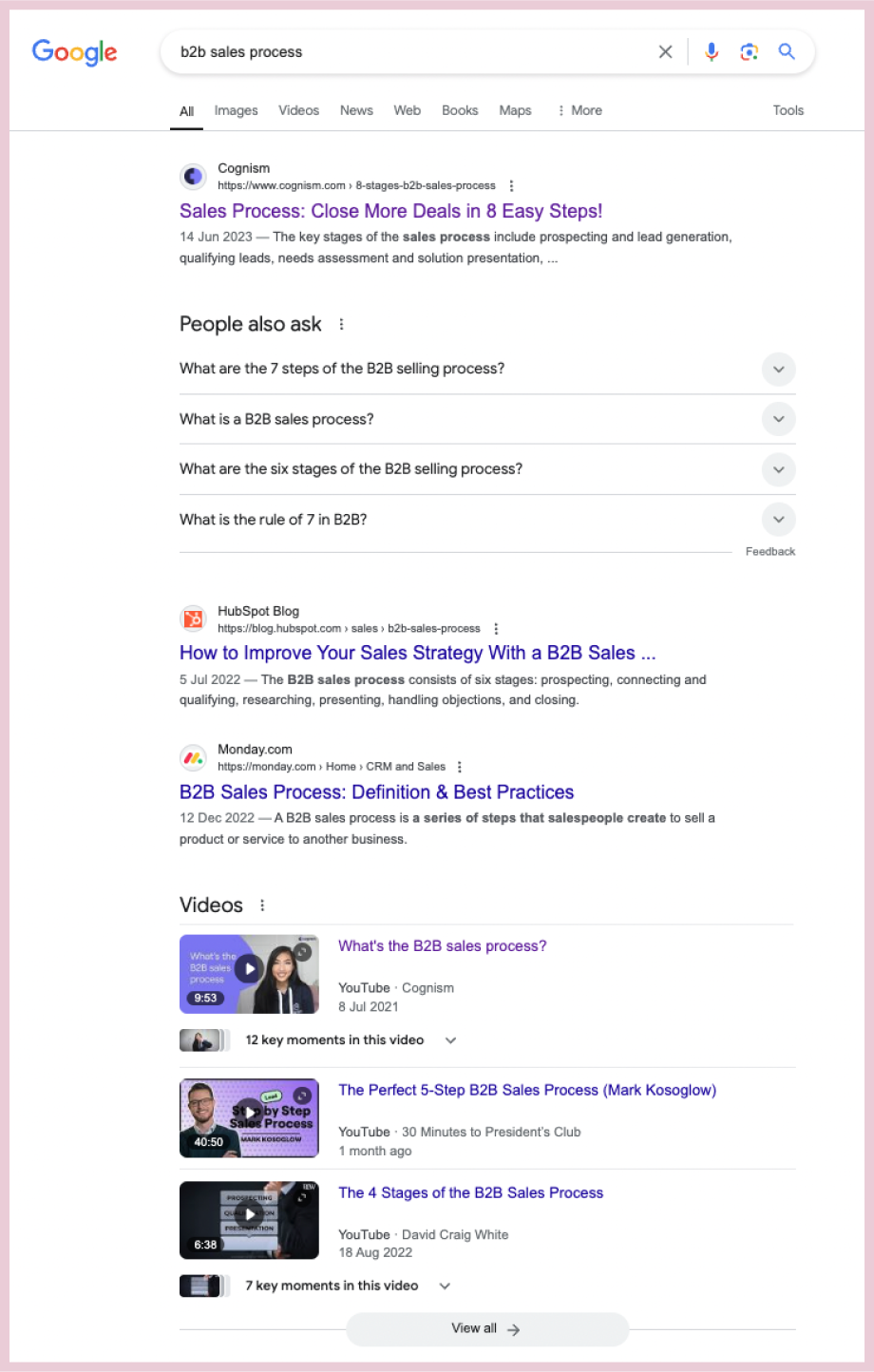
Relevant questions in the ‘people also ask’ section of Google – again this could give ideas for additional sections or information to cover to increase the value of your content, you could even add an FAQs section at the end of the blog which explicitly covers those related questions.
Step 4: Make a new copy and highlight the content updates needed
Make a new copy in an editable format and mark up anything that needs updating, which typically falls into the following categories:
Out-of-date info. Information, statistics, screenshots, sources (I tend to stick to the rule of only using sources from the last three years) that now feels outdated.
Content gaps. Information, trends, examples, etc that have arisen since the last time the content was updated and need to be added in to ensure full coverage of the topic – plus any new sections to add in identified through analysing the top ranking posts and ‘people also ask’ for the topic.
Additional value. Ideas to increase the quality and value of the content through incorporating unique angles, new data analysis, subject matter expert insights, etc.
Proofreading edits. Typos that you missed before, broken links, structural improvements, fluffy language that could be tightened – no content is perfect, so it’s always worth a quick tidy up as you go.
Keyword optimisations. Make sure the target keyword is covered in all bases (title, meta description, first paragraph, image file names, image alt text). Optimise the structure and copy for any secondary keywords identified in Search Console – this typically means adjusting subheaders and editing language to explicitly align with those keywords.
Personally I like to copy and paste the content into a new Google Doc and use a different colour of highlight for the different types of updates – adding comments as I go. But do whatever feels most useful for you, you can even print the page out and grab a pen and highlighter if you’re feeling particularly old-school.
Step 5: Make those updates!
From there it’s just a case of doing the research to address any gaps or outdated information, writing the new copy, designing the new images, and getting it re-published.
It’s always worth updating the publication date when you re-publish to give a firm signal to Google that you’ve updated the copy.
💡A word of warning: be very careful if you update the URL
URLs are important for SEO because, done well, they’re a strong signal of the target keyword and the value that the content offers.
But it’s common for URLs to be done poorly or automatically generated, following the structure of the title exactly instead of pinpointing the focus topic and keyword.
It’s also common for URLs to contain the date, which can quickly make it feel outdated.
For instance, for a blog about content marketing trends the ideal URL would be …/content-marketing-trends – but it might end up being …13-content-marketing-trends-to-look-out-for-in-2022 instead.
In this scenario, it’s tempting to update the URL to slim it down and take out that old date. That’s a good idea, but you need to be very careful.
If you link to that blog anywhere else on your website, it’s going to cause a broken link when you change the URL, which will have a negative impact on SEO – so you need to be ready to update them all immediately.
My best advice is to think about URLs as evergreen.
The blog content might change, but that URL should stay the same. So if you do change the URL, only change it once, and change it to reflect the core topic and keyword covered, so that you never need to update it again.
Step-by-step guide: how to address keyword cannibalisation with a content refresh
If you’ve spotted signs of keyword cannibalisation (multiple pieces of content competing for the same search terms) through the content refresh process, then the updates needed are different.
There are two ways to do a content refresh to address keyword cannibalisation.
Firstly, you could combine the competing posts:
Determine the highest ranking URL of the competing posts.
Combine the competing posts into one larger post that covers all aspects of the topic in entirety.
Make any additional updates and improvements using the refresh list in the previous section.
Publish the new bumper-blog on the highest ranking URL.
Archive the other competing post(s) and add a 301 redirect to the new bumper-blog.
Secondly, you could try to optimise for different keywords:
Determine the highest ranking URL of the competing posts.
Add any relevant content from the other competing posts into that highest ranking post to increase its value – and make any other updates and improvements too.
Look for secondary keywords that the other competing posts (aside from that highest ranking one) are already ranking for that are related to the same topic but are more specific e.g. question keywords or long-tail keywords, so that it’s clear they’re targeting different search intent
Choose a keyword for each of the other competing posts and make changes to re-optimise for that new target keyword.
Re-publish all blogs.
This is trickier because it’s always hard to optimise existing content for a new keyword, but if the content is different enough from each other then this may be worth a try.
Keep an eye on each post and see if they stop competing and start to rank for the new target keywords. If they do, great. If they don’t then your best bet is to archive the competing posts to avoid cannibalisation.
I find it always helps to look at real-world content examples to put things into context, so let’s take a look at a couple of worked examples of content refreshes that I’ve done myself recently.
Content refresh example to improve SEO performance and prevent content decay
I wrote the blog as a personal commentary, not as an SEO play.
But looking at Search Console post-migration, it was clear that the blog was getting a steady (though small) stream of traffic from organic search, and because of this it became clear to me that it could be performing much more highly than it was.
Organic traffic to the blog on the H&M Conscious Collection for the first few months after publication – showing a small trickle of impressions and clicks.
By September it was obvious that traffic wasn’t going to increase on its own, and it seemed like it could be slowing down (see graph below), so I thought I’d do a little content refresh experiment of my own.
So, on the 1st October I made a bunch of updates.
I updated outdated information, like this reference to a legal case from ‘last week’ that was actually referring to a case from 2019:
And this reference to a page on H&M’s website that no longer existed:
I edited the blog title and meta description to align with keywords that were gaining impressions and clicks – ‘hm greenwashing’ being the main one:
The positive impact was pretty immediate.
The blog went from 687 impressions and 18 clicks in the month of August 2024, to 3,663 impressions and 102 clicks in October 2024.
SEO performance continued to increase in November 2024, with 10,196 impressions and 252.
And that was all with a relatively simple content refresh – there’s a lot more I could do here to make this blog even more valuable to readers.
Content refresh example to combat keyword cannibalisation
The upcoming EU Pay Transparency Directive is an important topic for Ravio’s core audience of People Leaders who manage compensation and benefits for their company – so the team wanted to cover it in depth.
When I originally joined Ravio back in 2023 they already had a blog on the topic of the EU Pay Transparency Directive which covered the changes in gender pay gap reporting that the new legislation would bring in.
It wasn’t specifically optimised for SEO, and it was a mix between an entry-level ‘what is X’ blog and a detailed explainer on gender pay gap reporting in Europe and how the new Directive would change this.
This meant that it included sections like ‘What is the EU Pay Transparency Directive’ which meant that Google assumed that it was targeting the keyword ‘EU Pay Transparency Directive’.
Instead of fixing the issues with the original blog, when I joined the team I built on the series by publishing the following pieces:
Everything you need to know about the EU Pay Transparency Directive – this was designed to be the main pillar page guide for the topic
As you can tell from the titles of these blogs alone, they weren’t keyword optimised and all of them heavily featured the term ‘EU Pay Transparency Directive’.
This led to keyword cannibalisation, with each of these blogs competing and pushing each other down the search rankings.
The solution was to make the pillar page as strong as possible by adding in additional elements from the other competing blogs – and then to archive and redirect the competing blogs.
I made some additional updates at the same time:
Title update to make it crystal clear what the blog covered: ‘EU Pay Transparency Directive: complete legislation guide and FAQs’
Updated introduction to cut the fluff and get straight to the top query i.e. when do I need to be ready for the EU Pay Transparency Directive
Add in additional information released since publication: a section on Sweden’s draft proposal for transposing the Directive into national law and a section with data findings from Ravio’s pay equity original research report.
The result is that Ravio’s guide made it to page 1 for the keyword ‘EU Pay Transparency Directive’ – as well as being featured in the ‘people also ask’ section.
It’s also ranking highly for additional secondary keywords which has significantly boosted traffic, such as ‘EU Pay Transparency Directive 2026’:
As well as question keywords like ‘who does the EU pay transparency directive apply to?’:
Important content should be refreshed at least once per year. Market trends and data can change quickly, so an annual content refresh ensures that content stays fresh and relevant – maintaining performance and avoiding content decay for important traffic and conversion-driving content.
This is a general rule, but there’s no right or wrong here.
For your top-performing content, it might be worth scheduling a content refresh every 6 months just to make sure performance doesn’t start to decline.
For less important content, an annual refresh might be unnecessary. And some content doesn’t need refreshing at all – a panel event summary from two years ago, for instance, is unlikely to ever be strong enough to be a high SEO performer today.
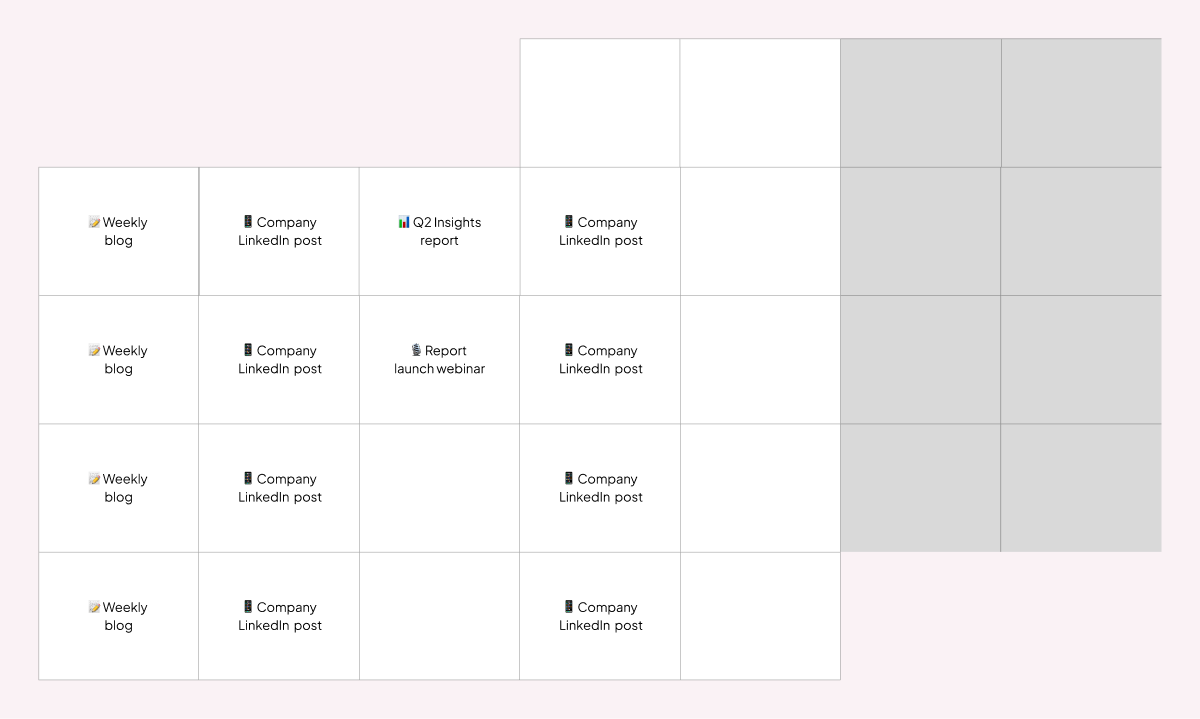
My personal recommendation is to schedule content refreshes into your content calendar in the same way you would for new content. Put them in every six months for high-performing content that drives new traffic and conversions. Put them in once a year for everything else. When the time arises, check whether it’s worth the time and effort refreshing (using the advice in the ‘how do you know what content to refresh’ section above) before diving in.
Should you prioritise refreshing content over creating new content?
Well, it depends (sorry, but it really does!)
Prioritisation for new vs refreshed content comes down to the same principles as in the section ‘How do you know which content to refresh first?’ above – essentially content that has the most potential to increase brand awareness and drive conversions should be top of the list, whether that’s a new piece or an old piece to refresh.
Generally speaking, you want to strike a balance of new content and content refreshes so that over time you’re producing new content on important topics whilst staying on top of a growing content library.
Klaviyo, for instance, has about 20-30% of the content calendar reserved for content refreshes each quarter, with 70-80% new content – which I’d say is around the right balance to aim for.
If you have a large amount of legacy content gathering dust and damaging SEO performance, but that does have high potential and is still relevant, then it might be worth an initial focused content refresh sprint to get through some of that backlog and give an immediate boost to SEO performance – and then move into that 80/20 balanced calendar from there. I’ll often do this if I start working with a new company that hasn’t been carrying out regular content refreshes.
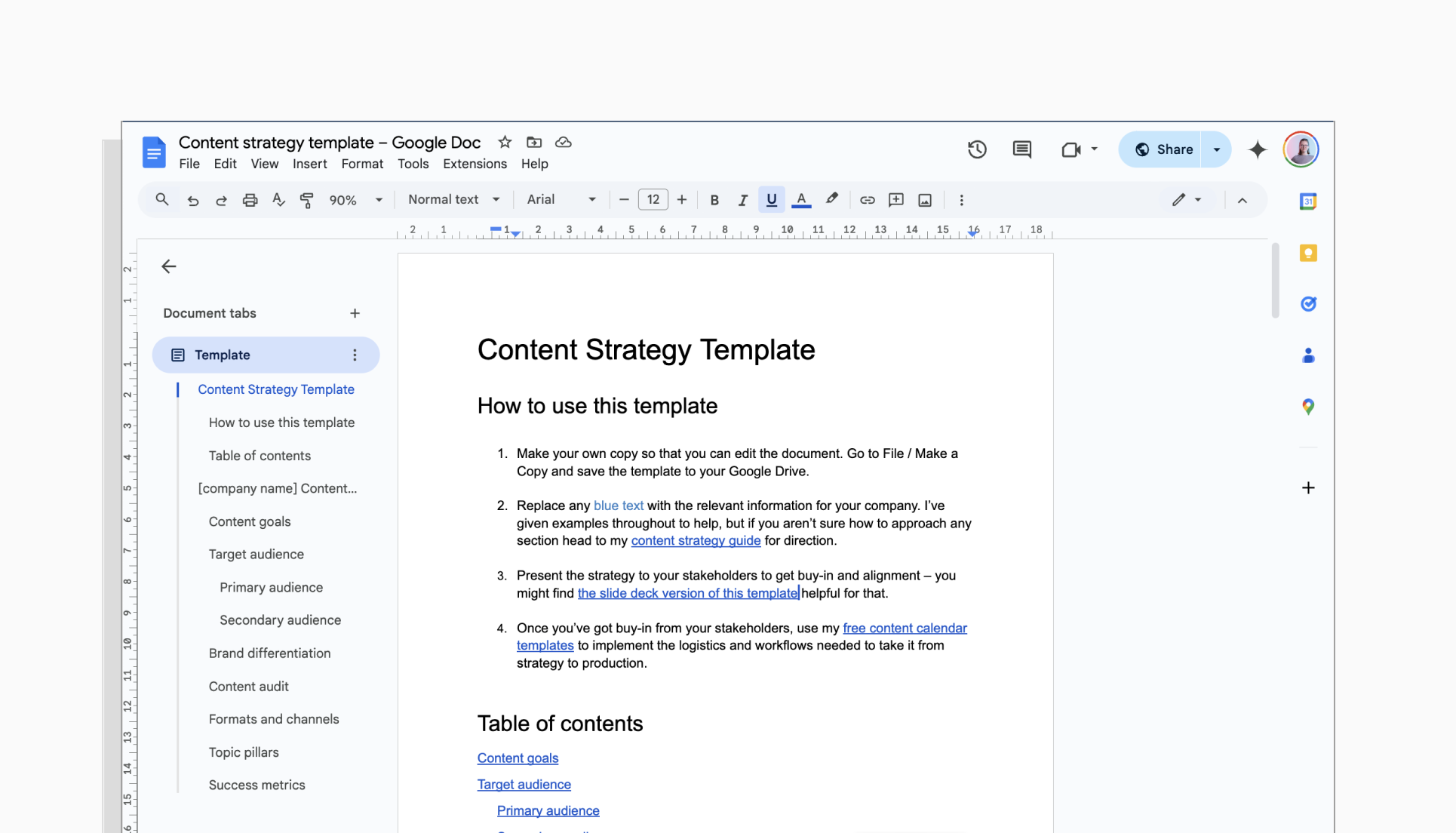
What’s included in the content strategy templates?
Both content strategy templates contain sections for all of the vital information that any content strategy should contain:
Content goals
Target audience analysis
Brand differentiation analysis
Content audit and current performance
Content production: pillar topics, channels, formats, and cadence
Success metrics and KPIs.
There are examples throughout for each of these factors – and you can also find further guidance and explanation in my content strategy guide.
The Google Docs / Word template has more space for detailed analysis, intended as a document that will support the content marketing team’s planning and production.
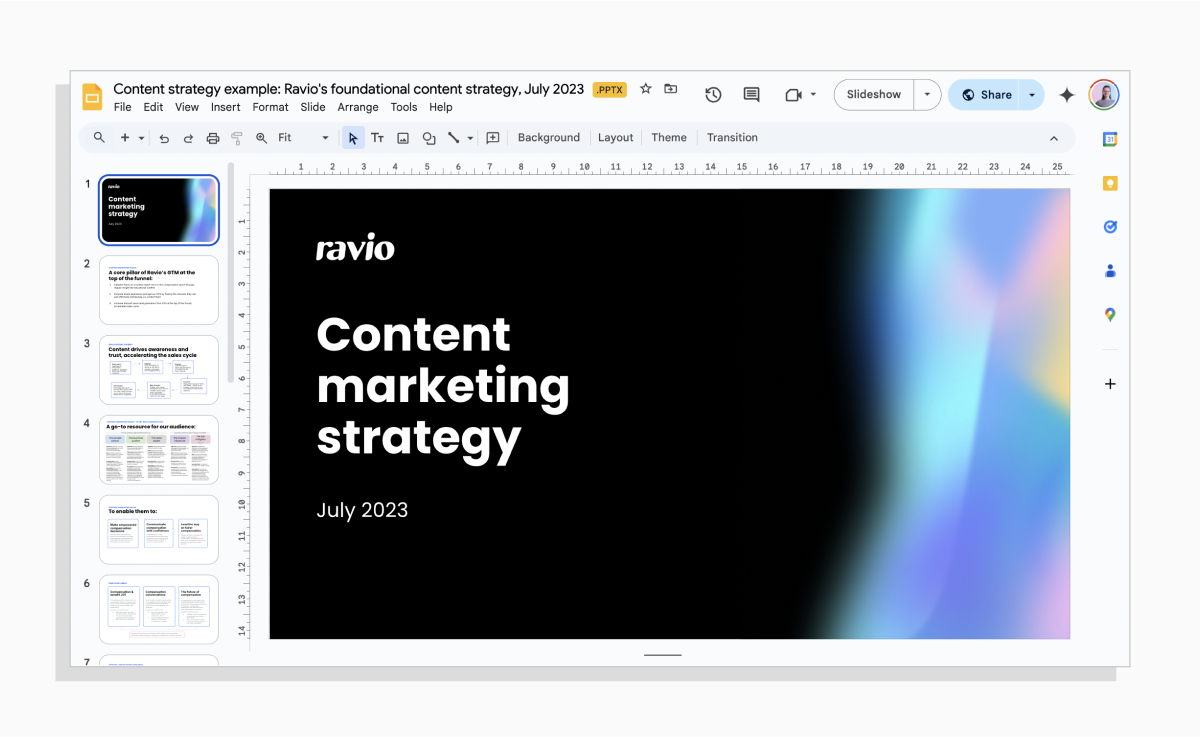
The Google Slides / PPT template is lighter on the detail, intended as a version that can be used when presenting the strategy to key stakeholders for alignment and buy-in.
Content strategy template for Google Docs / Word
I personally find it easiest to build a content strategy in Google Docs (or Word if Microsoft is your jam).
It’s easy to structure the document in a way that makes it quick to navigate and find specific pieces of information, but also has the flexibility to enable you to add as much context and information as you need to make the strategy actually useful as a reference point to guide decision-making, and to link to other documentation such as customer research notes.
Content strategy template for Google Slides / Powerpoint
Getting buy-in on a content strategy from senior leadership stakeholders is often the hardest part of the process – but having a clear presentation template to hand can make it less stressful.
That’s where the Google Slides / PPT version of the content strategy template comes in, covering all the top-level details that will help you get buy-in from stakeholders.
Subject knowledge matters in writing great content.
A writer that knows your subject area will be able to quickly understand your target audience and the topics and pain points that will hold value for them – and connect the dots on how your product offering fits into that.
So, if you’re looking for writing support, it makes complete sense to seek out an HR tech writer with experience in the subject area.
This blog is here to help you out with that quest.
In case you don’t already know me – hey, I’m Tabitha.
I’m a content writer and strategist with experience in the HR tech space. I built a foundational brand and content engine for Ravio – a B2B HR tech solution for compensation benchmarking and management. Initially this was as the first in-house content marketing lead, and I’m now continuing to support the team as a freelance content writer.
Ravio’s brand voice strives to include a human and advice-focused element to all pieces of content, harnessing Ravio’s network of partners in HR tech, venture capital, and compensation consultants. Because of this I’ve been able to interview several experts in the HR and compensation space (from JooBee Yeow to Alistair Fraser to Becky Brawn of People Collective, and many more!) through which I’ve quickly built my own subject expertise.
In terms of topics, Ravio’s focus is compensation, so I’m pretty knowledgeable in all things salary benchmarking, equity compensation, variable pay, employee benefits, salary bands, job architecture, employment law (Europe), pay transparency, pay equity.
Here are a few content writing examples for HR tech companies that I’m particularly proud of:
Original research content is a great way to build brand awareness, catching the attention of your target audience with new data-led insights on the topics they care about.
But where do you start with planning original research?
I don’t know about you, but I find that examples are always helpful when I’m getting my head around a new idea.
If you’re the same, in this article I’ve pulled together a few of my favourite examples of original research content in a range of different formats.
So, I’ve started a swipe file – a round up of the best content and campaigns I stumble across each month. Subscribe to get them to your inbox, once a month.
Gong is a revenue intelligence platform, supporting sales teams through recording conversations with prospects and providing guidance to increase the likelihood of winning the deal.
Gong has an ongoing content series titled ‘Gong Labs’ which shares findings from analysing their huge internal database of sales conversations. These are hugely valuable insights that will support sales teams with their own sales pipeline.
The blog shares data gathered by analysing the objections that arose during the 300 million calls recorded in the Gong platform – complete with graphics that highlight the key data insights.
It also includes advice on how to overcome each of the top objections.
This advice combines the data findings i.e. what worked in the calls that Gong has on file, as well as subject matter expertise from the expert author Armand Farrokh, who is the founder of the 30 Minutes to President’s Club podcast.
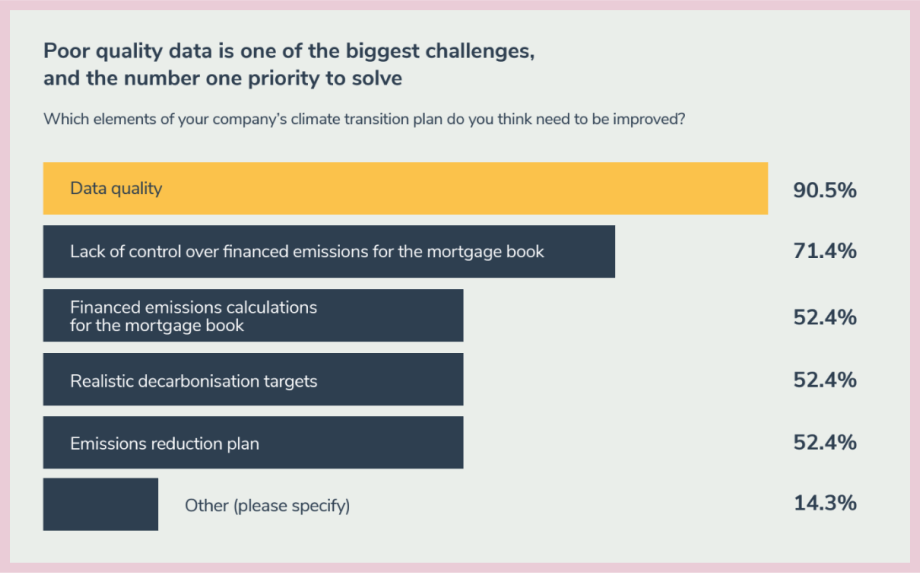
The analysis focuses on what makes a robust and credible climate transition plan, highlighting the lenders who are excelling on climate plans and progress through a lender leaderboard as well as the features of those who are lagging behind.
A survey of ESG Leads at these mortgage lenders also illuminates the key challenges and barriers, moving the discussion from theory to reality.
Supercritical is a carbon removal marketplace, with a current focus on biochar as a viable carbon removal solution for companies to purchase carbon credits in.
Their 2024 Market Outlook Report uses data findings from their own research team to chart the growth of the market for carbon credits – but with an important twist.
Every insight and graph included in the report highlights market growth with relation to the biochar projects that have passed vetting to enter Supercritical’s marketplace, and those who have failed.
It makes a clear point: that the current growth in the biochar market is reliant on poor quality carbon projects that companies should not trust for carbon removal.
This is interesting data insight in itself, but it also provides evidence for Supercritical’s brand positioning as a trusted marketplace partner for credible carbon offsetting and removals – it’s a win for both product and content marketing.
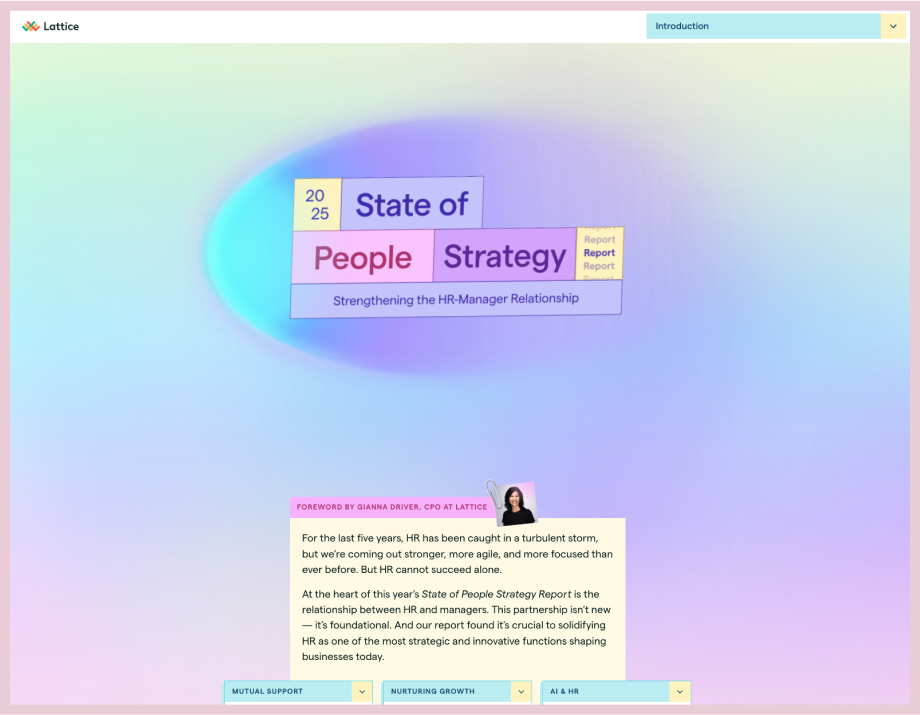
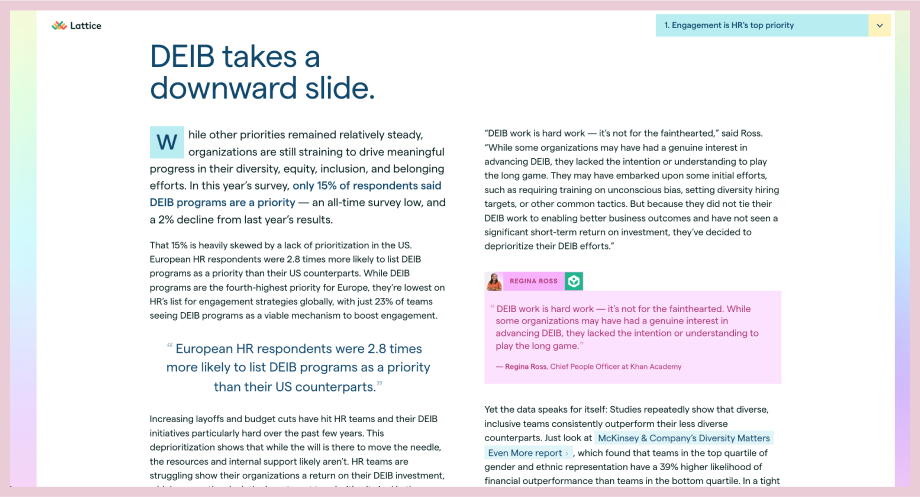
The report itself is a relatively simple format: a survey of HR teams to find out the latest trends and challenges in the function, and draw trends compared to previous years.
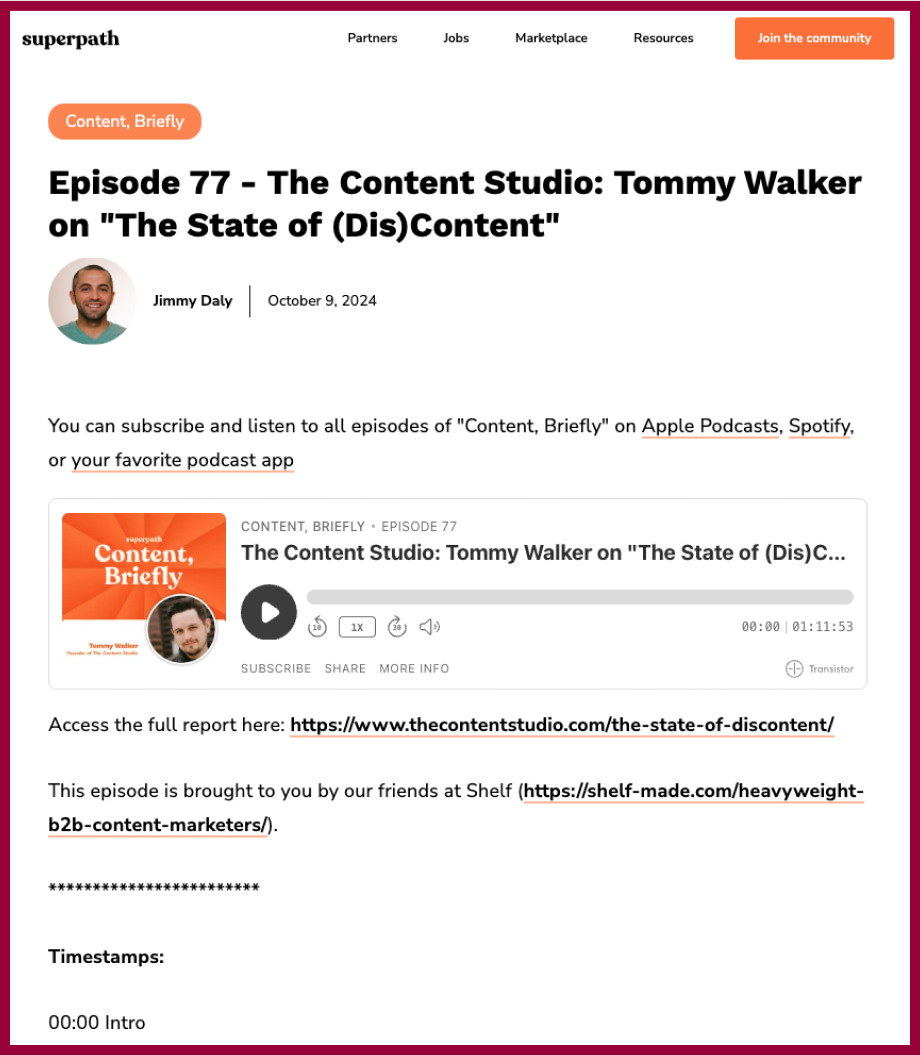
What I find interesting is how they’ve transitioned from a static PDF report (2023):
To presenting the findings through an interactive landing page – for the first time in 2024, and again for the 2025 report.
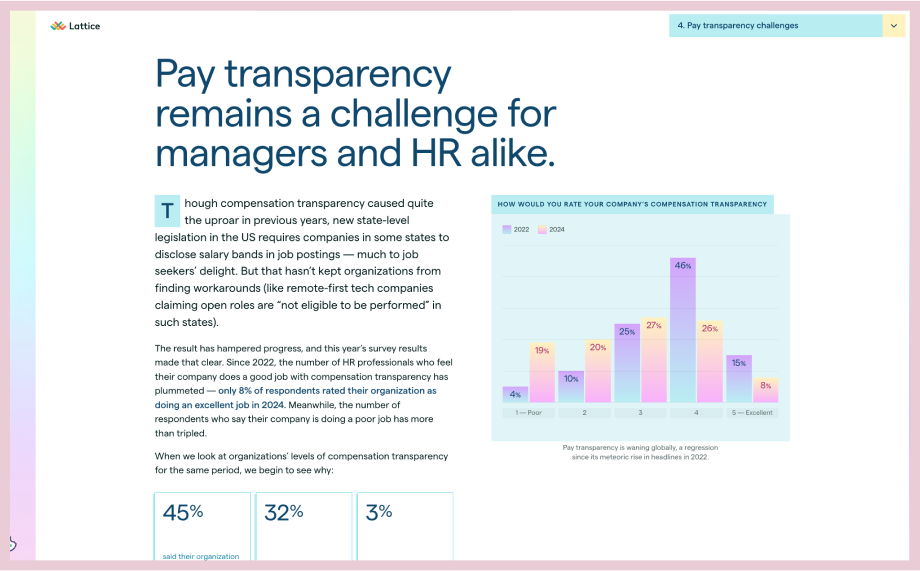
The landing page format brings the data to the forefront through striking graphics:
It also brings expert opinions to the forefront, with quotes peppered throughout the landing page:
These visual elements, alongside the ability to scroll and click between different sections of the landing page, makes for a piece of original research content that users are likely to come back to again and again.
LinkedIn’s B2B Marketing Benchmarks report uses a creative twist to highlight the key insights and takeaways: a set of ‘marketing team of the future’ persona cards.
Each of these persona cards had a section of the report which expands on the topic they represent, with key data findings. This is for the ‘creative vanguard’ for instance.
I actually don’t think the full report is that great an example of original research – it’s a little bit style over substance. But I love this creative way that the findings are summarised, so its made it to the list.
The premise of the blog centres around a question from a real-world Stripe customer:
‘Last year, one of our users—Yuval Shwager, the head of product at Mixtiles—came to us with a question: “We want to offer buy now, pay later (BNPL) options, but how do we know they won’t add checkout friction or cannibalize our card volume?”’
Stripe answered the question through an experiment: running A/B tests on 150,000 payments sessions, with half showing buy now pay now (e.g. Klarna, Afterpay) as an option, and half not.
It’s original research content, but to answer a single objection or question raised during the sales process – answering the question whilst also providing a snapshot of genuinely interesting data insights from Stripe’s product.
Ravio is a compensation management platform which includes real-time compensation benchmarking data and market trends.
Ravio’s data is its strength – offering more accurate, more reliable, more up-to-date compensation data than anyone else. Showcasing that strength is an important goal of Ravio’s content strategy and brand voice – highlighting data insights through educational content, as well as within the product.
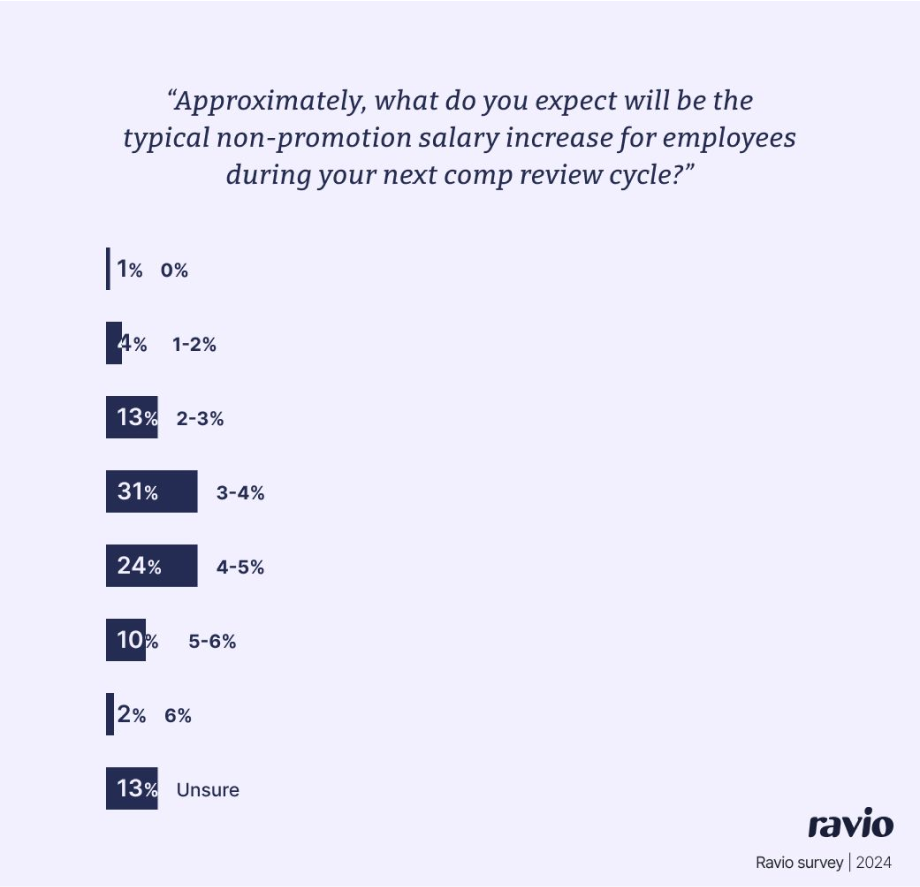
The report shares the most important trends and insights as HR teams head into compensation review season – such as hiring rates, attrition rates, typical salary increases, etc.
Ravio’s own data is coupled with a survey to find out key priorities and barriers for HR teams, adding additional insights to support the narrative.
It has become an important brand touchpoint for Ravio, with the report expected by the market and resulting in a major uplift in traffic and interest in the Ravio platform.
Because of this, we’ve also developed themed reports which dive deeper into a particularly important topic.
For instance, in early 2024 we published the Ravio Pay Equity report to share insights from Ravio’s data on the gender pay gap and representation of women in tech – a topic that is becoming more and more important with the introduction of pay transparency legislation like the EU Pay Transparency Directive.
In the argument of to gate or not to gate, Klarna seems to be on the ‘not to gate’ side of the debate. They regularly publish original research in the form of landing pages which share key findings on a topic – such as the checkout or the money management pulse.
The landing pages make for a snappy way for users to identify interesting findings, whilst also giving Klarna the SEO benefits that come with having original research content in an indexable format.
When used by product designers, Figma forms the bridge between designer and developer. The designer produces the prototype on Figma, ready for the developer to implement.
There can be a tricky working relationship at play here, with frustrations from the designer when the developer doesn’t do their design justice, and frustrations from the developer when the design isn’t code-ready.
Figma’s Decode the Developer report addresses that pain point with a report that highlights the key challenges, the benefits of designers and developers working together more effectively, and how to go about that – all insights gained through a survey of front end developers.
I like this report because it’s full of actionable insights and it targets a clear pain point that they know impacts their primary target audience of product designers.
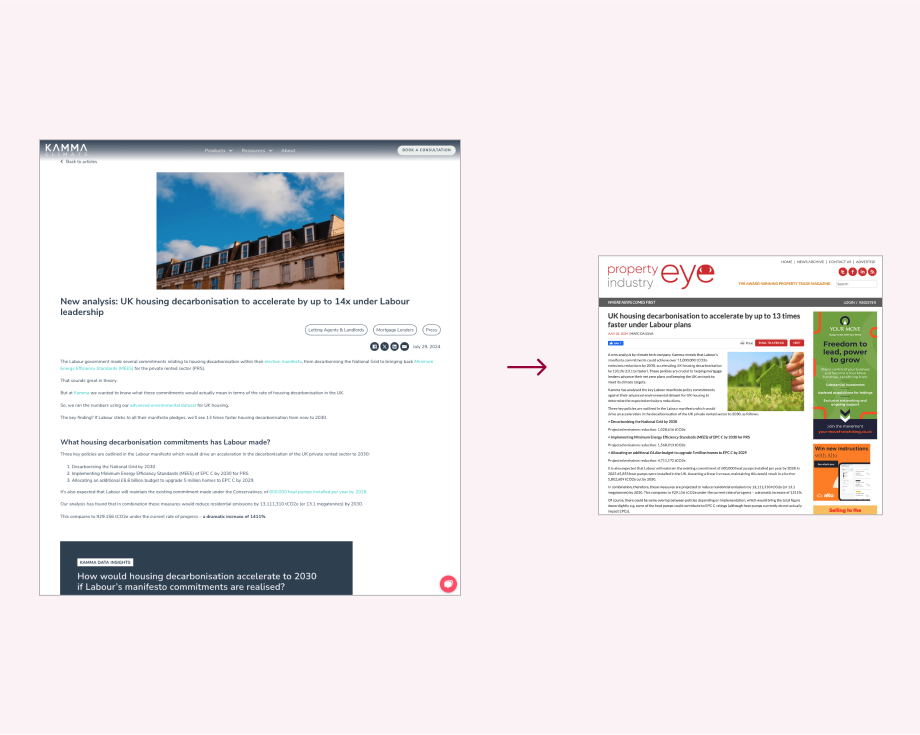
Kamma felt that trade PR was an important channel for them to increase brand awareness and generate leads.
Kamma is a climate data provider, and so has an internal database that gives the perfect foundation for bespoke data analysis to provide journalists with headline-worthy press releases – which is exactly what I executed for them.
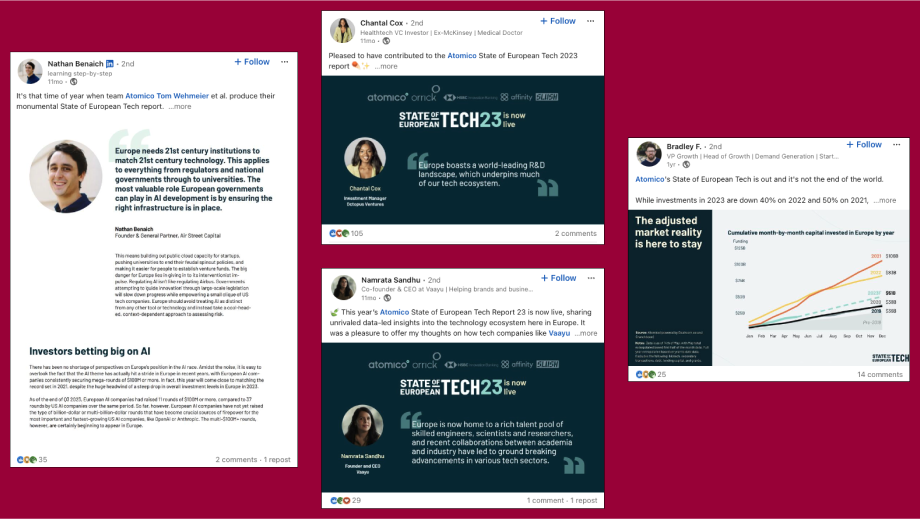
Atomico’s annual State of European Tech report is a classic ‘state of’ industry style report – but it’s a good example of this style, because it’s an incredibly comprehensive and detailed analysis of the European tech industry.
It’s particularly interesting because of how Atomico harnesses partners to produce the report. The 2023 report has a whole section dedicated to partners, because of how many partners and collaborators are involved in the project. This includes data partners (like Ravio) who provide data on various elements of the tech industry.
It also includes subject matter experts who are incorporated into the report throughout, commenting on key findings to add further insights via expert opinions and experiences.
Not only does this help to make the content of the report as high-quality as possible, it also supports the distribution of the report at publication, providing a whole host of partners and contributors to share the report and help to increase its reach.
Content marketing 101: have a foundational content strategy in place before you start creating content.
When there’s no content strategy in place, it’s all too common to see early-stage companies performing what I like to call ‘random acts of content’.
One of the sales team suggests writing a blog to answer a question that a prospect brought up on a demo call one time. The founder thinks ‘state of’ style industry reports are the best way to grow the brand. The content marketer has a topic that they’d love to cover to add to their portfolio.
All of these content pieces could perform well.
But if they did, it would be through pure luck.
We don’t want lucky wins. We want replicable success – a targeted approach so that we can get a clear understanding of what works, and build from there.
So if your startup is just about to commence its marketing journey, or if the journey so far has been something like the scenario outlined above, then you need a content strategy.
And this article will teach you how to go about creating one.
How to create an effective content strategy: a step-by-step guide
There are lots of content strategy guides out there that all claim to be the definitive way to create a content strategy, from the likes of Hubspot, MailChimp, and Semrush.
None of them are that revolutionary definitive guide.
They’re all just variations on a theme.
Which is what I’m going to give you too.
But, unlike most of those guides, I actually have first-hand experience of developing effective content strategies for startups like Lune, Ravio, and Kamma.
And I’m sharing my own personal approach with you.
Think of it like this: if you hired me as a content strategist to help you figure out how your company should do content (which, by the way, you can), this is the process that I would follow for that project.
To kick things off, here’s every step in my content strategy process in brief:
Step 7: Content cadence– how often will we share new content for each chosen format and channel?
Step 8: Success metrics – what will we measure to understand what’s working well for our content goals?
Now let’s take a detailed look at each step.
Step 1: Content goals
Defining the aims, objectives, goals for your content is a vital starting point for any content strategy – giving the purpose behind the plan and ensuring that the content strategy is designed for business impact.
So how do you figure out the right content goals?
Well, content goals should always be informed by the priorities of the business as a whole, answering the question: how will content marketing support progress towards the company’s goals?
So, for example, if the north star objective for the overall company is to increase MRR by 20%, then you might want to build a content strategy which prioritises conversion and supporting the Customer Success team with upselling.
The ideal scenario looks like this:
Business goals defined by leadership team
Marketing goals (overall) informed by business goals and defined by marketing lead
Content goals informed by marketing goals and defined by content lead.
If you aren’t quite sure where to start, these are some of the most common content marketing goals to consider:
Increase brand awareness
Increase organic search traffic
Build brand credibility and trust in the market
Demonstrate topic expertise
Increase lead generation
Increase conversion rates
Build loyalty with existing customers to increase retention
Build an owned audience (e.g. newsletter subscribers).
Of course, if you use any of these goals you’ll need to turn them into SMART goals to make sure they have a specific purpose in the context of your business. Increasing lead generation, for instance, might become ‘30% increase in inbound deals in the next year.’
Step 2: Audience analysis
Next up: audience.
Who your audience is makes a big difference to how you approach content.
The big questions to ponder are:
Who are we talking to when we create content?
What kind of content do they typically engage with?
What channels do they hang out in?
What specific pain points do we know that they have, that are relevant to our brand, and that we could address through content?
If your ICP is a sales executive struggling to close deals, who spends 2 hours a day on TikTok and never reads written content, then a company blog isn’t going to have the impact you want it to.
It’s also pretty likely that there will be multiple personas involved in the sales cycle for your brand, so you need to understand how each of those differs in terms of content needs.
For this reason it’s really important to get into the details here, to really get to know your niche target audience as well as you possibly can so that you can create content that will actually resonate with them and provide value.
The absolute best way to do this is to speak to customers – or people who fit the ideal buyer persona(s) for your company. If you can, set aside time early in the content strategy process to conduct a handful of interviews designed to find out the information above.
If that’s not possible, then go detective and seek out all the information that already exists about your target audience:
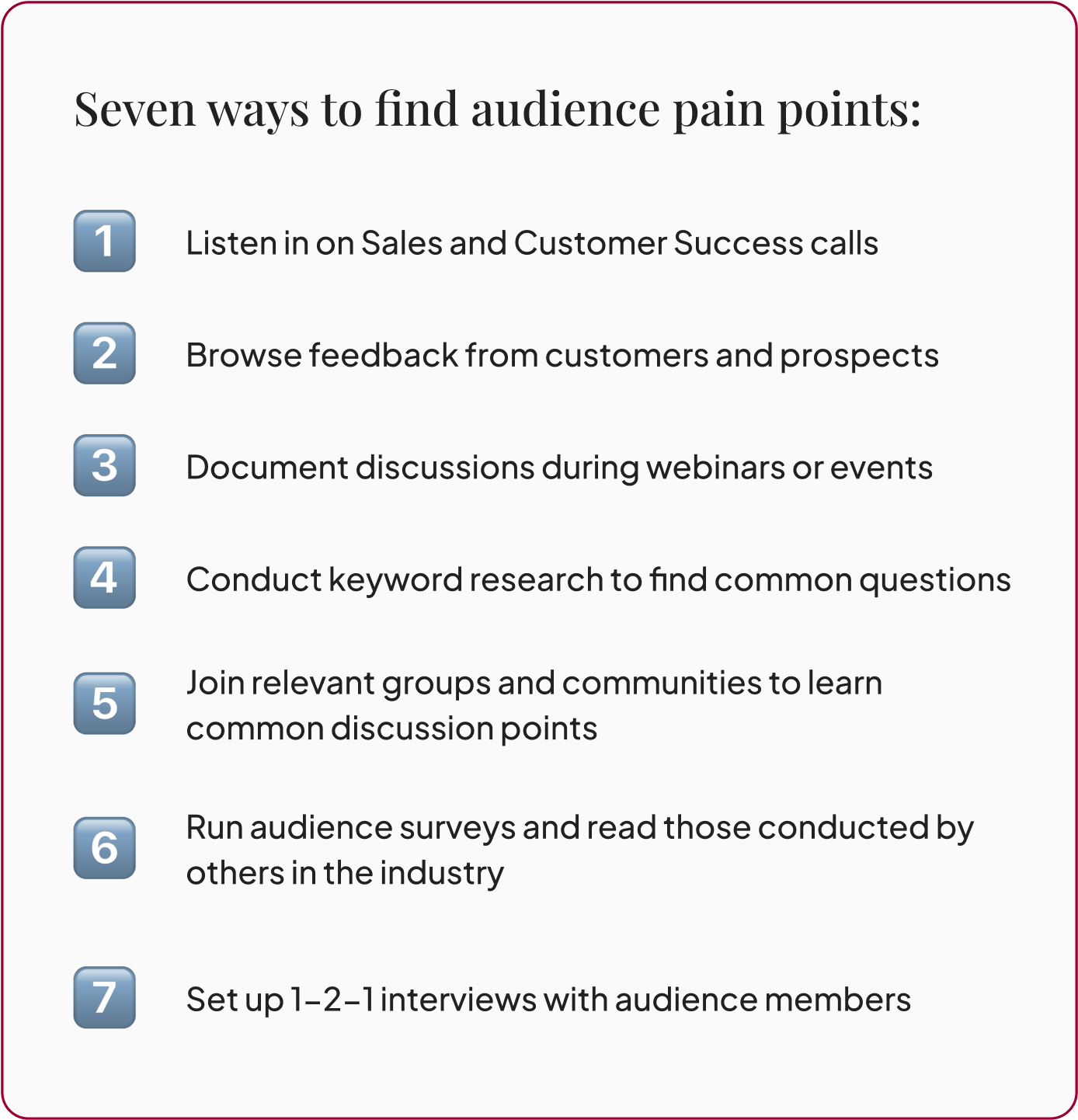
Sales and Customer Success calls – sit in on upcoming calls or listen to previous calls via a call recording tool like Gong or Grain (if your company doesn’t already record sales calls, I highly recommend it, they’re an absolute goldmine for feedback, pain points, and ideas).
Feedback gathered from prospects and customers – find all the common feedback, objections, topics raised, etc that the sales and customer success teams have noted down in Slack or Notion.
Questions or discussion points raised at previous webinars or events
Social listening – find the LinkedIn channels, Slack communities, Reddit threads, industry influencers, etc that your target audience are using, and see what kind of discussions arise
Keyword research to identify common search queries in your space
Industry research – find existing industry research in your space e.g. recent data reports or surveys run with your target audience, to understand current trends and concerns.
Step 3: Brand differentiation
There’s a lot of content out there today that all covers the same topics in the same ways.
That’s true in every industry, and the chances are that all your competitors are using content as part of their marketing strategy too.
If your content does the same, it isn’t going to cut through.
Bland, tickbox content used to work for SEO purposes. Create a blog structured around a target keyword, with subheadings optimised for longtail or question keywords, and it didn’t matter too much how useful that content actually was.
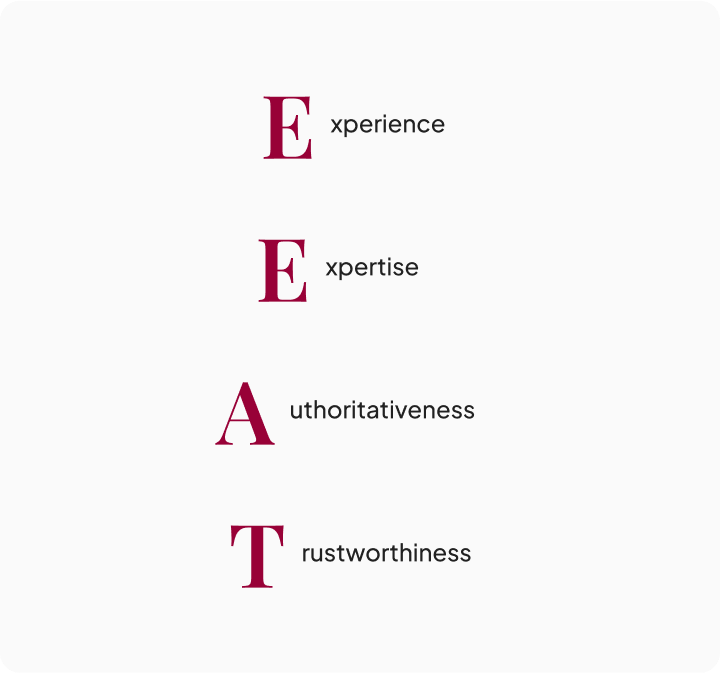
That isn’t true anymore. Google’s SEO algorithm prioritises relevant and valuable content over everything else – especially since the EEAT update.
You want your content to stand out (for the right reasons).
And that means figuring out how you will differentiate your brand’s content from the noise, and provide genuine value for the target audience. This could include:
Brand voice. What kind of personality and language will resonate with your target audience? Could we create a slightly different brand voice to our competitors? Brands in the consumer space have done this really well – the likes of Innocent, Monzo, and Aldi, for instance, who are all well known for their chatty and humorous voices on social media. It’s less well done in the B2B world, but even a subtly different brand voice can stand out from the bland business blogs.
POVs. What strong opinions does the company have about the sector it operates in? This often comes from the founding team and might even be the story behind why the company was founded to begin with. It could also be key principles, beliefs, or best practices that informed how the product has been developed.
Data insights. Many tech startups will have proprietary data that can be harnessed for content through identifying trends and stories to tell, and sharing that data within your content gives you unique angles and insights. It could be that the company owns a database as part of the product (like Ravio’s salary benchmarking database, for instance) or it might be that proprietary data exists in the form of how users engage with your product (like the Gong labs series, for instance).
Expert insights. Collaborating with subject matter experts will always strengthen your content, bringing insights and first-hand experiences from people who have a deep understanding of your sector and the problems of your target audience. You might have internal experts or existing relationships with external experts, or you might need a plan for how to build that.
Pain point content. We touched on this in the audience section, but understanding the pain points of your target audience means that you can create content which resonates – either through validating the pain or through providing expertise to overcome it. It’s way more valuable than yet another ‘What is X’ blog.
Content authors. Most company content is in the voice of the brand. Trusted messengers are important for brand credibility, so consider who else could author content for your company. That might look like ghost-writing blog content for those subject matter experts in your network – like this blog for Ravio, authored by Rewards expert Rob Green. Or it might look like a founder or CEO who builds the company in public via LinkedIn posts or a Substack newsletter (like Buffer’s radical pay transparency content, or the Wrap Text newsletter by Equals). Or it might look like expert panel events that are turned into short video clips for social media. And so on.
The key outcome of this thinking is to create a set of content principles to include in your content strategy – a simple list of a few non-negotiables that every piece of branded content should adhere to, to ensure it meets the level of quality that you want to put out there.
For instance, you might decide that every piece of content you publish should target a niche pain point for your specific target audience, and should include either proprietary data or expert advice that informs how to overcome that pain point (which is exactly what Ravio’s content principles look like).
Step 4: Content audit
Unless you’re starting completely from scratch, it’s highly likely that the company you’re building a content strategy for already has existing content.
Conduct an audit of that existing content with two things in mind:
Content to refresh or repurpose. Some content is probably still relevant to the topics and pain points you plan to address for your audience, but it may be outdated or out of line with the goals that you’re putting in place. It’s well worth marking these pieces for a content refresh or to repurpose the messages into new content.
Impactful content. Analysing which content is driving progress towards key goals – whether that be specific content formats, topics, or channels – can help to inform which to prioritise in the content strategy.
Your content shouldn’t sound like every one of your competitors’.
With my Content Strategy Audit you’ll identify the creative content opportunities that competitors can’t replicate, and that will truly build brand authority.
Steps 1-4 are the foundational pieces of the content strategy. You’ll then use the information from those steps to determine steps 5-8.
Unless you have a huge content marketing team at your disposal, you can’t create content in all formats and distribute it via all channels.
And even if you could do that, you shouldn’t – it would be a waste of time.
Instead, you want to focus on the content channels and formats that fit your target audience.
So, there are two key questions to explore:
What channels does your target audience hang out? As an example, LinkedIn is likely a great shout for a B2B content marketing strategy, but might not be your best bet for B2C. There are also likely niche communities that your audience are engaged with or voices in the space that they trust – think Superpath or the Content Marketing Institute for content marketers, for instance.
What formats does your audience like to engage with? Do they prefer to watch short-form video clips, listen to podcasts, read long-form articles, and so on.
Pick 1-2 formats and channels that have the most potential for your target audience, and focus on them. Don’t try to do them all at once – you can always add to and build on these initial foundations later.
As an example, let’s assume you’re a B2B company whose number one goal with content marketing is to drive inbound revenue.
You might opt for the following content formats as a priority:
Content pillars are 2-3 core topics or themes that your content will focus on – with the aim of demonstrating deep brand expertise in the topics that are most important for your audience.
They’re important to give focus to the content strategy as well as to ensure content resonates with the target audience. They also help you build topical authority (especially when coupled with a topic cluster approach) which is important for keeping your company top of mind for audience members, as well as to enhance SEO performance.
There are 3 things to consider when determining what the right content pillars are:
Pain points – the most urgent pain points of your target audience.
Brand expertise – topics that align most with the solutions that your product or service offers, and that the team internally have deep knowledge of.
SEO potential – the parent keywords with potential to bring organic traffic to the website i.e. those with relevant search intent and a good balance of keyword volume and keyword difficulty.
Step 7: Content cadence
How often will you produce content for each format and channel that you’ve chosen to prioritise (see step 5)?
Planning a realistic content cadence starts to bridge the gap between content strategy and content production – preparing you to put a content calendar in place.
The answer will come down to internal capacity and budget. Who is creating content? Can you work with external freelance content writers to increase capacity?
I’d highly recommend considering how you could use a content repurposing workflow to make a more efficient cadence here too.
For instance, if original research reports are a key format for you, then that’s going to be a lot of work to produce. Content repurposing can help you make the most of the time spent – by taking that research report and turning it into additional formats and pieces e.g. blogs for each key finding, webinars sharing key insights, YouTube videos sharing the webinar recording, LinkedIn posts for each data graphic or expert contribution, etc.
In that scenario your content cadence might be something like:
1 original research report per quarter which includes proprietary data analysis and subject matter expert (SME) interviews
1 blog per week – with 6 per quarter repurposed from the report findings and SME interviews
1 webinar series per quarter (live and on demand via YouTube) – on the report topic and findings
2 LinkedIn posts per week via company page – with 1 per week sharing data insights from the report and 1 per week sharing SME insights.
You get the gist.
Also consider how content refreshing will fit into the cadence to ensure that content will stay up-to-date and relevant over time – it’s easy to get into production mode and forget about older content, but it’s an important part of the process.
Step 8: Success metrics
What does success look like for your content marketing?
The right metrics to track will depend on the content goals you set back in step 1.
If driving revenue is the top priority then you might track lead: conversions from content, pipeline produced by content conversions, pipeline influenced by sales enablement content, the number of ICPs engaging with content.
If brand awareness is more important currently, then you might focus on traffic, impressions, and engagement for each key channel – as well as organic shares of your content in key communities for your target audience (user generated content).
My advice is always to pick a limited number of metrics to track. Tracking everything under the sun is tempting, but it’s also time-consuming and often doesn’t help to move the needle. Stick to a few key metrics that directly relate to your content goals, and all is well.
🧠 The most important things to remember when developing your content strategy
If there’s anything I want you to take away from this content strategy guide, it’s these points:
Start simple, learn what works, and build from there
Make differentiation a priority – bland content that mirrors your competitors won’t have the impact you want, find what’s unique about your brand and the unique value that you can offer your audience through content
Less is truly more – produce less content but make sure every single piece is super high quality and holds true value for your audienceLean on subject matter expert content and original research content to demonstrate expertise and differentiate from bland AI content
Be efficient – make content repurposing and content refreshes a priority from the word go.
Ta da!
That’s it. There’s your content strategy.
Plug the findings for each of those eight steps into a document (word doc, slide deck, notion page – whatever you fancy, whatever you’ll actually use day-to-day).
Then use that strategy to plan the content calendar for the next quarter, avoiding those random acts of content and instead producing content informed by a deep understanding of your target audience and company goals.
All that’s left then is to get cracking on production.
If you work with freelance writers, send them the content strategy so that they understand the foundations of content marketing at your company.
Then, at the end of the quarter, do another content audit to see what’s working, what isn’t, and adjust, build on, or double down on the strategy from there – it should be a living, iterative document that helps you to keep testing and learn what works.
Back in early 2023 I joined the team at Ravio as their first content marketing hire, to build the foundations of a content engine that would build brand awareness and demonstrate the depth of Ravio’s insights and expertise in the compensation management space.
I spent the early weeks absorbing as much customer insight as possible – reading feedback, listening to sales and customer success calls recorded via Grain, researching compensation leader communities, and so on.
I then used that information to develop a first version content strategy to inform content production at Ravio from then on. The resulting document is a first pass that has already been iterated and improved upon from learnings and refinement along the way, but it gave the initial structure and focus that was much needed.
How a content strategist can help with your content strategy
Implementing a strong content strategy is not a quick or easy task.
From customer research to pillar planning, there’s a lot of time and effort that goes into producing a content strategy that will actually guide the direction of your company’s content marketing.
Some teams struggle to find the time to focus on strategy alongside all the tactical work going on. Others don’t have internal content marketing expertise to lean on.
In these scenarios, working with an external content strategist to build the content strategy can be a huge help. Having it in place means the team can produce well-informed content, instead of random acts of content.
A content strategy is a document that defines a company’s approach to content marketing – the objectives for content marketing, the types of content that will be created, the distribution channels used, the topics focused on, and so on.
The core question that a content strategy answers is: ‘how will the content that we create and distribute under our brand’s name contribute towards our business goals and priorities’.
A content strategy is not the same as a content plan or calendar. Whereas the content strategy is a strategic document that forms the guiding principles and approach to content, the content plan or calendar is a tactical document that outlines exactly what pieces of content will be produced over a period of time e.g. the next quarter.
A content strategy is important because it gives structure, focus, and purpose to content creation and distribution, ensuring that every piece of content produced is working towards a defined goal and will resonate with a specific target audience.
Without a content strategy it’s common for companies to fall into a routine of producing what I like to call ‘random acts of content’ – content ideas that come up through internal conversations, mimicking topics seen on competitor or industry websites, and so on – which vastly reduces the likelihood of content having the desired impact on brand awareness or revenue pipeline.
There are a few things that I see as clear markers for a great content strategy:
Enables focus and structure. The point of the content strategy is to bring clarity to content plans ensuring that every piece of content is making progress towards defined goals, and will resonate with the intended target audience through seeking to understand them deeply and find the overlap between their needs and the expertise that branded content can offer.
Prioritises brand differentiation and content quality. There’s a lot of content out there today, and that’s only growing with AI content generation. Differentiation is vital, finding the unique value and insights that your brand can offer through content to solve the real pain points of your target audience. Original research and expert-led content are both great to emphasise.
Starts simple and iterates. A content strategy doesn’t need to be pages and pages long to be effective. The best content strategies start simple to create clear focus. It’s then much easier to learn what works, and build on the strategy over time to increase impact efficiently.
Informs content creation, every time. Ultimately a content strategy should be a set of guiding principles that inform the content that you choose to create for a brand. If you’re not sure what to prioritise, the content strategy should be the document that you turn to to decide. If it isn’t serving that purpose, it isn’t a good content strategy.
Making content repurposing a priority is a smart move.
Repurposing content helps you get the most possible impact out of every idea, ensuring your most important messages reach as many of your audience as possible.
But it does take time to get right, especially if you’re keen to repurpose content into a format that you don’t currently have internal expertise on – like repurposing blogs to videos if your team’s skills lie in writing.
If that’s you, then there are plenty of content repurposing tools out there today that can make it much easier to reformat content for new formats and channels.
11 repurposing tools to help you make the most of every piece of content
In this blog post we’ll explore the pros and cons of 11 of the best tools for repurposing content that are on the market in:
📹 A note on the many other repurposing tools for video clips
There are LOTS of AI tools out there now that can take long-form video and turn it into short video clips, optimised for different social media channels (TikTok, Instagram, YouTube shorts, etc) – or transform a video clip for one channel into the right format for another channel.
I wanted this blog to cover the range of different content repurposing tools out there for all kinds of formats to cover any repurposing workflows that you might have – so I’ve limited the inclusion of those video clip tools in favour of adding more variety.
If you’re specifically looking for video repurposing, here’s user reviews for the other tools that didn’t make the cut: Lumen5, 2short, Flowjin, Minvo, Opus Clip.
Before we get into the details, below is a quick overview of how these tools compare.
As you can see, most of these options receive favourable reviews from users – the main differences to look out for are the types of repurposing offered and the price point.
Most of the repurposing tools also offer a free trial, so it’s well worth testing them out yourself to see which is best suited for your needs before making a commitment.
1. Repurpose.io
Repurpose.io content repurposing options
Repurpose.io is a tool that makes repurposing content across different social media platforms simple – designed primarily for social media creators, but equally useful for businesses who focus on video content and have a presence on multiple social media channels.
The focus for is repurposing video content for use across several social media channels – like turning a TikTok post into a YouTube short, or a LinkedIn post into a Threads post, or a podcast video into an Instagram reel.
Repurpose.io key features
Key features included in Repurpose.io are:
Resize videos. Different channels have different format and size requirements for video – some are horizontal, some vertical, for instance. With Repurpose.io you can resize a video for a different channel at the click of a button.
Automate repurposing workflows. Post content once on one social media channel, and Repurpose.io will automatically repurpose that content into posts optimised for all other channels that you use.
Custom templates. Repurpose.io includes a library of templates that you can customise to align with your own brand, and use as the basis for future content.
The ‘content marketer’ package is $35 (£27) per month for users with a maximum of 5 of each social media channel.
The ‘agency’ package is $149 (£117) per month for users with up to 20 of each social media channel – targeting agencies who manage social media channels for an abundance of clients.
Repurpose.io reviews
Repurpose.io has a rating of 3.4 out of 5 on Trustpilot – with users highlighting the positive impact of using the tool and the great customer support, but being disappointed that it’s difficult to cancel the product once you’ve committed to using it.
Welcome is webinar hosting software, which also includes the ability to repurpose webinar recordings into into short video clips for use across other platforms – like YouTube shorts, LinkedIn, embedding on a website, and more.
Welcome key features
In terms of content repurposing, key features of Welcome include:
An AI tool to find the best moments to turn into short clips
Suggested titles and clip descriptions
Automatic webinar transcript – which can be used for repurposing into written content like blogs or social media posts.
Welcome also has core features related to designing and hosting webinars.
Welcome pricing
Pricing for Welcome begins at $625 (£490) per month, billed annually at $7500 (£5875) – but remember with this higher price that Welcome is a webinar hosting platform first, with a content repurposing feature.
Welcome reviews
Welcome has a rating of 4.7 out of 5 on G2 – with users highlighting the customisation abilities within the webinar platform and the ability to easily create evergreen assets, though they do point out that due to the detailed features, Welcome can be a tricky platform to get to grips with initially.
Vidyo is an AI tool largely used for repurposing long-form video content into short-form clips, for use across social media channels – TikToks, Instagram reels, YouTube shorts, and so on.
Vidyo can also be used to turn video content into written content e.g. blogs.
Vidyo key features
Key features included in Vidyo are:
Resize even multi-camera videos. Vidyo’s cutmagic tool detects poor framing and scene changes, making it possible to repurpose videos with multiple cameras or screens for any platform.
Free templates. Vidyo includes a library of templates for all social media channels to help with future content creation.
Auto generate captions for any language you like.
Brand kit to personalise content with logos, custom outros, and more
Instant access to royalty-free stock videos, to add b-roll footage to videos.
Automatically turn video content into written content – like creating show notes from a video podcast, or creating a LinkedIn post from the insights in a video clip.
Vidyo pricing
Vidyo has a free plan which includes 75 credits per month for 720p quality videos, and limited access to the platform’s features.
For $49 per month users can access 600 credits per month and all features – and for large teams custom packages are available in discussion with Vidyo’s sales team.
Vidyo reviews
Vidyo has a rating of 4.6 out of 5 on Product Hunt – users highlight that the tool is easy to use and affordable, especially with the free plan as an option.
Piktochart is a design tool for transforming text-based content (documents, blogs) into visual formats like infographics, social media images, banners, flyers, posters, and more.
Piktochart can also be used for video editing and for automatically transcribing video into text – for instance, to turn a video into a transcript which can then be automatically turned into a blog post.
Piktochart key features
Key features of Piktochart for repurposing content include:
Upload document – upload a document to Piktochart and turn it into any format you like
Brand assets to upload and save branding such as logos, brand colours, brand fonts, and more
Customisable template for a myriad of content formats.
Piktochart pricing
Piktochart has a free plan which includes 2 downloads per month and 50 credits for AI projects. Piktochart’s paid plan begins at $14 (£11) per user per month for professionals – and $24 (£19) per user per month for business or team accounts.
Piktochart reviews
Piktochart has a rating of 4.4 out of 5 on G2 – users love Piktochart as a tool to create infographics and images for social media images, but note that you need to purchase the paid plan to access valuable features.
Munch is an AI tool for repurposing long-form video content into short-form video clips, for use across differing social media platforms – Instagram reels, YouTube shorts, etc.
Munch key features
Key features of Munch include:
Automate video repurposing. Upload videos to Munch and AI will identify the best clips to use for trending content across social media, and then edit them to optimise the content for the channels that you use.
Automated subtitles in over 15 languages.
Insights from social media trends data to optimise content creation for maximum reach and engagement.
Munch pricing
Munch has three pricing options:
The Pro plan costs $49 (£38) per month and includes 200 monthly upload minutes.
The Elite plan costs $116 (£91)per month and includes 500 monthly upload minutes.
The Ultimate plan costs $220 (£172) per month and includes 1000 monthly upload minutes.
Munch also offers a free trial for new users, with 20 minutes of upload time for free and access to all features.
Munch reviews
Munch has a rating of 4.7 out of 5 on G2 – with users highlighting the amount of clips that Munch creates from each video uploaded, but that some of the clips tend to be irrelevant or have incorrect timings for use as a standalone clip.
Wavve is an AI tool for repurposing podcast episodes into video clips – either using video versions of the podcast episode, or using waveform animations as the video with audio clips as the audio.
Wavve key features
Key features of Wavve include:
AI magic clips tool automatically identified the most appealing audio snippets to turn into clips
Customisable templates for content planning across different channels – and a drag and drop design editor to make your own
Waveform animations that match your branding
Auto-generate transcripts, captions, and SRT files in 60 languages.
Wavve pricing
Access to Wavve costs $19.99 (£16.50) per month – but savings can be gained by opting for annual billing ($15.99 or £12.50 per month) or lifetime access for $400 (£314).
Wavve also offer a free 7 day trial.
Wavve reviews
Wavve has a rating of 4.8 out of 5 on G2 – with users highlighting the platform’s ease of use, but suggesting it would be beneficial to be able to save different designs and tool kits for use across different brands or channels.
Canva is a graphic design tool, with the Magic Switch feature enabling users to resize and transform designs for use across different channels.
Magic Switch suggests the best formats for repurposing, based on the original design – so it can be used for repurposing designs into several different document formats such as an executive summary, blog post, presentation outline, LinkedIn post, video clip, etc.
The design will be automatically optimised for that format, and AI support suggests copy to use.
Canva Magic Switch features
Key features of Canva’s Magic Switch tool include:
Resize any design into different sizes for every channel that you use
Repurpose designs into different document formats e.g. a presentation into a blog post.
Canva Magic Switch pricing
To access Canva Magic Switch you will need a Canva Pro account, which costs £13 ($15) per month for one user.
Canva offers a 30 day free trial for Canva Pro.
Canva reviews
Canva has a rating of 4.7 out of 5 on G2 – but note that this is for Canva as a product overall, not specifically for the Magic Switch feature. Users do reference the Magic Switch feature as something that they like about Canva, enabling resizing across different channels.
Designrr is a tool for repurposing blog posts, podcasts, videos, or PDF documents into other formats. The primary use is to turn these types of content into eBooks – as well as PDFs, dynamic flipbooks, or webpages. Designrr can also be used to turn podcasts or videos into written transcripts or documents.
Designrr features
Key features of Designrr include:
Multiple import options mean that you can import content from PDFs, Word, Google Docs, audio and video files, or straight from your company’s blog.
Transform a series of blogs, podcasts, videos, or documents into a full Ebook.
Standard: $29 (£23) per user per month, 100 templates and limited features.
Pro: $39 (£31) per user per month, 300 templates and additional features e.g. flipbook generator, clone projects.
Premium: $49 (£39) per user per month, same as pro but with further additional features e.g. export to website, create custom templates.
Business: $99 (£78) per user per month, includes transcription feature.
There is a 7 day free trial available for all tiers apart from business.
Designrr reviews
Designrr has a G2 rating of 4.3 out of 5. Users like the layout and design capabilities, but highlight that it is a complex tool which can take a long time to get to grips with.
Unifire is a repurposing tool for text-based formats – turning text, audio, or video content into newsletters, blog posts, LinkedIn posts, or tweets.
Unifire features
Key features of Unifire include:
Templates instead of prompts – Unifire automatically puts the content you import into ready-made templates for whatever format you want to repurpose into to give a starting point, and you can add custom instructions from there.
No restrictions on team members per account, for a fully collaborative experience.
Starter: $16 per user per month, limit of 2 hours and 300,000 characters upload, limited features.
Premium: $28 per user per month, 10 hour and 1 million character upload limit, add colleagues for collaboration, transcription tool.
Business: $199 per month, unlimited uploads, unlimited team members, custom content templates, priority support, priority AI processing.
Unifire also offers a 14 day free trial.
Unifire reviews
Unifire has a G2 rating of 4.5 out of 5. Users love how easy the platform is to use and the time saved through repurposing, but would prefer if the pricing tiers didn’t limit credits and highlight that sometimes the AI transcriptions can be hit or miss.
Typefully is a repurposing tool for written social media posts. It enables you to write a post once, and repurpose it across all the accounts you manage. For instance, you might write a post for LinkedIn and use Typefully to optimise that post for Twitter / X and Threads. Typefully can also repurpose documents into social media posts e.g. create draft LinkedIn posts from a Google Doc or podcast episode. Finally, Typefully can also repurpose social media posts into newsletters.
Typefully features
Key features of Typefully include:
AI ideas and rewrites if you aren’t happy with a post, or you’d like to see additional options.
A library of prompts is saved in the tool and added to each time you write a post or import a piece of content, to be referenced if you need ideas for future posts.
Share drafts with collaborators, and leave comments.
Automatically send DMs to users that interact with your posts.
Schedule across all platforms.
Analytics in the tool for all posts, and insights on how to improve posts in future for better engagement.
Free: 15 posts per month, 1 account, limited features.
Creator: $12.50 (£10) per month for unlimited posts and all features.
Team: $39 (£31) per month for unlimited posts, all features, unlimited users, limit of 2 teams.
Agency: $79 (£63) per month for unlimited posts, all features, unlimited users, unlimited teams.
Typefully also offers a 14 day free trial for paid plans.
Typefully reviews
Typefully has a rating of 4.7 out of 5 on Product Hunt. Users love the ability to cross-post with ease and great UI, but highlight that the pricing can be expensive for individual users.
Content Drips is primarily a design tool for social media posts, which includes the ability to automatically repurpose text, blog posts, or Twitter / X threads into on-brand carousel posts for LinkedIn or Instagram.
Content Drips features
Key features of Content Drips include:
Carousel templates, customisable based on your brand assets
I’m forever googling for things like ‘content repurposing examples’ – or any other type of content marketing example that you can think of.
The results are rarely what I’m looking for.
I want real-world examples that show me how real brands are using techniques like content repurposing, examples that will give me ideas and inspiration for my own work.
So, I’m taking the notion of ‘be the change you want to see in the world’ to heart, and making the content that I want myself – in this blog post you’ll find:
Repurposing content seems like a sensible approach in theory, but how do you actually repurpose content that you already have in your company’s content library?
There are two main ways to repurpose content.
Firstly, you can take individual ideas from a large piece of content (like a long-form blog, report, or ebook) and create shorter, standalone content for each of those smaller ideas.
Secondly, you can take existing content in one format, and transform it into a different format, like turning a blog into a YouTube video.
To bring that to life a little more, here’s 11 ideas for how to repurpose content:
Original research report ➡️ standalone blogs
Blog post ➡️ LinkedIn carousels
Podcast episodes ➡️ blog post
Podcast episodes ➡️ short form video clips for social media
Webinar or event ➡️ blog post summary
Webinar or event ➡️ short form video clips of interesting chats for social media
How-to blog posts ➡️ YouTube ‘how-to’ video tutorial
Blog post ➡️ podcast guest interview (i.e. a team member features on someone else’s podcast talking about insights from the blog)
Blog post ➡️ free tool or template
Blog post series ➡️ summary infographic
This is really only a starting point – every content format could theoretically be repurposed into all of the other content formats, it’s an infinite loop scenario.
In reality, only a small handful of these will be relevant for your brand, so it’s always well worth doing the thinking on your content repurposing strategy before you get started.
Real-world examples of repurposed content
Ideas are good, but examples are what we’re really here for.
So, without further ado, let’s take a look at 11 examples of repurposed content done by content teams in real life – one example for each of the ideas highlighted in the previous section.
Shopify Masters is a weekly podcast by Shopify, where hosts Shuang Esther Shan and Adam Levinter interview entrepreneurs and industry experts about their experiences and advice for running successful online businesses.
The primary format is an audio podcast, available on platforms like Spotify and Apple Podcasts.
Each podcast episode is also filmed, with the video version of the podcast available via YouTube – a form of content repurposing in itself, using the same episode content across channels to capture both audio and visual listeners.
Beyond these core formats, Shopify’s content team also repurpose every podcast episode into a blog post, with the topic focused on the key lessons each entrepreneur imparts. An episode with Kat Kavner, co-founder of bean brand Heyday Cannings, for instance, was transformed into a blog on viral marketing – with the title ‘A Behind-the-Scenes Look at a Viral Marketing Campaign’.
Turning the podcast episode into a written blog extends its reach because not every small business owner in Shopify’s ideal audience will be a podcast listener, some will prefer their content in written form. It also means each episode can be optimised for SEO to further expand reach – in this example, the blog is presumably targeting the keyword ‘viral marketing campaign’, for instance.
Insights from the podcast are then used across other blogs too.
This is especially effective, because every podcast episode is an interview with a subject matter expert for Shopify’s audience – a business owner who has seen major success and growth. Dropping their insights and advice into relevant blogs instantly improves the quality of Shopify’s blogs, making them more trustworthy and valuable for the audience.
Grace Beverley’s Working Hard, Hardly Working – podcast ➡️ video clips for social media
Grace Beverley’s business began as a fitness YouTube channel named GraceFitUK.
As she built a loyal audience as an influencer, she began to monetise her brand, initially through selling fitness programmes and merch products like resistance bands, all still under the ‘Grace Fit’ name.
Over the years she evolved this into two thriving B2C e-commerce businesses: Shreddy (fitness products) and Tala (fashion), as well as being involved in countless other startups as an advisor, investor, or ambassador.
More recently, she’s been using her own business success to develop products and content aimed at other business owners – including her podcast Working Hard, Hardly Working, which centres around conversations between Grace and other successful entrepreneurs.
As someone who has built a business empire from a starting point as a YouTube and Instagram influencer, it’s no surprise that Grace is a dab hand at repurposing content for use across the channels that she has a presence on.
Particularly notable is the way that she harnesses short video clips from the podcast episodes across her social media channels.
For instance, Joe Wicks featured in an episode of the Working Hard, Hardly Working podcast in November 2024.
Grace shared a 45 second clip of her conversation with Joe as a post on her personal LinkedIn:
And she’s even re-used her YouTube channel for the podcast – the old GraceFitUK videos are gone, and the channel is now used to house full video versions of the podcast episodes, as well as YouTube shorts for short clips of the conversations.
Given Grace’s presence and following across all of those channels already, repurposing the core podcast episode into multiple different formats makes total sense as part of the distribution strategy to maximise the reach of each podcast episode.
A core part of Ravio’s content strategy is to draw insights and trends from the compensation database which lies at the heart of the Ravio platform, and turn those insights into uniquely valuable content.
As part of this, in 2024 I led on the launch of the first Ravio Compensation Trends report – a annual report which summarises key trends in hiring and compensation for the previous year from Ravio’s data, and surveys HR and Reward Leaders on their plans and priorities for the following year.
The report is a large-scale undertaking, a time-consuming piece of original research content with lots of stakeholders and moving parts involved. The result is a gated PDF report full to the brim with data and insights. The time and effort involved, and the sheer amount of valuable content created, means it’s even more important to repurpose the content from the report to increase its lifespan, and to maximise its reach and impact.
One part of the repurposing plan for the report was to turn each of the key findings and stories that surfaced throughout the report into a standalone blog post for the Ravio blog:
And much more – testament to the fact that one valuable piece of content can keep a content calendar full of opportunities for months.
Lattiverse – event ➡️ blog
HR platform Lattice hosts a free annual conference in San Francisco and London, called Lattiverse.
It’s a day filled with fireside chats, expert panels, and presentations – all of which is full of ideas and insights for valuable content.
So it makes sense that Lattice’s content team create blog content from the event, pulling all the highlights together into a blog post on ‘top takeaways from Lattiverse 2024’.
Lattiverse pt.2 – event ➡️ video clips for social media
Whilst we’re on Lattiverse, it’s also a great example of repurposing a live event into on demand content – so let’s stick with it for a little longer.
Every Lattiverse session is held in person in San Francisco or London, but also broadcast online for those who can’t make it.
The recordings are made available on demand after the event finishes – hosted on ‘Lattice plus’, a landing page that houses all of Lattice’s on demand event recordings.
This event to on demand video repurposing flow is well worth doing to maximise viewers, both for in-person events and for webinars too.
Lattice also take short clips from the video recordings and use them as LinkedIn posts too, like this one, for instance.
Lattice is one of the brands I look up to on subject matter expert content – every blog weaves quotes from several experts throughout the copy – so I’ve no doubt we’ll see content from the sessions repurposed further in other content over the weeks and months to come.
Kamma’s insights – blog ➡️ LinkedIn carousel
Carousels have been a favourite LinkedIn post format of mine for a couple of years now.
They always get a high engagement rate as users flick through the interactive slideshow PDF, so they’re a great way to repurpose blogs in a way that will have a higher impact on LinkedIn than simply sharing the blog link (which the LinkedIn algorithm hates!)
And at Lune too – like this carousel which repurposes a guide I wrote on how Lune evaluates the quality of the carbon projects it offers to customers for offsetting.
The content team at Cognism are making a bet on YouTube as a strong channel for B2B content. With good reason, YouTube is a major search engine, and reaching a fraction of the audience on there could be hugely impactful.
Cognism has turned several of their blogs into YouTube videos.
This blog explaining the B2B sales process, for instance, has been turned into a talking head video, where Cognism’s Senior Video Marketer, Emily Liu, runs through the sales process.
Not only is this a great shout to expand the audience potential of a piece of content, but the video repurposing is helping Cognism to dominate on SEO too. Video is becoming more and more powerful in SEO rankings, with videos typically taking up a chunk of the real estate on page 1 of Google.
We can see that here for the search term ‘B2B sales process’, which Cognism holds the top spot for with the blog above, but also holds the top video spot lower down on page 1.
Tommy Walker’s State of (Dis)Content – report ➡️ podcast guest interview
Content expert Tommy Walker recently released the State of (Dis)Content – an original research report containing data insights and themes gathered from a survey of hundreds of content marketers.
He did a great job at teasing the results of the report over the weeks and days before launch, with LinkedIn posts sharing snapshots of the data before the full release.
That meant that by the time the report was ready to launch, Tommy was already being invited on podcasts to discuss the findings, and he featured as a guest on the Content, Briefly podcast by Superpath.
Original research content is particularly strong for this. The data often uncovers new angles and insights, which means its ripe for PR and guest opportunities, because the industry wants to jump on those new ideas quickly.
Thought leadership content is similarly strong: if known names like CEOs put strong opinions out there in the world, you’re likely going to be asked to come and discuss that opinion in further detail.
Lune’s business case for sustainability – blog ➡️ free tool or template
One of the key pain points and objections that I came across in my time at Lune is that sustainability leads were keen to implement a tool like Lune into the product (embedded carbon emissions calculations and quality offsetting) to reduce carbon impact, but were struggling to get buy-in from leadership.
I created a blog post to address this, on the topic of how to make the business case for sustainability – demonstrating to leadership stakeholders the ROI and revenue impact that sustainability initiatives will have.
After further discussions with sustainability leads, it became clear that they largely wanted to use the insights from the blog to create a presentation that they could take to discussions with their leadership stakeholders to help them get buy-in.
So, I repurposed the blog into a free slide deck template, giving sustainability leads a starting point for the presentation they were keen to create.
The slide deck templates were also repurposed internally for use as a sales enablement resource. For instance, the slide deck was used as the basis for a presentation co-developed with the team at Payhawk to gain stakeholder buy-in, which began their journey to creating Payhawk Green – and it worked, Payhawk are now a customer of Lune’s.
Hung Lee’s Recruiting Brainfood – newsletter ➡️ LinkedIn post
There are tons of newsletter tools and platforms out there today, but people tend to be loyal users of one or two, so if you have a newsletter it could be beneficial to use multiple platforms.
Hung Lee’s Recruiting Brainfood newsletter is a good example of this.
Recruiting Brainfood is primarily hosted on Substack.
But Hung Lee also repurposes it as a newsletter on his personal LinkedIn profile – and with 51,000+ subscribers on LinkedIn, it’s clearly well worth doing.
Cosy Homes Oxfordshire’s retrofit explainers – blog post series ➡️ infographic
We quickly found a dedicated audience of retrofit fans, who were already exploring ways to improve the energy efficiency of their home, and knew all the retrofit lingo.
But, when we tried to expand our reach outside of that first adopter audience, education was a major barrier – most homeowners didn’t know what a heat pump was, or what they should look for to know if their home was well ventilated, or not.
To make the most of that content, I used it as part of an infographic on home energy efficiency – highlighting the key places in a home that can be improved through retrofit for better comfort, lower energy bills, and lower carbon emissions.
Both the blogs and the infographic continued to perform well, so I developed the ‘Cosy House’ – using the image from the infographic but turning it into an interactive tool on the Cosy Homes Oxfordshire website, which highlights each part of the home and uses the content from the blog explainers to educate users on how to address energy loss in each area.
And I also turned it into a ‘how to’ video exploring how to retrofit a home:
Plus, we also ran a series of webinars on some of the key retrofit measures that caused confusion – using the blog content as a basis for the webinar, but diving deeper with advice from an expert who worked in the field.
The webinars were recorded and uploaded as blog summaries to the Cosy Homes Oxfordshire website (insulation, heat pumps), as well as being uploaded to Youtube – where the videos are still performing well (insulation, heat pumps).

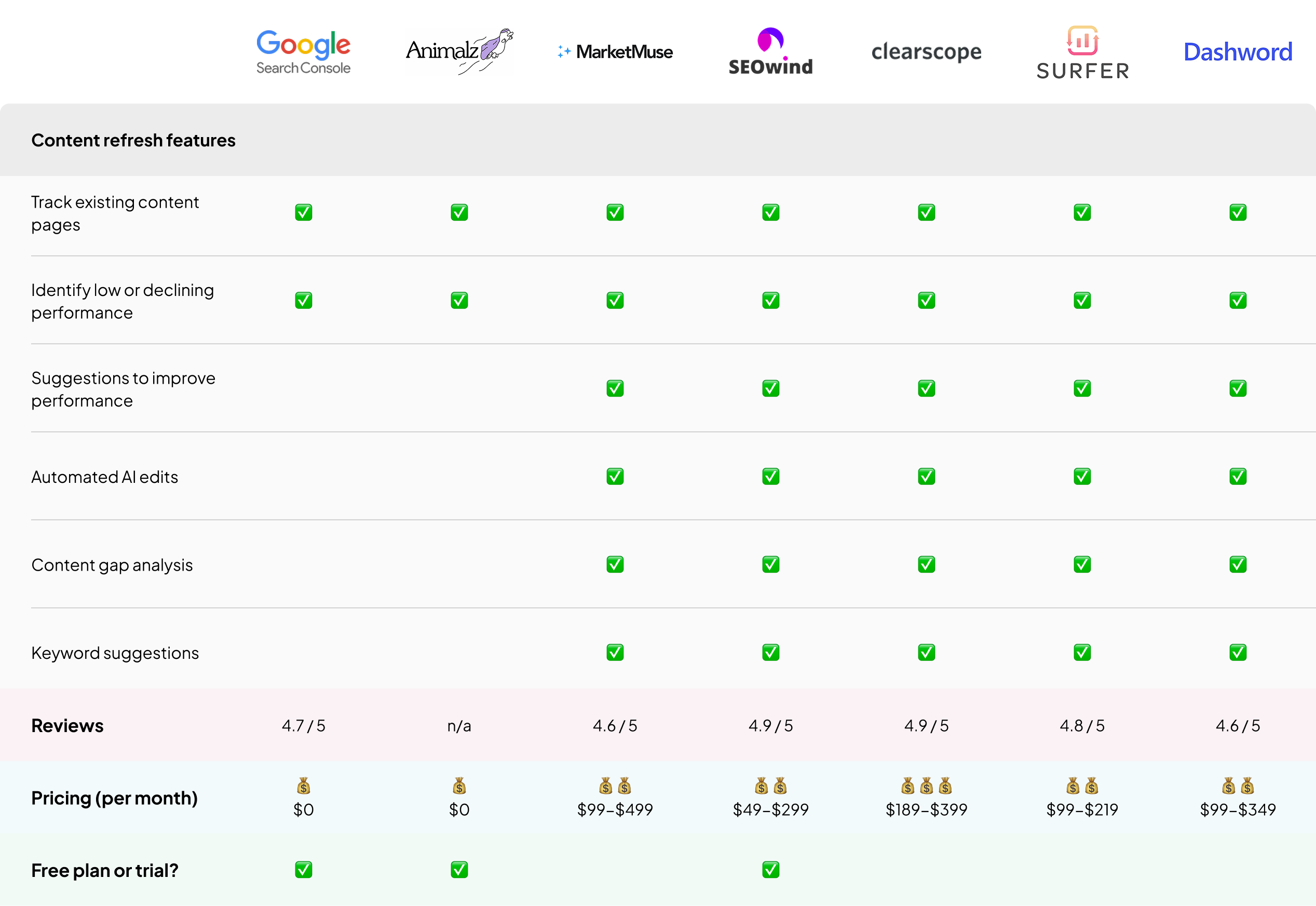


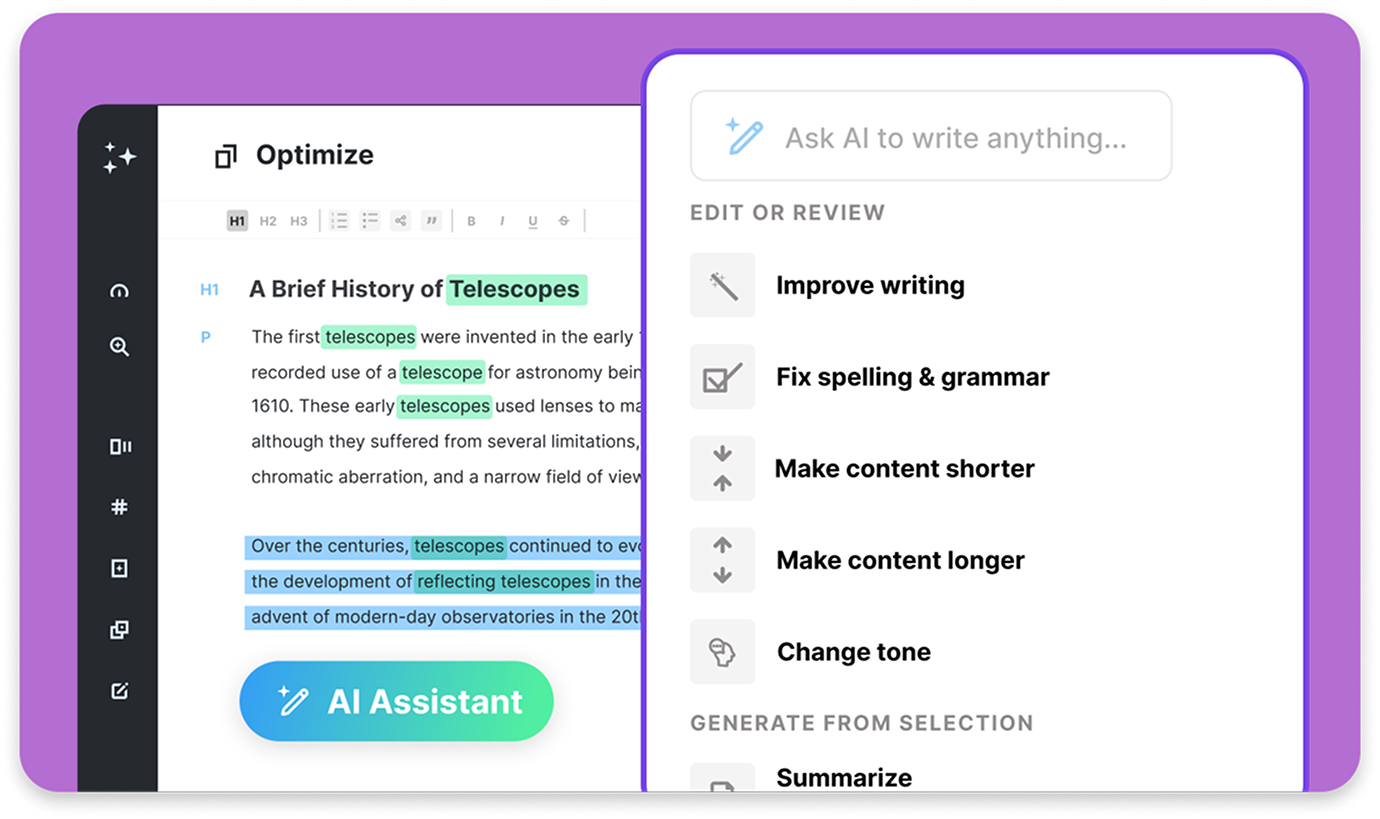







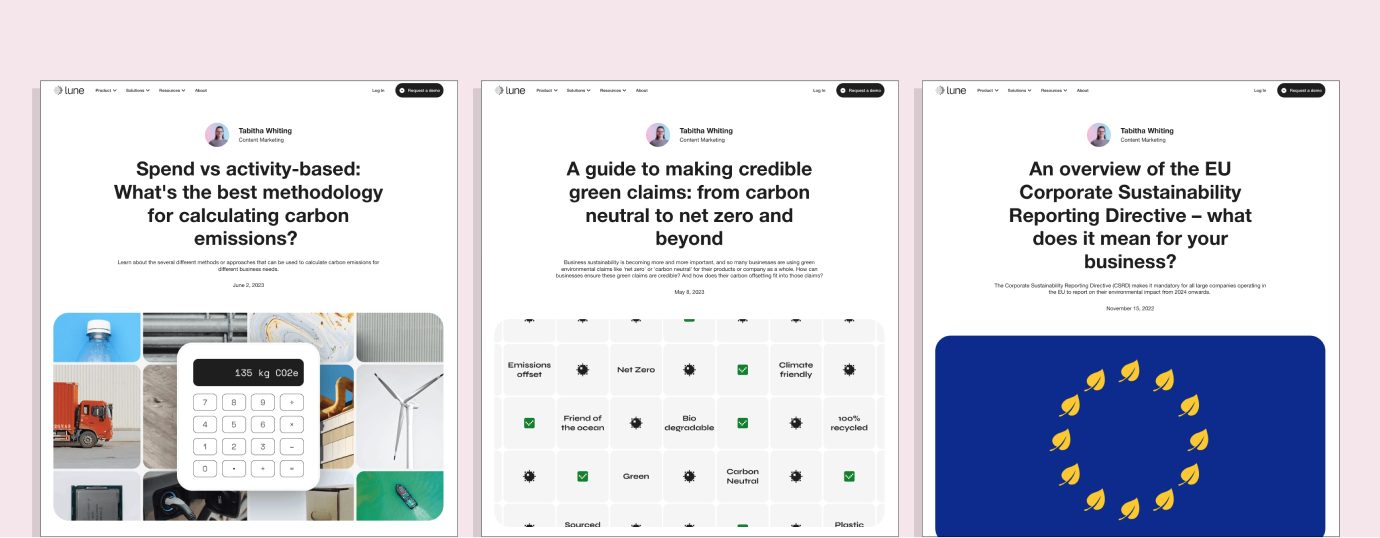













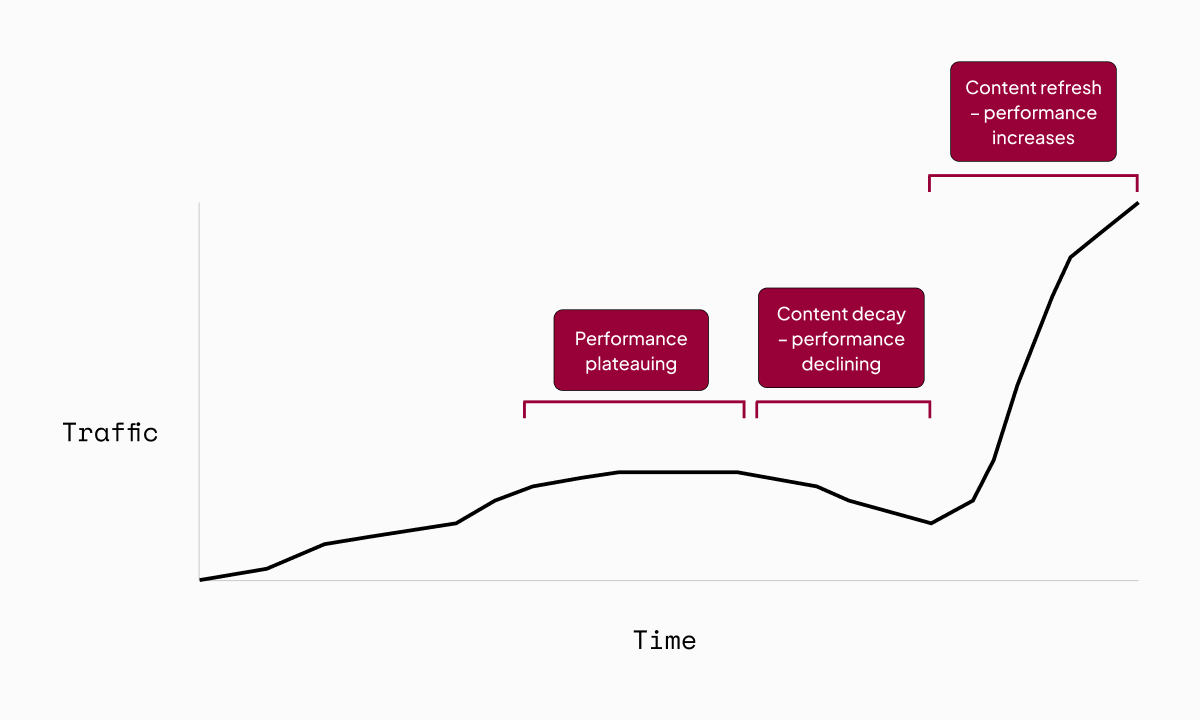



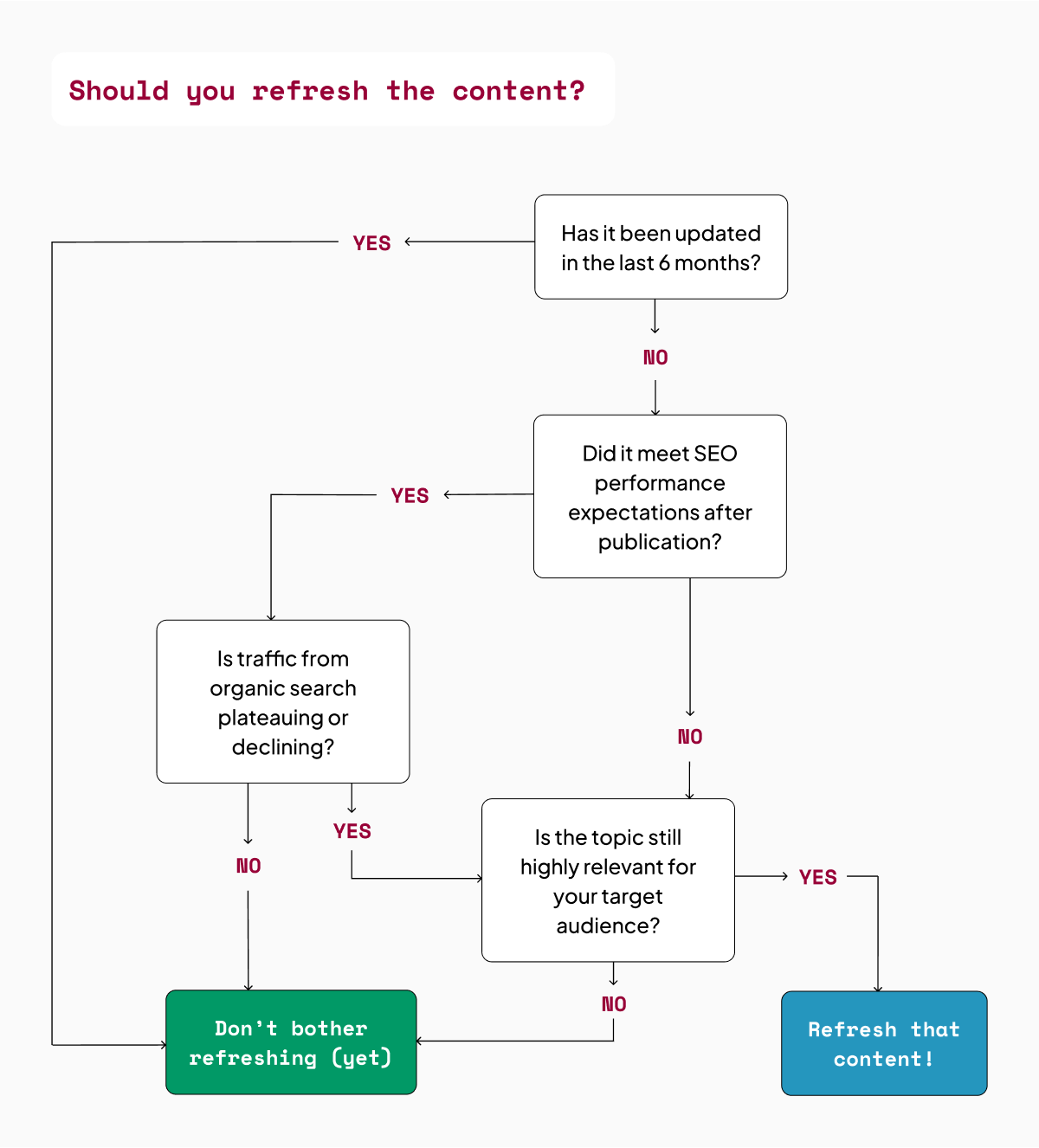

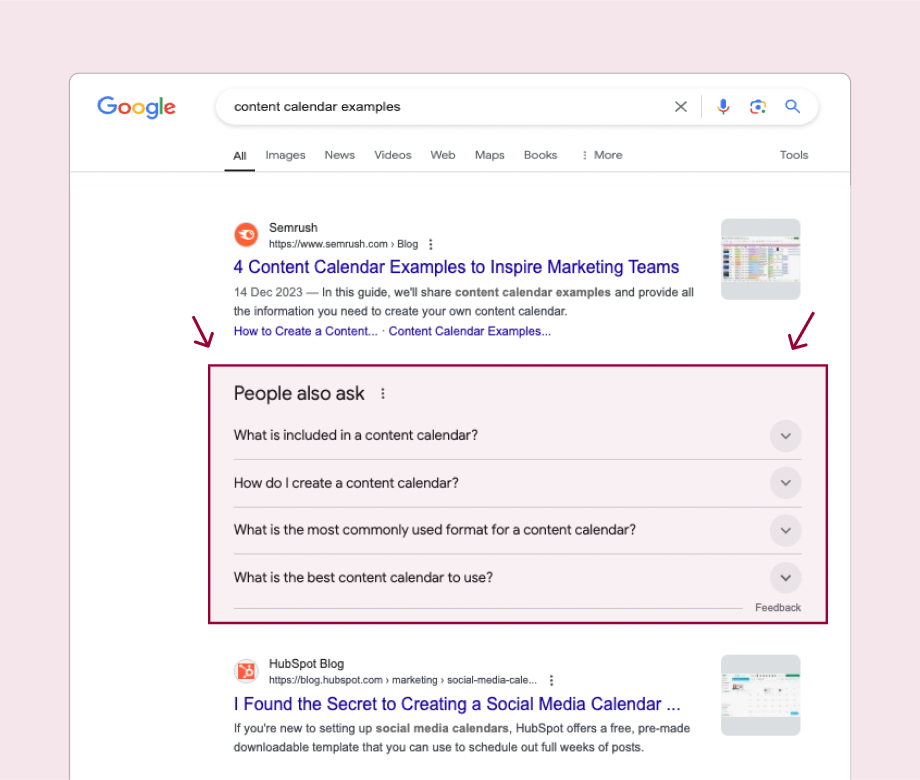

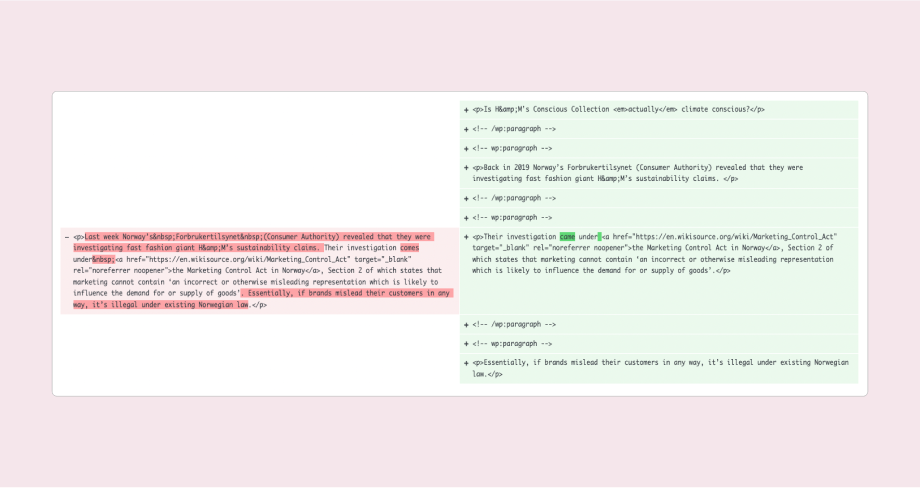

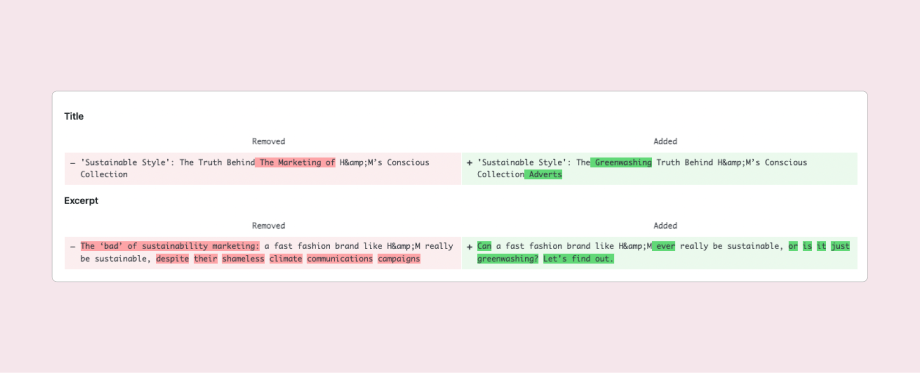


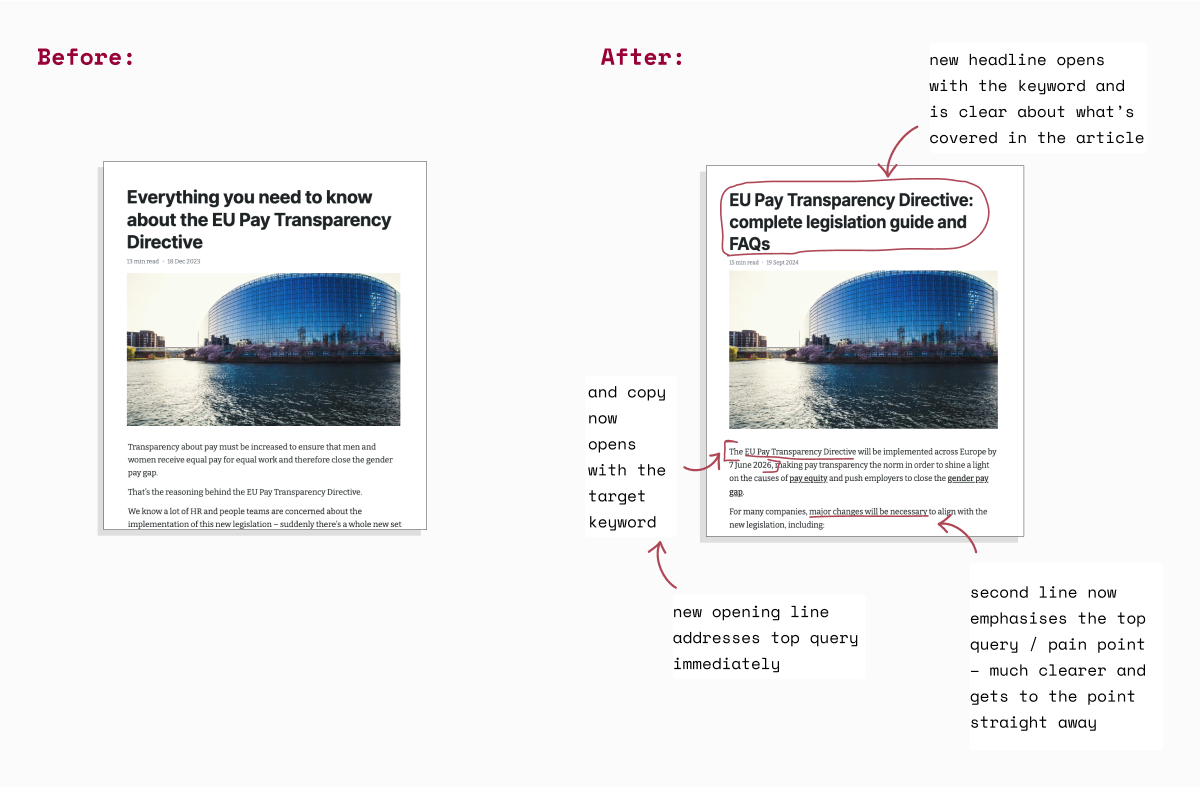
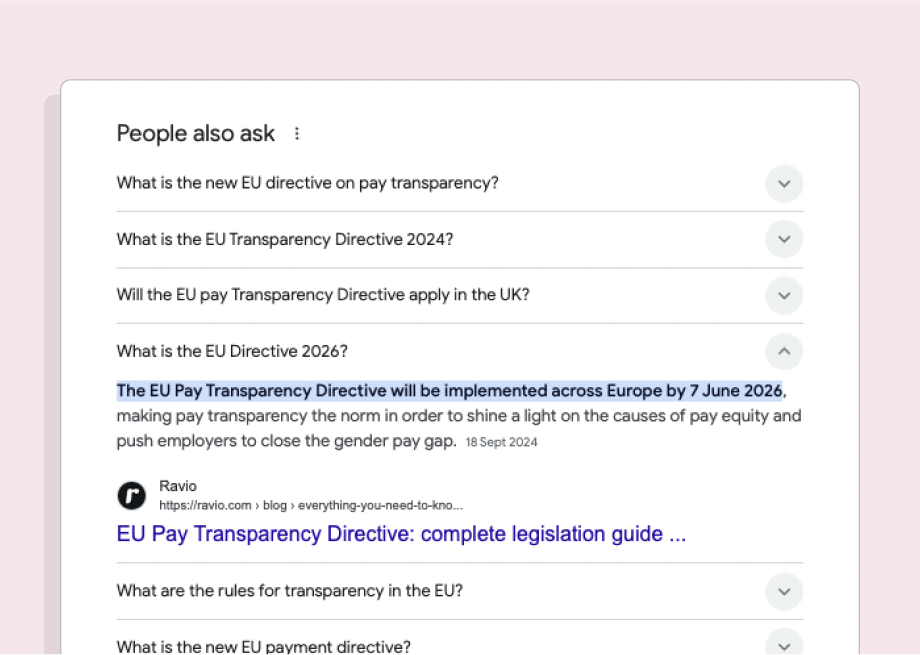
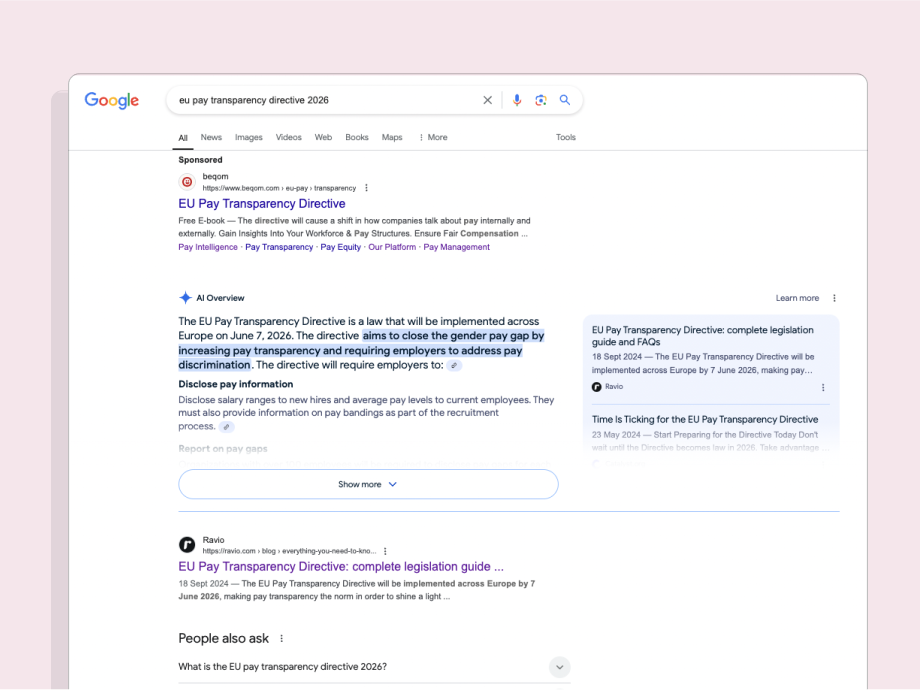
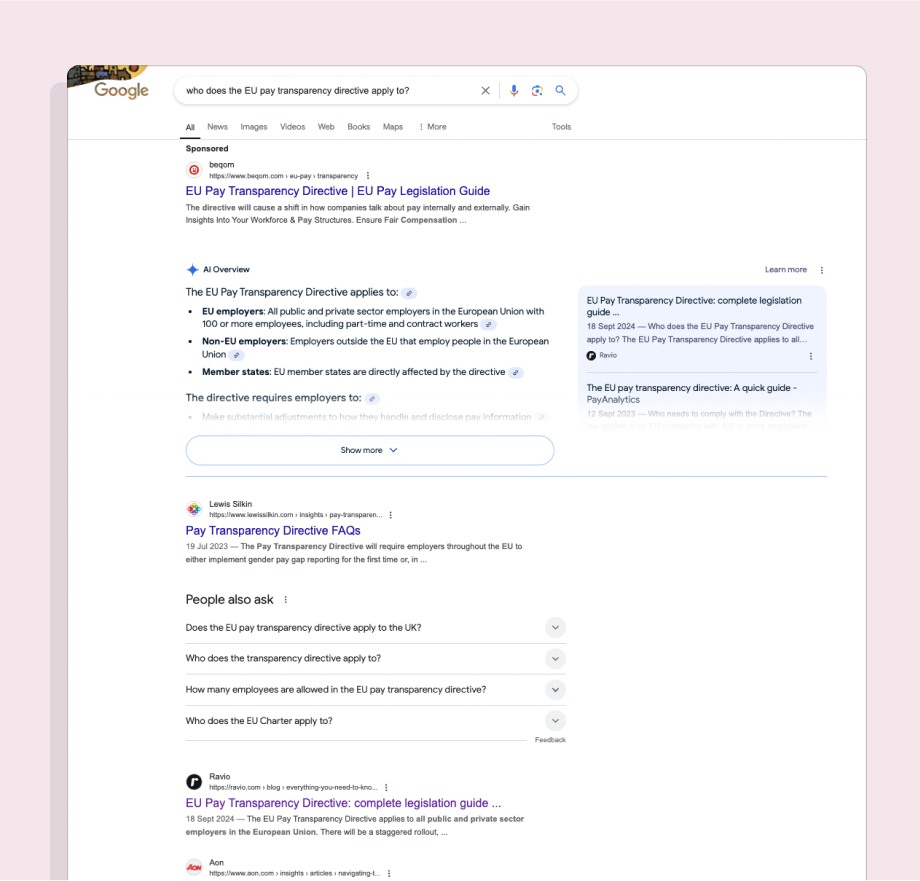
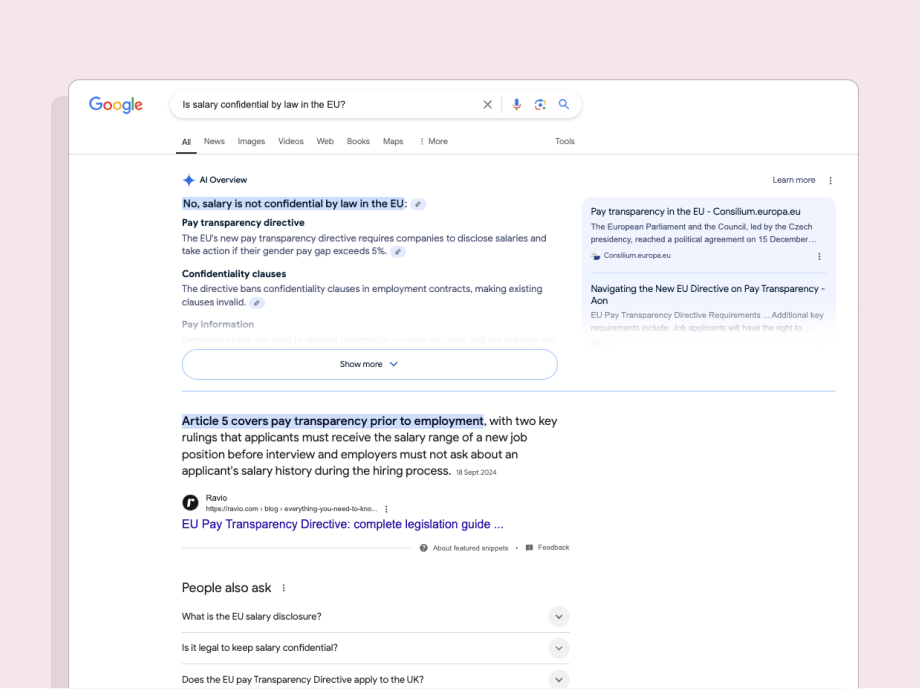
![Content strategy templates [free download]](https://tabithawhiting.com/wp-content/uploads/2025/01/header-content-strategy-template-e1736011912336.png?w=800)