
Content refreshes should be a regular component of any content marketing plan.
Some content becomes outdated, like headlines that refer to the ‘latest’ industry trends for 2022. Some content doesn’t perform as well as you’d like and needs a booster. Some content performs better than expected and could do even better with optimisation.
In all of these cases, a little content refreshing can do wonders for performance.
If you’re not sure where to start, this article will cover everything you need to know about how to effectively refresh content:
- What is a content refresh?
- What are the benefits of refreshing content?
- How do you know which content to refresh?
- How do you know which content to refresh first?
- What updates should be made when refreshing content?
- Content refresh examples
- How often should you refresh content?
- Should you prioritise refreshing content over creating new content?
What is a content refresh?
A content refresh is the practice of updating existing content.
It includes replacing outdated information or sources, adding in new information on the topic that has arisen since publication, and making SEO improvements.
The purpose of a content refresh is to ensure that older content remains accurate and up-to-date to prevent content decay i.e. the gradual decline of performance as the content becomes stale and value for the target audience decreases.
What are the benefits of refreshing content?
There are three major benefits to content refreshes:
- Prevent content decay to maintain (or increase) SEO performance
- Maintain or improve user experience
- Make quick wins as a content team.
Let’s take a closer look at each of these.
Content refreshes prevent content decay to maintain (or increase) SEO performance
The ‘Google Freshness Algorithm’ has been part of Google’s ranking algorithm since 2011, and essentially means that ‘fresh’ content will typically rank the most highly.
Outdated and inaccurate content, therefore, sends a clear signal to search engines that the content won’t be of the highest value to search users.
This doesn’t mean that you need to be constantly refreshing every piece of content, because Google does recognise that some content is evergreen and so will need updating less often – using the ‘Query Deserves Freshness’ function to determine if a search term requires an up-to-date answer, or whether the answer will typically remain the same for the long-term.
But if you see older content start to plateau or decline in terms of traffic from organic search, then this is likely why.
This is known as content decay, and it can be stopped in its tracks by a content refresh.
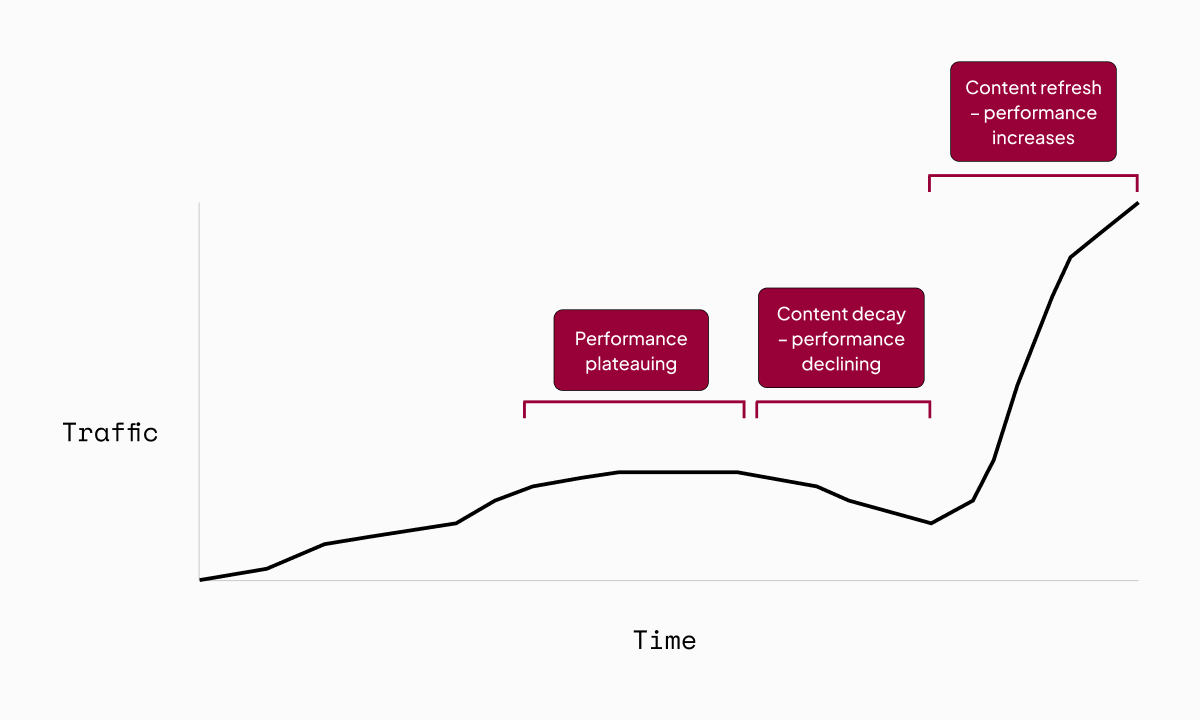
Refreshing the content removes any outdated and inaccurate material or sources, and replaces it with up-to-date information. This ensures it stays relevant and valuable.
To put this into perspective, Single Grain shared the results of a content refresh test on their website. They updated 42 blog posts and saw a 96% increase in traffic – totalling over 8,000 more monthly visitors post-refresh.
A content refresh is also the perfect opportunity to make any additional optimisations to improve SEO performance, so it might even start to rank more highly than before. That’s especially important for content that has never quite reached its full potential – content that ranks on page 2 or 3 of Google, for instance.
Content refreshes improve user experience
Ensuring that content remains up-to-date and relevant is a must for SEO, but it’s also just a must for your readers.
Outdated content damages brand credibility.
I’m sure we’ve all come across blogs before that include blatantly out-of-date information, or rely on data sources from decades ago. And I’d be willing to bet that it didn’t leave the most positive impression of the brand behind the blog.
Inaccuracies, out-of-date information and sources, irrelevant content – it all leads to a horrendous user experience for website visitors, which isn’t a good look for your brand.
Content refreshes are quick wins for the content team
As we’ve seen, content refreshes have an immediate positive impact – keeping user experience on track and can lead to a significant uplift in organic traffic (and at the very least will prevent existing traffic from declining).
They’re also low lift.
A content refresh is typically significantly quicker and easier than creating a new piece of content. Some pieces of content might need a complete overhaul, but usually it’s a case of making a few crucial updates and hitting re-publish.
So, content refreshes mean immediate impact with not-too-much time and effort.
What’s not to love?
How do you know which content to refresh?
There are a lot of companies out there that have hundreds of blogs on their website dating back years – it would take a significant amount of time and effort to bring all those blogs up to date.
So should they?
Well, no. Not all of that content is worth refreshing.
So how do you know which content to refresh?
The TLDR is this: focus on content that has high potential for increased traffic and/or conversions post-refresh – let’s take a look at what that means.
Earlier in this article I referenced a Single Grain study on content refreshing, which saw a 96% increase in traffic from updating 42 blogs.
More interestingly, 62% of that uplift came from just five of the refreshed blogs.
The majority of the refreshed blogs that saw no increase in performance were blogs that had less than 20 monthly visitors to begin with – which the study authors took as an indication that those blogs had low potential for SEO. These blogs simply weren’t worth the time and effort put into refreshing them.
So, we need to prioritise content that has high potential to improve or rectify SEO performance for content refreshes.
That means:
- Content that has had high traffic (impressions and clicks) from organic search but is starting to plateau or decline
- Content that has had a high number of conversions from organic search (e.g. sign ups, form submissions) but is starting to plateau or decline
- Content that is currently ranking page 2 or 3 for keywords that are highly relevant to your brand – the vast majority of clicks go to content on page 1
- Quality content on important topics for your brand that has underperformed against expectations for traffic / conversions
- Content that is showing signs of keyword cannibalisation (i.e. multiple pages on your website are competing for the same target keyword, damaging rankings).
💡Listicle blogs can be prime targets for content refresh
The Single Grain content refresh study found that listicle blogs saw particular performance improvements after being refreshed.
11 listicles were updated as part of the Single Grain content refresh, and those 11 posts (26% of the content refreshed overall) were responsible for 84.2% of the total traffic gained post-refresh.
The hypothesis is that listicle posts that focus on sharing examples are often the content type in most need of regular updating to stay fresh and relevant. For instance, one of the listicles Single Grain updated was a blog originally titled ‘11 Digital Marketing Trends’. ‘Trends’, by nature, need to be up-to-date to stay relevant. The Single Grain team updated those original 11 trends to do just that.
At the same time, listicles are also relatively easy to add additional value to, by adding additional examples. For the same blog, the Single Grain team added a whole bunch of new digital marketing trends – 31 to be precise – and retitled the blog ‘42 Digital Marketing Trends You Can’t Ignore in 2023’.
So, if you have any listicle content in a similar vein, it’s well worth adding it to the list of potentials for a content refresh.
Google Search Console is your best friend for figuring out which content this applies to.
To find content that is starting to plateau or decline in SEO performance use the ‘pages’ view in the search results report. Click into each page and check the trends for impressions and clicks. This will also surface important content that isn’t doing as well as you’d have hoped – which will also likely be evident from Google Analytics (or whichever web analytics tool you use).

To find content that is currently on page 2 or 3 of results for the target keyword, use the same search results report but filter by ‘average position’.
Take a general look at the queries you’re ranking in positions 10-30 for, as there may be secondary keywords in there that you could optimise existing content for.

One tip that’s caught me out before: make sure you have the ‘average position’ box ticked at the top of the page – it isn’t ticked by default and you won’t be able to use the filter if it isn’t.
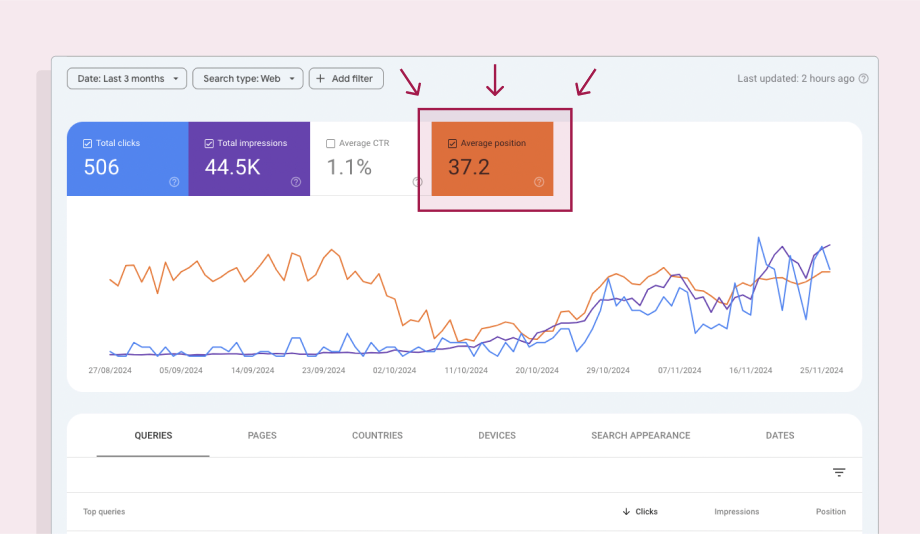
You can also use the ‘add filter’ function to search for specific keywords that you’re targeting with existing pieces of content to see how you’re ranking for those target keywords.
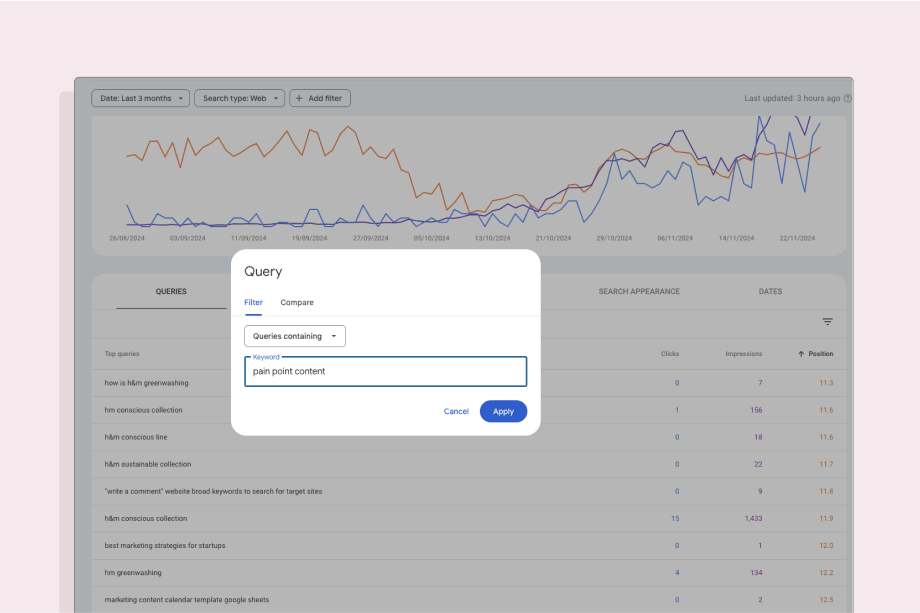
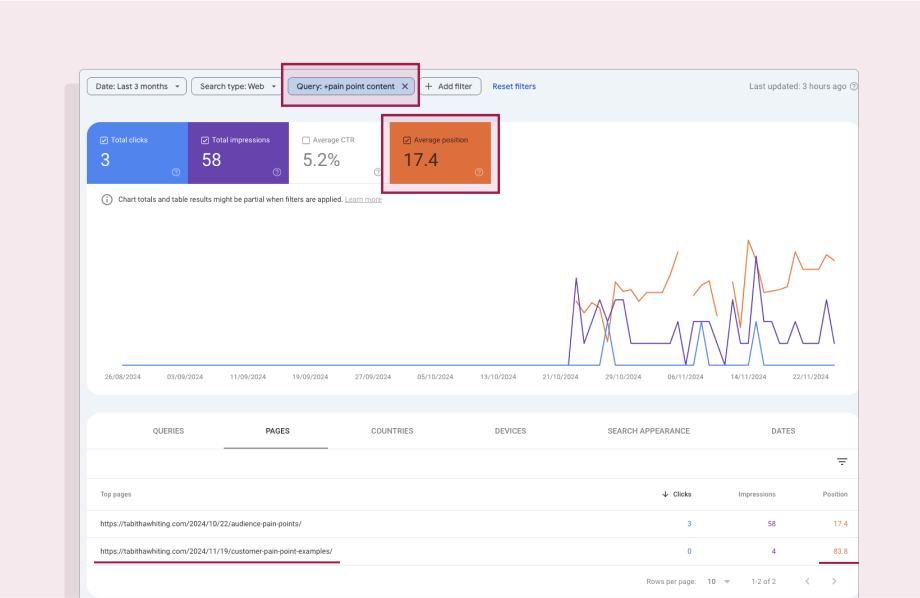
In this example for ‘pain point content’ my blog on the topic is ranking at position 17 on average – which means it could likely be bumped up the rankings with a refresh and optimisation.
If you saw multiple pages getting clicks for the same keyword, that would be a sign that keyword cannibalisation could be harming performance. In this example you can see I have two blogs on the topic of pain point content, but only one is getting impressions and clicks for that target keyword (the other is targeting ‘customer pain point examples’).
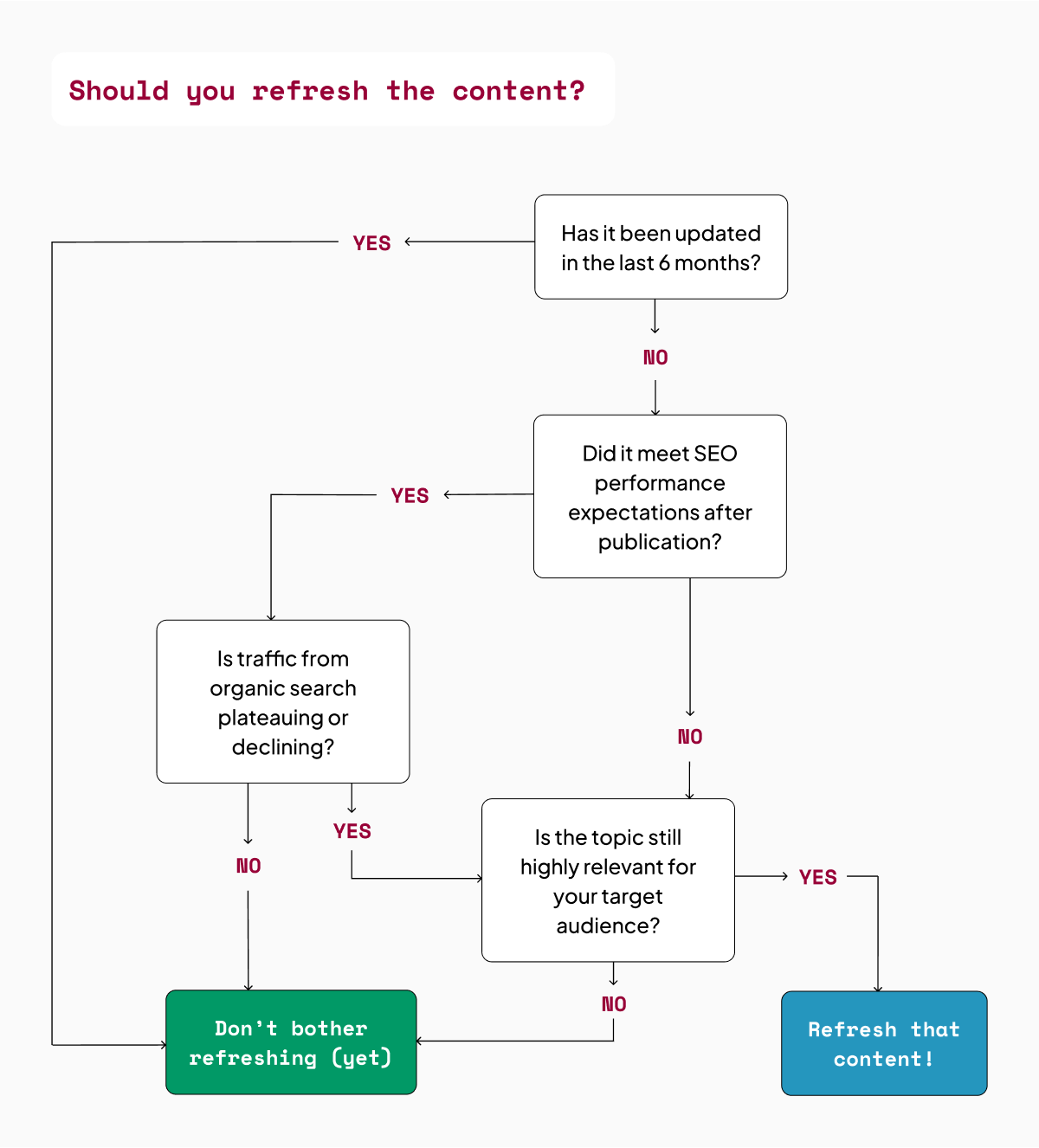
To summarise (because there was a lot of info in this section!), when deciding whether to refresh a piece of content or not, you need to consider the following…
Firstly, was the content published or last updated at least 6 months ago?
Secondly, does it fit into one of the following categories?
- A high traffic or high conversions piece of content that is starting to plateau or decline
- A piece of content that has performed decently but never reached page 1 of search rankings for the target keyword
- An important or highly relevant topic e.g. serving a common pain point for your target audience, that has never performed as highly as expected.
How do you know which content to refresh first?
It will often be the case that you run through the above exercise and find that there are a fair few pieces of content that are worth refreshing.
That’s especially true if you’re implementing content refreshes for the first time – you’ll likely end up with 50 blogs that haven’t been touched since publication, are still relevant topics, and have a lot of room for improvement on SEO performance.
So which should be refreshed first?
Well, it really just comes down to a prioritisation exercise.
Priority content will differ from company to company depending on your specific content strategy and goals.
But a few universal points to consider when prioritising content for refreshing are:
- Revenue potential. Bottom of funnel blogs targeting keywords with commercial search intent (i.e. search terms users use when they’re ready to buy a solution) are more likely to bring users that convert to sales leads – so they’re likely to be a company priority.
- Evergreen pain points that come up regularly in sales calls. Content that targets the specific pain points of your target audience makes your brand stand out as an expert in the field, whilst also providing your sales team with valuable content to share to support prospects or overcome their objections.
- Pillar pages. Pillar pages are, aptly, ‘pillars’ in your SEO performance. They form the core of topic clusters so they contain a lot of internal links to other content on your site, and they likely rank for several secondary keywords as well as your target keyword – so they’re very important for overall SEO performance and domain authority. Keeping them performing highly, therefore, is important to keep the whole foundation of your SEO strategy afloat.
- Business priorities. If there’s a big push happening to push a specific product or feature then you’ll likely want to prioritise refreshing content on relevant topics that references that product/feature, or could have this added during the refresh.
- SEO potential. Not all content is for SEO. Case studies, for instance, are unlikely to perform highly for organic search – but they’re super important sales enablement content for prospects evaluating whether to choose your brand. Content refreshes are primarily to ensure organic search performance remains high, so non-SEO content is usually lower down the list – though it’s important to keep all types of content up-to-date for user experience.
🛠️ 7 best content refresh tools
SEO tools with content refresh or optimisation features can help you identify which content could perform better if refreshed, and to understand what edits to make.
Discover the tools
What updates should be made when refreshing content?
A lot of advice that you’ll read about content refreshes tells you that changing a headline from ‘2023 trends’ to ‘2024 trends’ and updating the publication date to today’s date is enough to signal to Google that a piece of content is fresh and relevant.
That’s bullshit – Google’s algorithm is a tad smarter than that (and so are your readers, for that matter).
Different content will need different updates during a refresh, but as a general rule there are two main scenarios to consider:
- Poor SEO performance – content decay, or content that never met its potential
- Keyword cannibalisation
Step-by-step guide: how to address poor SEO performance with a content refresh
Here’s my process for updating content which isn’t performing as well as expected, or is showing those dreaded signs of content decay…
Step 1: Re-read the content
First things first, take the time to read the full content, start to finish, so that you know exactly what you’re working with and can start to spot areas that might need updating.
Step 2: Keyword analysis
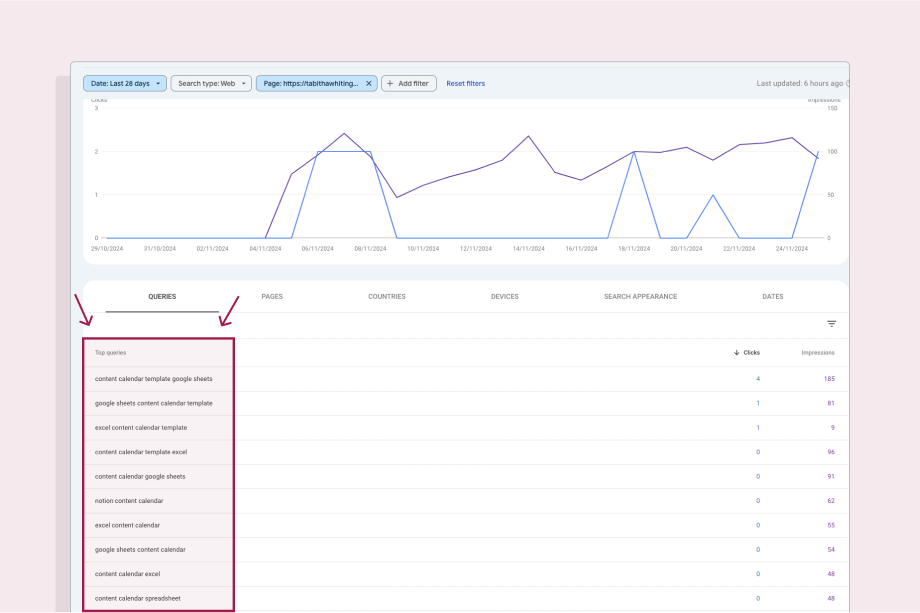
Use Google Search Console to find out what secondary keywords users are seeing the content in association with (i.e. commonly used search terms other than the keyword you’re actually targeting) which you could optimise for to increase clicks.
For example, below you can see the queries that users are searching when they come across my free content calendar templates.
I’m targeting the keyword ‘content calendar template’ but, as you can see, there are several secondary keywords that are similar but more specific in terms of platform – such as ‘content calendar template google sheets’ and ‘notion content calendar’. These are search terms that I should be optimising for in the subheadings and body of the blog to maximise performance.
Step 3: Analyse the top 10 ranking posts
Google your target keyword and read through the top 10 posts that are ranking for that keyword.
Make a note of:
- Gaps or information that feels light or lacking – if you can offer additional or unique insights (e.g. original research or subject matter expertise) that aren’t currently being covered and would provide more value to users, then it will help your performance.
- Information they include that you don’t currently offer a perspective on – if all the top ranking posts are covering something that you aren’t, it’s likely that Google views that as valuable information for the users searching that keyword, so adding it in will help your performance.
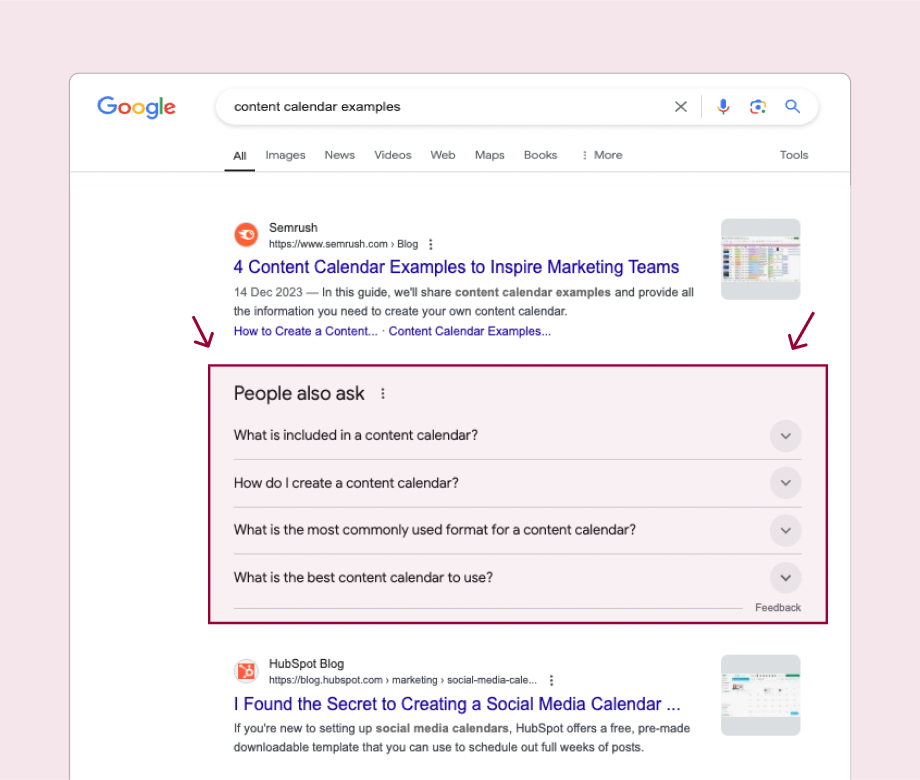
- Relevant questions in the ‘people also ask’ section of Google – again this could give ideas for additional sections or information to cover to increase the value of your content, you could even add an FAQs section at the end of the blog which explicitly covers those related questions.
Step 4: Make a new copy and highlight the content updates needed
Make a new copy in an editable format and mark up anything that needs updating, which typically falls into the following categories:
- Out-of-date info. Information, statistics, screenshots, sources (I tend to stick to the rule of only using sources from the last three years) that now feels outdated.
- Content gaps. Information, trends, examples, etc that have arisen since the last time the content was updated and need to be added in to ensure full coverage of the topic – plus any new sections to add in identified through analysing the top ranking posts and ‘people also ask’ for the topic.
- Additional value. Ideas to increase the quality and value of the content through incorporating unique angles, new data analysis, subject matter expert insights, etc.
- Proofreading edits. Typos that you missed before, broken links, structural improvements, fluffy language that could be tightened – no content is perfect, so it’s always worth a quick tidy up as you go.
- Keyword optimisations. Make sure the target keyword is covered in all bases (title, meta description, first paragraph, image file names, image alt text). Optimise the structure and copy for any secondary keywords identified in Search Console – this typically means adjusting subheaders and editing language to explicitly align with those keywords.
Personally I like to copy and paste the content into a new Google Doc and use a different colour of highlight for the different types of updates – adding comments as I go. But do whatever feels most useful for you, you can even print the page out and grab a pen and highlighter if you’re feeling particularly old-school.
Step 5: Make those updates!
From there it’s just a case of doing the research to address any gaps or outdated information, writing the new copy, designing the new images, and getting it re-published.
It’s always worth updating the publication date when you re-publish to give a firm signal to Google that you’ve updated the copy.
💡A word of warning: be very careful if you update the URL
URLs are important for SEO because, done well, they’re a strong signal of the target keyword and the value that the content offers.
But it’s common for URLs to be done poorly or automatically generated, following the structure of the title exactly instead of pinpointing the focus topic and keyword.
It’s also common for URLs to contain the date, which can quickly make it feel outdated.
For instance, for a blog about content marketing trends the ideal URL would be …/content-marketing-trends – but it might end up being …13-content-marketing-trends-to-look-out-for-in-2022 instead.
In this scenario, it’s tempting to update the URL to slim it down and take out that old date. That’s a good idea, but you need to be very careful.
If you link to that blog anywhere else on your website, it’s going to cause a broken link when you change the URL, which will have a negative impact on SEO – so you need to be ready to update them all immediately.
My best advice is to think about URLs as evergreen.
The blog content might change, but that URL should stay the same. So if you do change the URL, only change it once, and change it to reflect the core topic and keyword covered, so that you never need to update it again.
Step-by-step guide: how to address keyword cannibalisation with a content refresh
If you’ve spotted signs of keyword cannibalisation (multiple pieces of content competing for the same search terms) through the content refresh process, then the updates needed are different.
There are two ways to do a content refresh to address keyword cannibalisation.
Firstly, you could combine the competing posts:
- Determine the highest ranking URL of the competing posts.
- Combine the competing posts into one larger post that covers all aspects of the topic in entirety.
- Make any additional updates and improvements using the refresh list in the previous section.
- Publish the new bumper-blog on the highest ranking URL.
- Archive the other competing post(s) and add a 301 redirect to the new bumper-blog.
Secondly, you could try to optimise for different keywords:
- Determine the highest ranking URL of the competing posts.
- Add any relevant content from the other competing posts into that highest ranking post to increase its value – and make any other updates and improvements too.
- Look for secondary keywords that the other competing posts (aside from that highest ranking one) are already ranking for that are related to the same topic but are more specific e.g. question keywords or long-tail keywords, so that it’s clear they’re targeting different search intent
- Choose a keyword for each of the other competing posts and make changes to re-optimise for that new target keyword.
- Re-publish all blogs.
This is trickier because it’s always hard to optimise existing content for a new keyword, but if the content is different enough from each other then this may be worth a try.
Keep an eye on each post and see if they stop competing and start to rank for the new target keywords. If they do, great. If they don’t then your best bet is to archive the competing posts to avoid cannibalisation.
Content refresh examples
I find it always helps to look at real-world content examples to put things into context, so let’s take a look at a couple of worked examples of content refreshes that I’ve done myself recently.
Content refresh example to improve SEO performance and prevent content decay
I wrote this blog on H&M’s ‘sustainable’ Conscious Collection back in 2019. It was originally on Medium, but I migrated it to this website in early 2024.
I wrote the blog as a personal commentary, not as an SEO play.
But looking at Search Console post-migration, it was clear that the blog was getting a steady (though small) stream of traffic from organic search, and because of this it became clear to me that it could be performing much more highly than it was.
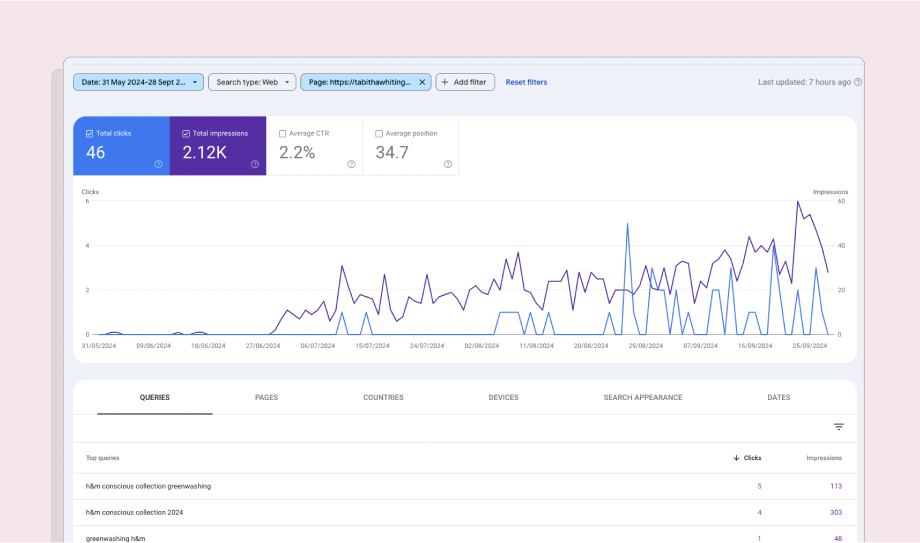
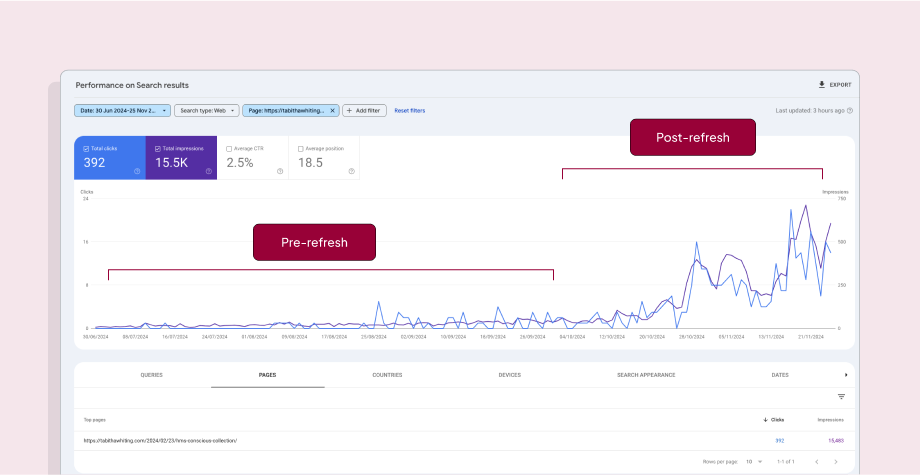
By September it was obvious that traffic wasn’t going to increase on its own, and it seemed like it could be slowing down (see graph below), so I thought I’d do a little content refresh experiment of my own.
So, on the 1st October I made a bunch of updates.
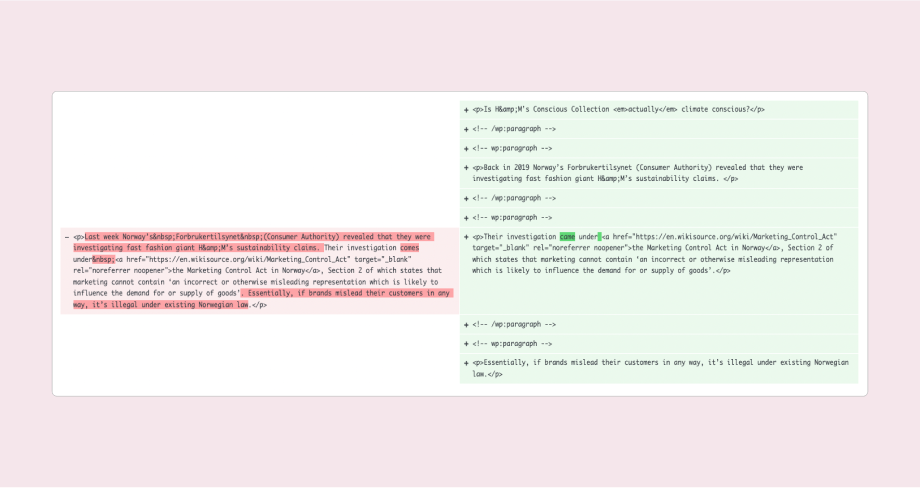
I updated outdated information, like this reference to a legal case from ‘last week’ that was actually referring to a case from 2019:
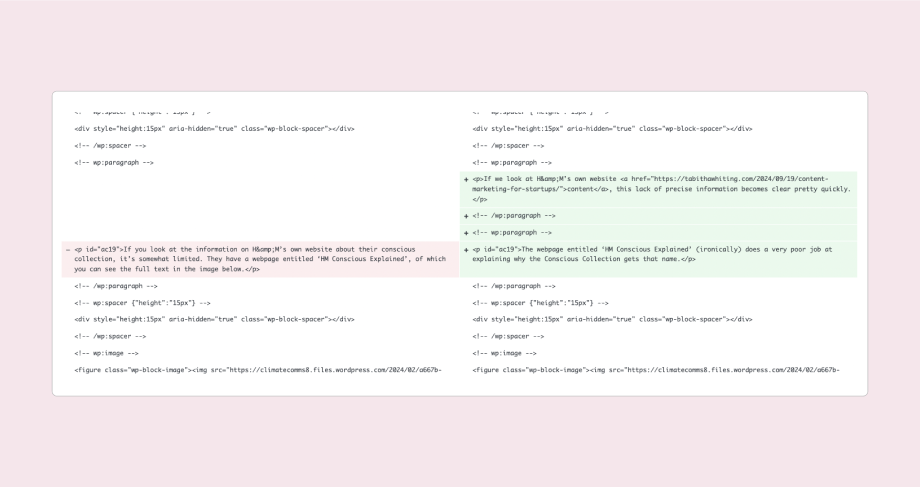
And this reference to a page on H&M’s website that no longer existed:
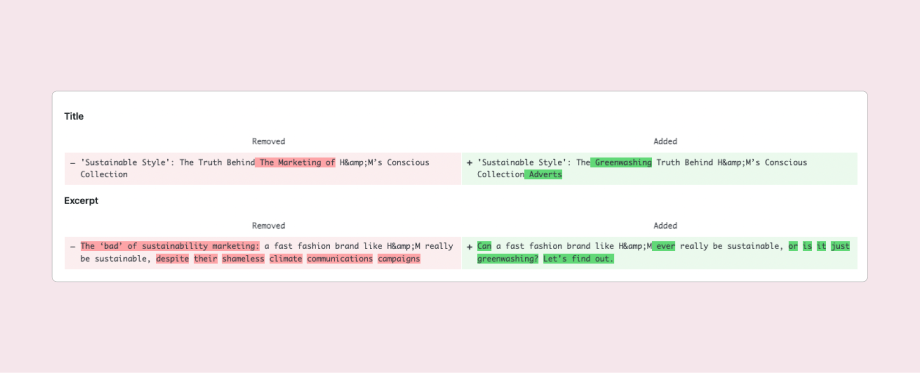
I edited the blog title and meta description to align with keywords that were gaining impressions and clicks – ‘hm greenwashing’ being the main one:
The positive impact was pretty immediate.
The blog went from 687 impressions and 18 clicks in the month of August 2024, to 3,663 impressions and 102 clicks in October 2024.
SEO performance continued to increase in November 2024, with 10,196 impressions and 252.
And that was all with a relatively simple content refresh – there’s a lot more I could do here to make this blog even more valuable to readers.
Content refresh example to combat keyword cannibalisation
The upcoming EU Pay Transparency Directive is an important topic for Ravio’s core audience of People Leaders who manage compensation and benefits for their company – so the team wanted to cover it in depth.
When I originally joined Ravio back in 2023 they already had a blog on the topic of the EU Pay Transparency Directive which covered the changes in gender pay gap reporting that the new legislation would bring in.
It wasn’t specifically optimised for SEO, and it was a mix between an entry-level ‘what is X’ blog and a detailed explainer on gender pay gap reporting in Europe and how the new Directive would change this.
This meant that it included sections like ‘What is the EU Pay Transparency Directive’ which meant that Google assumed that it was targeting the keyword ‘EU Pay Transparency Directive’.

Instead of fixing the issues with the original blog, when I joined the team I built on the series by publishing the following pieces:
- Everything you need to know about the EU Pay Transparency Directive – this was designed to be the main pillar page guide for the topic
- The EU Pay Transparency Directive and worker rights to salary information – a blog covering specifically the impacts of the Directive on existing employees
- The EU Pay Transparency Directive and salary information for job applicants – a blog covering specifically the impacts of the Directive on job applicants and hiring processes.
As you can tell from the titles of these blogs alone, they weren’t keyword optimised and all of them heavily featured the term ‘EU Pay Transparency Directive’.
This led to keyword cannibalisation, with each of these blogs competing and pushing each other down the search rankings.
The solution was to make the pillar page as strong as possible by adding in additional elements from the other competing blogs – and then to archive and redirect the competing blogs.
I made some additional updates at the same time:
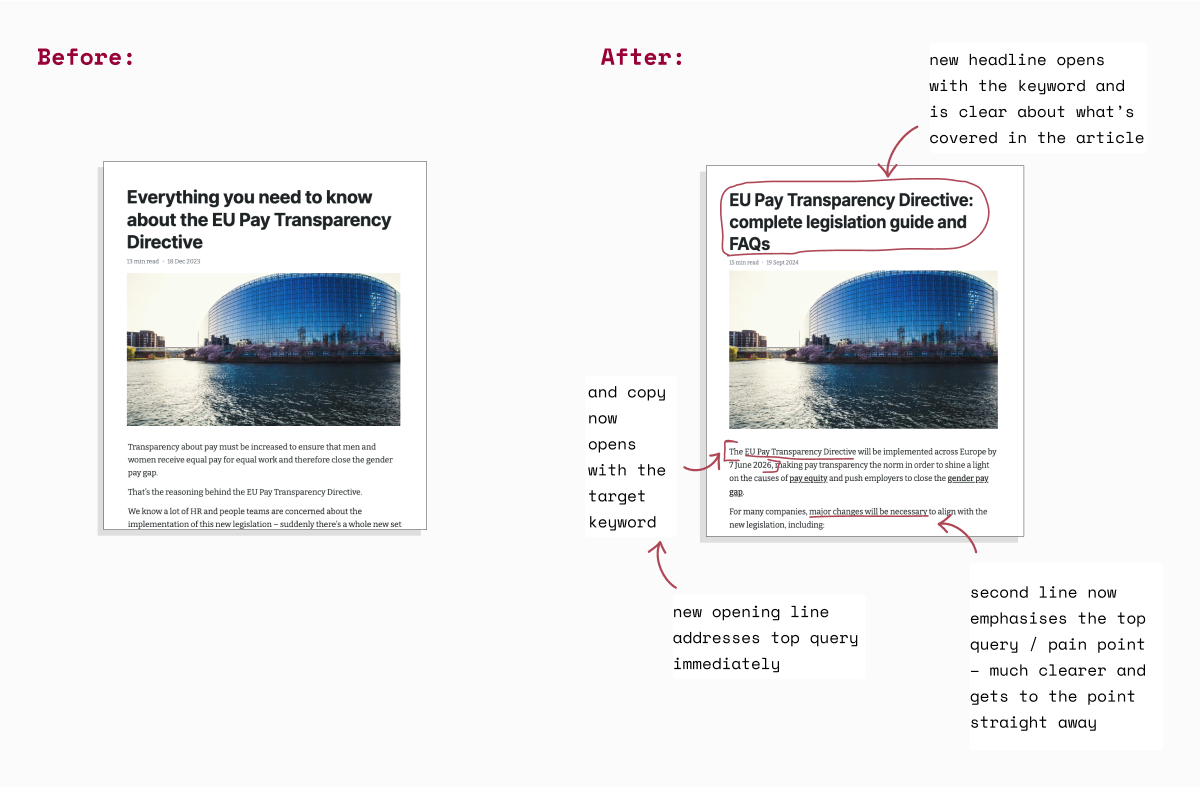
- Title update to make it crystal clear what the blog covered: ‘EU Pay Transparency Directive: complete legislation guide and FAQs’
- Updated introduction to cut the fluff and get straight to the top query i.e. when do I need to be ready for the EU Pay Transparency Directive
- Add in additional information released since publication: a section on Sweden’s draft proposal for transposing the Directive into national law and a section with data findings from Ravio’s pay equity original research report.
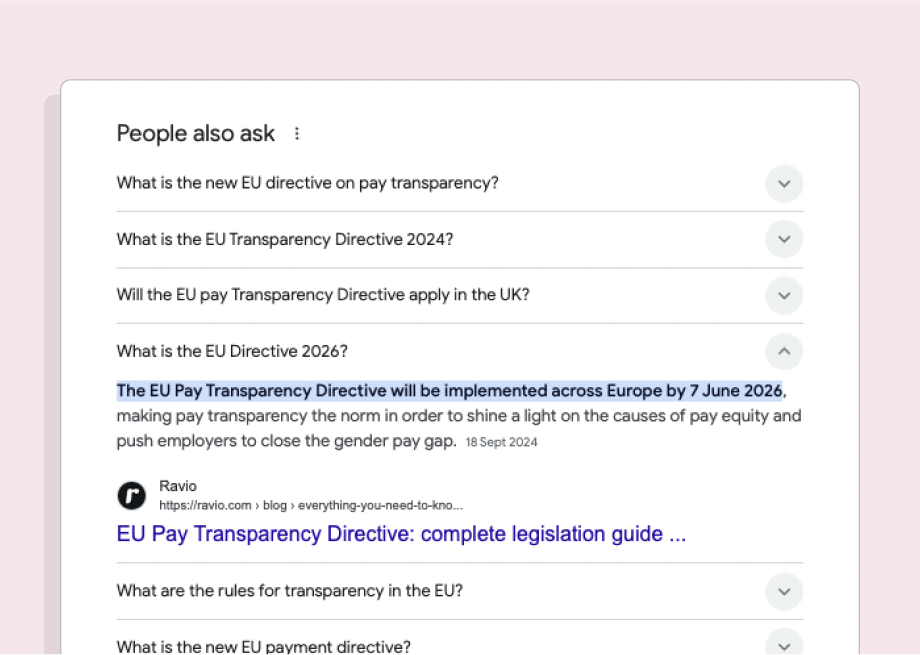
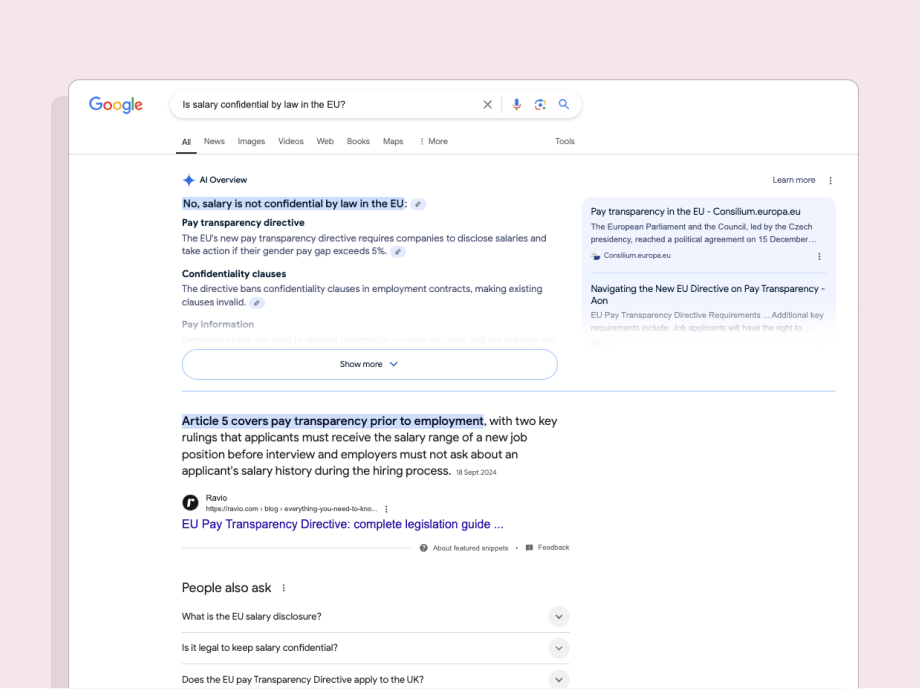
The result is that Ravio’s guide made it to page 1 for the keyword ‘EU Pay Transparency Directive’ – as well as being featured in the ‘people also ask’ section.
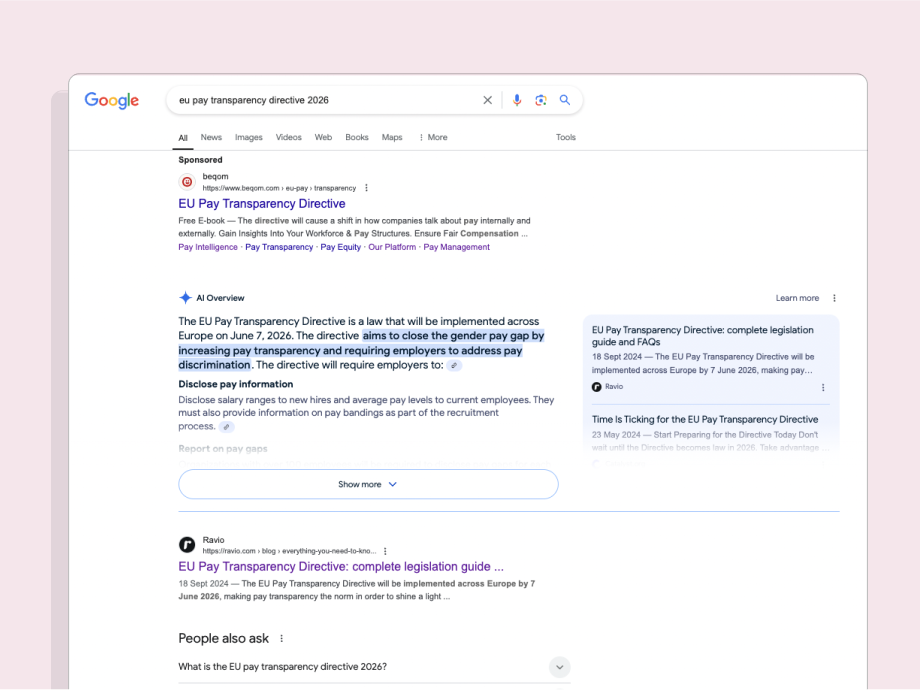
It’s also ranking highly for additional secondary keywords which has significantly boosted traffic, such as ‘EU Pay Transparency Directive 2026’:
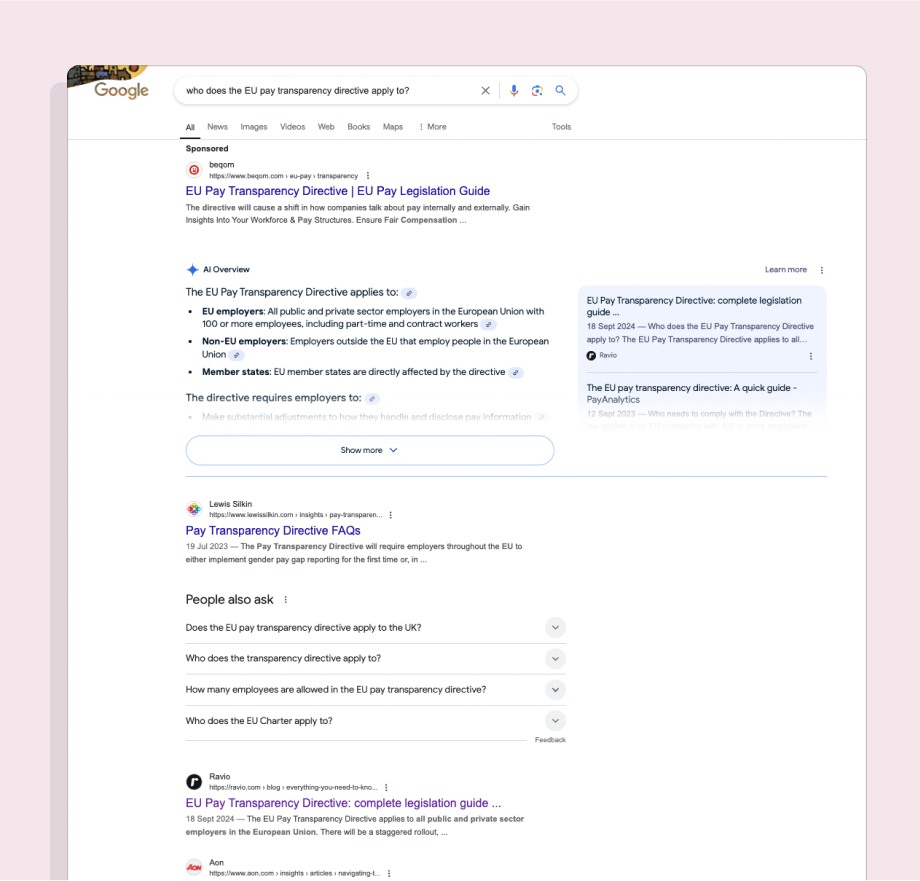
As well as question keywords like ‘who does the EU pay transparency directive apply to?’:
And ‘Is salary confidential by law in the EU?’:
How often should you refresh content?
Important content should be refreshed at least once per year. Market trends and data can change quickly, so an annual content refresh ensures that content stays fresh and relevant – maintaining performance and avoiding content decay for important traffic and conversion-driving content.
This is a general rule, but there’s no right or wrong here.
For your top-performing content, it might be worth scheduling a content refresh every 6 months just to make sure performance doesn’t start to decline.
For less important content, an annual refresh might be unnecessary. And some content doesn’t need refreshing at all – a panel event summary from two years ago, for instance, is unlikely to ever be strong enough to be a high SEO performer today.
My personal recommendation is to schedule content refreshes into your content calendar in the same way you would for new content. Put them in every six months for high-performing content that drives new traffic and conversions. Put them in once a year for everything else. When the time arises, check whether it’s worth the time and effort refreshing (using the advice in the ‘how do you know what content to refresh’ section above) before diving in.
Should you prioritise refreshing content over creating new content?
Well, it depends (sorry, but it really does!)
Prioritisation for new vs refreshed content comes down to the same principles as in the section ‘How do you know which content to refresh first?’ above – essentially content that has the most potential to increase brand awareness and drive conversions should be top of the list, whether that’s a new piece or an old piece to refresh.
Generally speaking, you want to strike a balance of new content and content refreshes so that over time you’re producing new content on important topics whilst staying on top of a growing content library.
Klaviyo, for instance, has about 20-30% of the content calendar reserved for content refreshes each quarter, with 70-80% new content – which I’d say is around the right balance to aim for.
If you have a large amount of legacy content gathering dust and damaging SEO performance, but that does have high potential and is still relevant, then it might be worth an initial focused content refresh sprint to get through some of that backlog and give an immediate boost to SEO performance – and then move into that 80/20 balanced calendar from there. I’ll often do this if I start working with a new company that hasn’t been carrying out regular content refreshes.
 Tabitha Whiting: High-impact content for high-impact startups
One thought on “How to refresh content to stop performance decline (ft. examples)”
Comments are closed.