Most content marketers have two things: a content strategy gathering dust in Google Drive, and a content calendar that’s a frantic record of what went out last week.
What they’re missing is the bit in between.
A content marketing plan is what connects your strategy to your calendar. Without it, you end up in the most common trap in content: creating a lot, building momentum on nothing.
What is a content marketing plan?
Before we get into it, just a quick note on terminology, because content plan, content strategy, and content calendar get used interchangeably all the time – and I want to make sure you know what you’re getting with this template.
Content strategy = the foundational thinking. Your goals, your audience, your pillars, your POV. The framework that guides all content decisions.
→ free content strategy template here if that sounds more like what you need.
Content marketing plan = the prioritised list of what you’re actually going to create this quarter and next, connected back to that strategy. This post.
Content calendar = the day-to-day production management. What’s in draft, what’s scheduled, what went out when.
→ free content calendar template here if that sounds more like what you need.
Why most content marketing plans don’t work
The most common version of a content plan is essentially a big list of content ideas with no signal about what matters.
Everything gets added. The blog series someone mentioned in a planning meeting. The webinar sales have been asking for. The LinkedIn presence the CEO noticed a competitor had. The research report that would be great for PR.
It all goes on the list, the list grows ever-longer, and it becomes impossible to manage, without a clear view of what should come first.
A good content marketing plan forces two things: a clear connection back to your strategy (so every piece has a reason to exist beyond “someone thought it would be nice”), and an honest view of priority (so you know what you’re committing to, what you’re intending to get to, and what’s just an idea for now).
That second part matters more than people give it credit for.
Prioritisation isn’t just an organisational nicety – it’s how you protect your time and stay focused on what’s actually working.
When you’re a content team of one, or even a small team, your capacity is the constraint.
A content plan that treats everything as equally important is a plan that guarantees you’ll make slow progress on everything rather than real progress on anything.
How to create your content marketing plan
1. Start with your strategy
If you don’t have a content strategy yet, start there first. Your plan is only as good as the strategy behind it – without clear goals, audience, and pillars to connect back to, you’re just making a list.
Dive deeper: Content strategy guide
2. Decide what goes in your plan
A content marketing plan has a different job to a content calendar. You don’t need publish times, post copy, or image briefs here. You need enough information to make good prioritisation decisions and brief the work clearly when the time comes.
For me, that means for each piece of content, I’m capturing:
What it is: working title and format.
How it connects to strategy: which topic pillar it belongs to, what goal it serves (SEO, brand building, lead gen, enablement), and who it’s for. If you can’t fill these in, that’s a signal the piece probably shouldn’t be on the plan.
How it’ll reach people: distribution. Where it lives and how it gets promoted. I find this is worth capturing at the planning stage because distribution dependencies (a guest’s LinkedIn reach, a design resource, a campaign launch) often affect timing – and, frankly, you shouldn’t create a piece of content without knowing how it’s actually going to get seen.
Who else is involved: collaborators. SMEs, freelancers, partner brands, other internal teams. Again, useful to flag early because these dependencies affect when something can realistically happen, and because it might impact the distribution plan too.
How urgent it is: priority. P1 means committed, this is happening. P2 means strong intention. P3 means nice to have if capacity allows.
Where it’s up to: a lightweight status so you can see at a glance what’s in brief, in progress, or not started yet – and I tend to split my content plan by planning period too, so if you work in a standard content manager job and you’re working quarter-to-quarter, you have a view of this quarter’s priorities, and next quarter’s too.
Rough timing: an estimated publish date. Doesn’t need to be precise (that’s what the production calendar is for), but having a sense of when something lands helps you sequence things sensibly.
3. Include an ideas log
The structure I use, and that’s reflected in the template, is to split my content plan by:
In flight – what you’re committed to this quarter.
Next up – what you’re planning for next, the right priorities for next quarter.
Ideas log – a place to dump ideas, but with all the context you need to prioritise them next time you’re looking at next quarter’s work. I review this at the start of each quarter and bring the best ideas into the plan.
4. Review it regularly
A content plan that only gets looked at in quarterly planning isn’t doing its job.
The most useful version is one you’re in weekly – adding new ideas to the log as they come up, updating statuses as things move forward, and occasionally promoting something from Next up to In flight when a piece becomes a priority.
The ideas log especially is worth maintaining as a live document rather than a once-a-quarter exercise.
When a subscriber question sparks a content idea, when you see a gap in your SEO coverage, when a partner suggests a collaboration – drop it straight in.
Quarterly planning then becomes much easier because you’re not trying to generate ideas from scratch, you’re choosing from a list you’ve already been curating.
Free content marketing plan template: Excel, Google Sheets, Notion
Right, rambling over, here it is.
There are two versions: one for Excel or Google Sheets, one for Notion. You’ll get access to them both, so pick whichever fits how you work.
Both include a how-to guide and example rows so you’re not starting from a blank page.
What’s in the content plan template
Both versions have the same structure, with three tabs:
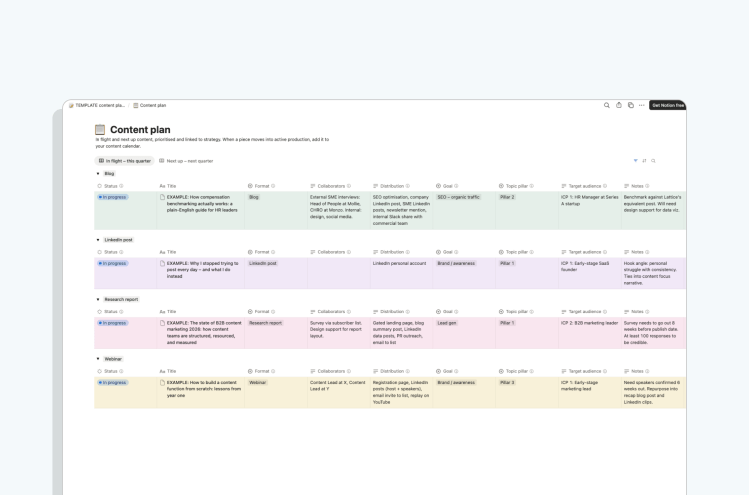
- In flight tab: your committed current-quarter content, grouped by format (change these to fit what you actually do). Each row captures title, distribution, topic pillar, goal, audience, SEO keyword, collaborators, priority, status, estimated publish date, and notes.
- Next up tab: same structure, for next quarter’s planning.
- Ideas log tab: a lighter version with fewer columns: idea description, format, pillar, goal, audience, potential collaborators, and notes – your place to capture all those good ideas when they arise, and prioritise them later.
Both include a purple column-guide row explaining what goes in each column and why, and a yellow example row showing how I’d actually fill it in. Delete both once you’ve set yours up.
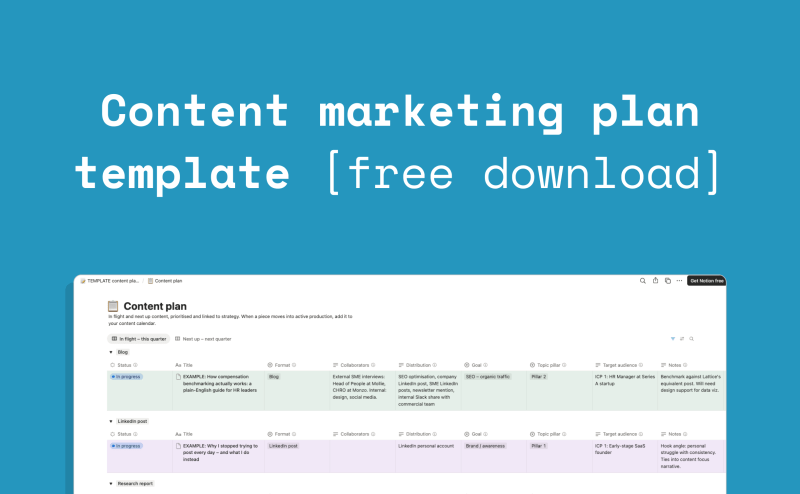
If you use Notion, the template is set up as two databases on a single page – the content plan with filtered views for In flight and Next up, and the ideas log as a separate database below it. The content plan database has a Format property you can group by to get the same channel view as the spreadsheet version.


One thought on “Content marketing plan templates for Excel, Google Sheets, Notion (+ how to create your own)”
Comments are closed.